How to Fix Error Host Localhost is not allowed to connect to this MariaDB Server
Xamp Server Localhost WordPress Error: To fix mysqli_real_connect(): (HY000/1300) Host ‘Localhost’ is not allowed to connect to this MariaDB Server error, follow below step to it fix within 2 mins
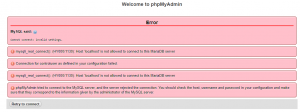
Error mysqli_real_connect(): (HY000/1300) is often seen when we try to open localhost WordPress website/blog with xampp server/ wamp server which pops with (HY000/1300) error message as shown in the image above
To fix mysqli_real_connect() error, follow the 6 steps below and make it fix in 2 mins
Step 1:
Stop Apache and MySQL modules in Xampp Server control panel
Step 2:
Select and open “my.ini” text file in config of MySQL Module
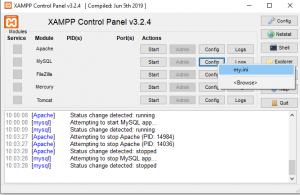
Step 3:
Open “my.ini” in a text editor and find # The MySQL server [mysqld]
Step 4:
Just write one line “skip-grant-tables” below [mysqld]
Code
# The MySQL server
[mysqld]
skip-grant-tables
port= 3306
……
……
Step 5:
Save and exit “my.ini” file
Step 6:
Start Apache and MySQL modules in the Xampp Server control panel. Now you can open your blog/ website without an error
Download Useful plugins for WordPress Websites:
To make WordPress website/blog fast and better, install the below-listed plugins which are highly recommended by many SEO Analysts
1) Yoast SEO or All in one SEO
2) AddtoAny Share Button, best plugin for sharing posts
3) WP-Optimize, Recommended for database optimization
4) WP Rocket Footer
5) WP Mail SMTP
6) WordPress Popular posts
7) Redirection
8) Autoptimize
Learn more
Link: Tips to fix WordPress Errors