DirectX powers the graphics and audio performance behind almost every game and multimedia app you run on Windows. If your games are stuttering, crashing, or throwing errors about missing DLL files, an outdated or broken DirectX installation is often the cause. This guide walks you through how to check your current DirectX version, update it correctly, and install the legacy runtime for older games that need it.
What Is DirectX?
DirectX is a collection of application programming interfaces (APIs) built into Windows. It lets software, especially games, communicate directly with your hardware including the graphics card, sound card, and system memory. Games built on DirectX tap into hardware acceleration features that improve frame rates, reduce input lag, and deliver smoother audio.
Windows 11 ships with DirectX 12 Ultimate preinstalled. Earlier versions like DirectX 11, 10, and 9 are also supported on older Windows releases, but on Windows 11 you always start with the latest generation.
How to Check Your DirectX Version on Windows 11
Before updating anything, confirm which version you currently have installed.
- Press Windows + R to open the Run dialog box.
- Type
dxdiagand press Enter. - Click Yes if prompted to check for digitally signed drivers.
- In the DirectX Diagnostic Tool window, select the System tab.
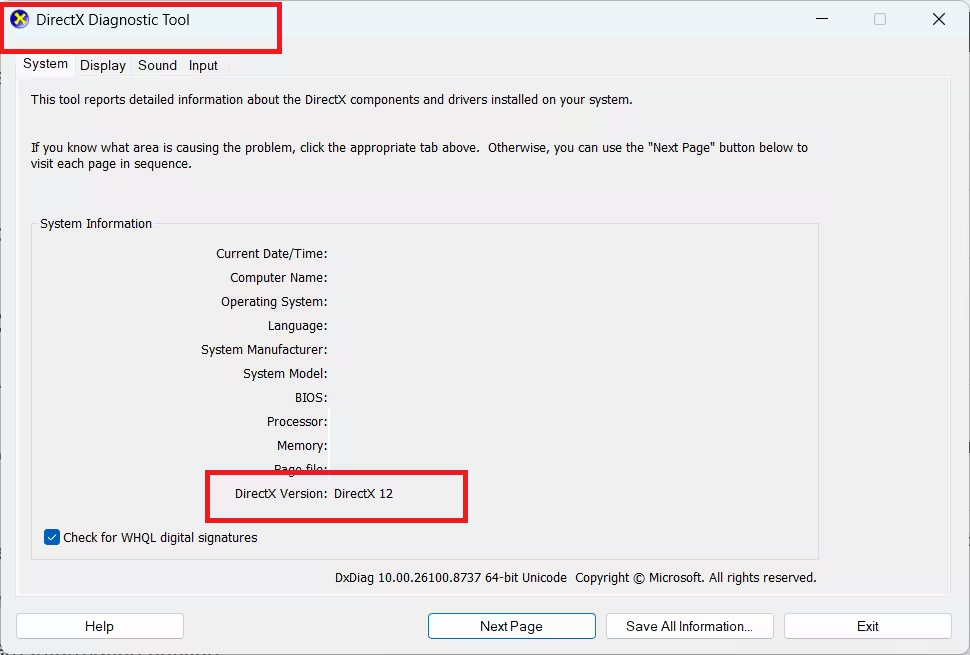
- Look for the DirectX Version entry in the System Information section.
The version number displayed here tells you exactly what is running on your PC right now.
How to Update DirectX on Windows 11
Windows 11 delivers all DirectX updates exclusively through Windows Update. There is no standalone DirectX 12 installer available from Microsoft. If you see a third-party site claiming to offer a DirectX 12 or DirectX 13 download, avoid it as those files are either fake or malicious.
Follow these steps to force an update check:
- Press Windows + I to open Settings.
- Click Windows Update in the left sidebar.
- Click Check for Updates at the top of the right pane.
- Download and install all available updates.
- Restart your PC after the updates finish installing.
Once your system restarts, open the DirectX Diagnostic Tool again and confirm the version number has changed if an update was available.
As of 2026, DirectX 12 is the latest version included with Windows 11. There is no official DirectX 13 release yet. Any website promoting a DirectX 13 download is not legitimate.
What to Do If Windows Update Shows No DirectX Update
If Windows Update finds nothing new, your DirectX installation is already current. In that case, the gaming or graphics issue you are experiencing is likely driver-related rather than a DirectX problem.
Try these steps instead:
- Open Device Manager, expand Display Adapters, right-click your GPU, and select Update Driver.
- Visit your GPU manufacturer’s website (NVIDIA, AMD, or Intel) and download the latest driver package directly.
- If the game supports it, switch the rendering API from DirectX to Vulkan inside the game’s graphics settings. Vulkan can sometimes deliver better performance on the same hardware.
How to Install the DirectX End-User Runtime for Older Games
Some older games rely on legacy DirectX components from the DirectX 9 era, specifically libraries like D3DX9, D3DX10, D3DX11, XAudio 2.7, XInput 1.3, and XACT. Windows 11 does not include these by default, which causes errors like:
“The program can’t start because d3dx9_35.dll is missing from your computer.”
The DirectX End-User Runtime Web Installer from Microsoft restores these missing libraries without altering your existing DirectX 12 installation.
- Go to the DirectX End-User Runtime Web Installer page on Microsoft’s website.
- Select your preferred language and click Download.
- Run the downloaded dxwebsetup.exe file.
- Follow the on-screen instructions to complete installation. Watch for optional software prompts such as browser toolbars and uncheck anything you do not want.
- Restart your PC once the installer finishes.
This installer adds the legacy side-by-side components the old game needs without downgrading anything on your system.
DirectX Version Compatibility by Windows Version
Different Windows versions ship with different DirectX versions. Here is a quick reference:
| DirectX Version | Supported Windows Versions |
|---|---|
| DirectX 12 Ultimate | Windows 11 only |
| DirectX 12 | Windows 10 and 11 |
| DirectX 11.3 / 11.4 | Windows 10 and 11 |
| DirectX 11.2 | Windows 8.1, 10, 11 |
| DirectX 11.1 | Windows 7 SP1 (with Platform Update), 8, 10, 11 |
| DirectX 11.0 | Windows Vista SP2 (with KB971512), 7, 8, 10, 11 |
| DirectX 10 | Windows Vista, 7, 8, 10, 11 |
| DirectX 9.0c | Windows XP, Vista, 7, 8, 10, 11 |
To upgrade beyond what your current Windows version supports, you need to upgrade the operating system itself. DirectX versions are tied to Windows releases and cannot be installed independently on unsupported OS versions.
Related Guides
- How to Fix DirectX 12 (DX12) Errors in Games: Step-by-Step Troubleshooting Guide
- How to Fix LoadLibrary Failed with Error 87: The Parameter Is Incorrect
- How to Run Disk Cleanup on Windows 11 (9 Methods)
Frequently Asked Questions
Is there a standalone DirectX 12 installer?
No. Microsoft removed standalone DirectX installers for modern versions. The only way to update DirectX 12 on Windows 10 and 11 is through Windows Update.
Can you uninstall DirectX?
There is no official uninstaller for DirectX because Windows depends on it to function. If you need to revert to an earlier state after a bad update, use System Restore to roll back to a restore point created before the update.
Does the End-User Runtime downgrade DirectX 12?
No. The DirectX End-User Runtime Web Installer only adds legacy side-by-side libraries from the old DirectX SDK. It does not touch or modify the DirectX Runtime version installed on your system.
What if dxdiag shows DirectX 12 but a game still errors?
The error is almost always about a missing legacy DLL like d3dx9_xx.dll rather than the DirectX version itself. Install the DirectX End-User Runtime to fix those missing file errors.

