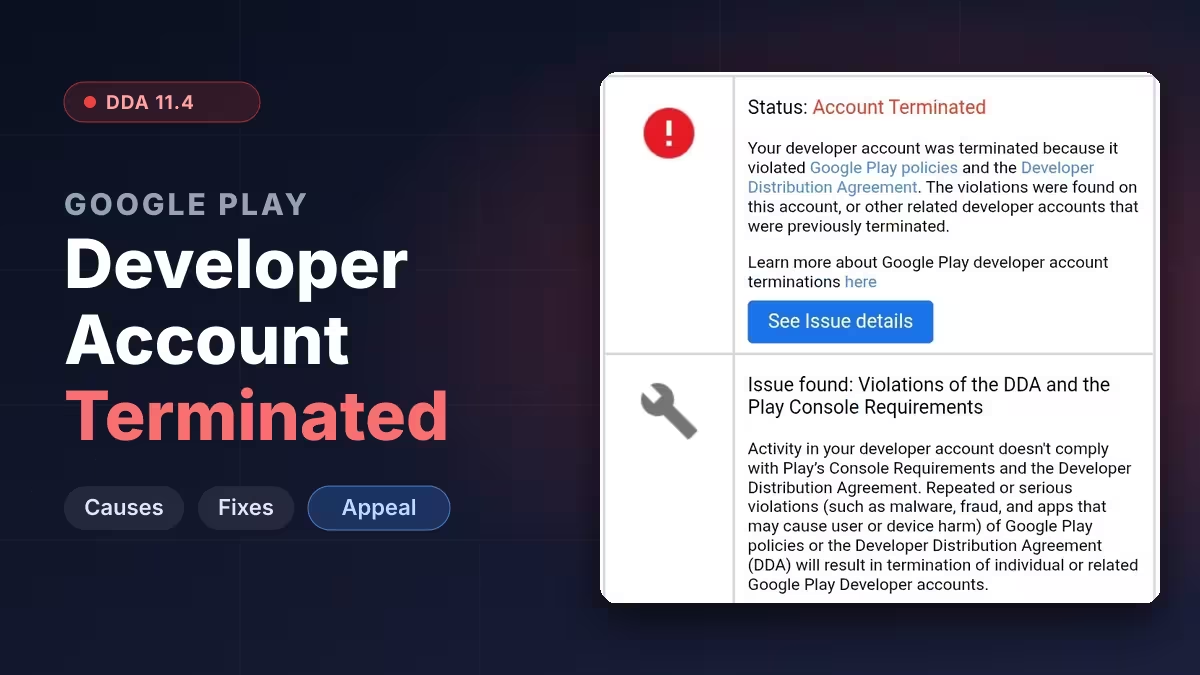
A Google Play termination email that cites the Developer Distribution Agreement and the Play Console Requirements often lands on accounts that never published a harmful app. Many of these cases point to section 11.4 of the DDA, which covers the accuracy of the information you give Google, not the content of your app. This guide explains what the clause means, the account details that most often trigger it, and how to file an appeal that gives you a real chance of reinstatement.
What DDA 11.4 Means for Your Developer Account
Section 11.4 is an identity and information clause, not an app content rule.
Under it, you promise that all information you give Google or users about your account and apps is current, true, accurate, supportable and complete. The Play Console Requirements back this up with a list of details Google expects to match: legal name and address, D-U-N-S number for organizations, contact email and phone, the developer email and phone shown on Google Play, payment methods, and the Google payments profile linked to the account.
When Google's checks find these details don't line up, or link your account to one that was terminated before, the result can be a full termination instead of a warning. Google's termination help page confirms that related accounts are terminated together and that new accounts will also be closed.
Why Google Terminates Developer Accounts Under DDA 11.4
Google doesn't name the exact trigger in the email, but developer reports point to a few repeat patterns.
- Payment mismatch: the $25 registration fee was paid with a personal card on an organization account, or with someone else's card.
- Profile mismatch: the legal name, address or phone number in Play Console, the payments profile and the D-U-N-S record don't match exactly.
- Shared or virtual details: a registered-agent address, virtual office or VoIP number that other terminated developers also used.
- Linked accounts: a shared computer, card, email or teammate connects your account to a previously terminated one.
The second paragraph of the email gives a clue. When it says violations were found "on this account, or other related developer accounts," Google may have tied you to another account rather than to anything you published.
Method 1: Fix Account Detail Mismatches Before You Appeal
Fix any mismatch first, because the appeal reviewer will compare the same records.
- Open Play Console and note the legal name, address, phone and email in Settings > Developer account > Account details.
- Open your Google payments profile and compare the name, address and payment card holder name.
- For an organization account, pull your Dun & Bradstreet record and check that the legal name and address match character for character, including suite numbers and abbreviations.
- Check whether the card used for the registration fee belongs to the organization or to you personally.
- List every Google account, computer and card you have shared with other developers or freelance clients.
Write down each mismatch you find. You will explain these in the appeal instead of hoping the reviewer misses them.
Method 2: Prepare Documents for Your Termination Appeal
Strong evidence of who you are and who owns the account makes a manual review much easier.
- Government-issued photo ID for the account owner.
- Company formation documents, such as articles of organization or a certificate of incorporation.
- Your D-U-N-S confirmation showing the matching legal name and address.
- A recent utility bill or bank statement that proves the address.
- If a personal card paid the fee, proof that you own the company, such as an operating agreement listing you as a member.
Keep the files ready as clear PDFs or images so you can attach them as soon as Google replies.
Method 3: Appeal the Google Play Account Termination
Google accepts only one appeal per termination, so it pays to get it right the first time.
- Use the account termination appeal form. Only the account owner or an admin can submit it.
- State your account name, developer ID and the date of the termination email.
- Explain each mismatch you found in Method 1 and why it happened, for example that the company was new and the owner paid the fee personally.
- Confirm that you have no other Google Play developer accounts, or list any related accounts honestly.
- Offer to provide the documents from Method 2.
- Submit the appeal and do not send a duplicate, since repeat requests can push your case back in the queue.
Google applies a deadline here. Under its appeal time limit policy, you must appeal within 180 days of the termination date, after which Google treats the matter as closed.
Method 4: Escalate a Rejected Appeal in the Play Console Help Community
A template rejection is not always the final word if a human never looked closely at your case.
- Post a factual summary of your case in the Google Play Developer Community, without sharing private IDs or documents publicly.
- Mention that you have already appealed and include the date.
- Ask a Product Expert to review it. These volunteers can flag cases to Google staff for manual review.
Developers have reported reinstatements of 11.4 terminations after this kind of escalation, though results vary and Google makes no promise.
How to Avoid a Google Play Developer Account Termination
Clean, consistent account data from day one keeps your account out of most automated identity flags.
- Pay the registration fee with a card in the exact name of the account holder, whether that is you or your company.
- Pick the right account type. Use an organization account only if your business has its own D-U-N-S number, card and records.
- Use a real business address and a mobile or landline number in your own name, not a shared virtual office or VoIP line.
- Keep Play Console, payments profile and D-U-N-S details identical, and update all three together when anything changes.
- Never share your developer login, card or computer with another publisher.
- Review third-party SDKs in your app, since bad code in a dependency can also count against your account.
Frequently Asked Questions
Can I create a new Google Play developer account after termination?
No. Google closes new accounts linked to a terminated one and keeps the $25 registration fee. Wait for the result of your appeal instead.
How long does a Google Play account termination appeal take?
Google support has told developers to allow up to 7 days, with longer waits in exceptional cases. Sending a second appeal during that time can delay the review.
Does DDA 11.4 mean my app had malware?
Not necessarily. Section 11.4 deals with the accuracy of your account information, so a mismatch in your name, address, phone or payment details can trigger it even if your app is clean.
Can I pay the developer fee with a personal card for my company account?
Developers report terminations in exactly this setup. For an organization account, use a card issued in the company's name so the payment matches the verified business details.
What happens to my apps after termination?
Google removes all apps in the account from Google Play, and their users, ratings and statistics are lost. If Google reinstates the account, you can publish again.
Is there a deadline to appeal a terminated account?
Yes. You have 180 days from the termination date to file your appeal. After that, Google no longer accepts it.
Related Guides
- Google Play DMCA Suspension: Why Apps Get Removed, How to File a Counter-Notice and Get Reinstated
- Google Play Impersonation Policy: Why Apps Get Suspended, How to Fix Your Listing and Appeal
- Google Play Device and Network Abuse Suspension: Causes, Fixes and How to Appeal
- Google Play Trader Status: How to Declare It, Who Must Do It and What Goes Public