After two decades as the go-to tool for GPU configuration on Windows PCs, the NVIDIA Control Panel is officially retired. NVIDIA confirmed the change alongside the Game Ready Driver 610.47 release, marking a clean break from the legacy software that shipped with GeForce drivers since the early 2000s.
If you are a GeForce user wondering what this means for your display settings, 3D performance tuning, or refresh rate controls, here is everything you need to know.
Why NVIDIA Discontinued the Control Panel
NVIDIA introduced the NVIDIA App in 2024 as a unified replacement for several of its standalone tools. Over the past year, the company steadily ported features from the classic Control Panel into the new client.
With the Game Ready Driver 610.47 update, that migration is complete for GeForce users. NVIDIA confirmed in the driver release notes that all actively supported Control Panel features are now available inside the NVIDIA App.
“After 20 years of dedicated service, the classic NVIDIA Control Panel is officially retiring for Game Ready and Studio Drivers,” NVIDIA stated in the announcement.
The company described the NVIDIA App as running faster and more efficiently than the old tool while carrying forward all the functionality GeForce RTX users relied on.
What Happens to Your Existing NVIDIA Control Panel
If the NVIDIA Control Panel is already installed on your PC, it stays there. NVIDIA will not remove it automatically.
However, there is an important exception. If you perform a clean installation of the new drivers, the installer will remove the Control Panel along with all previous driver files. After a clean install, the familiar right-click desktop shortcut for the Control Panel will also disappear.
Going forward, NVIDIA will not release any new features, bug fixes, or updates for the classic Control Panel. It remains available as an optional download from the Microsoft Store, but it is essentially frozen in its current state.
What About NVIDIA RTX PRO Users
The retirement applies specifically to Game Ready Drivers and Studio Drivers. NVIDIA RTX PRO users are on a different timeline.
NVIDIA confirmed the Control Panel will continue to receive support for RTX PRO hardware until the company finishes migrating professional-grade features into the NVIDIA App. No firm date has been given for that transition.
Where to Find Your Settings in the NVIDIA App
The NVIDIA App reorganizes Control Panel settings into two main areas.
3D Settings are now in Graphics
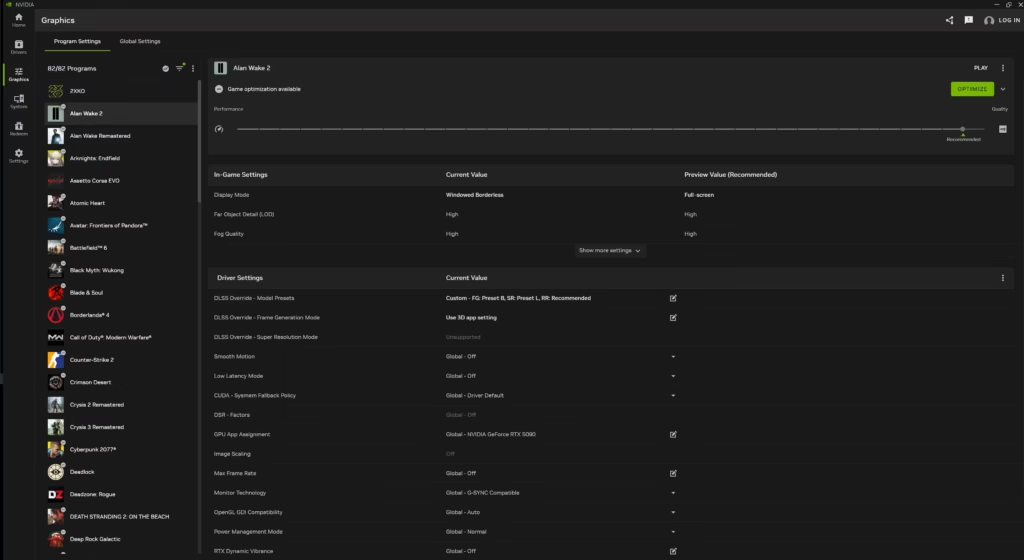
The 3D Settings screen from the classic Control Panel, specifically the Manage 3D Settings panel, moves to Graphics > Program Settings inside the NVIDIA App. This is where you configure per-application GPU settings such as power management mode, texture filtering, and frame rate limits.
Display and System Settings
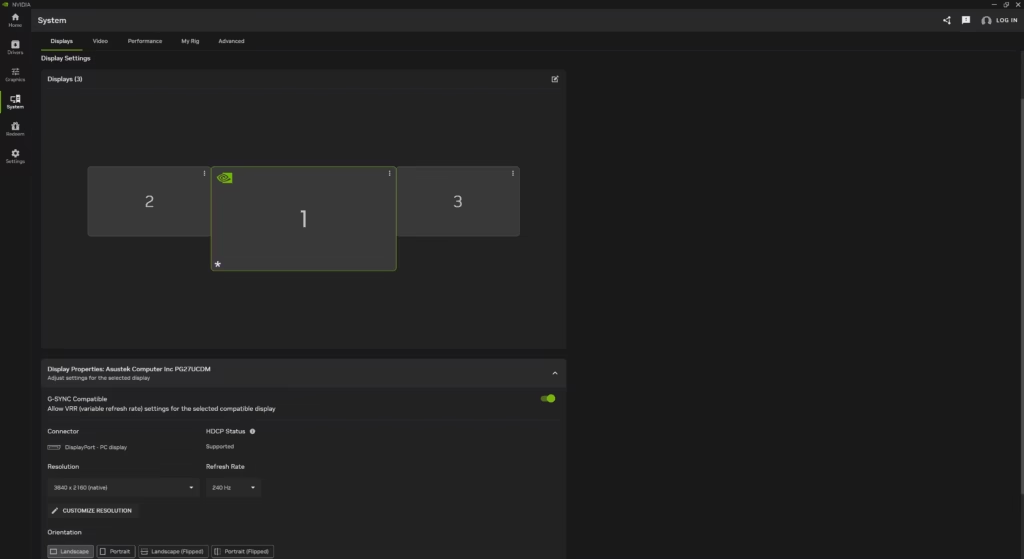
All other settings, including resolution, refresh rate, color output, HDR configuration, and G-SYNC controls, are now under the System tab in the NVIDIA App.
Additional Features in the NVIDIA App
Beyond replacing the Control Panel, the NVIDIA App includes tools that were never part of the old software.
- DLSS Overrides: Download and apply updated DLSS models to games in your library without waiting for individual game patches.
- Driver Updates: Browse and install Game Ready and Studio Ready drivers directly from within the app.
- In-Game Overlay (Alt+R): Monitor GPU temperature, frame rates, and other performance stats while gaming.
- ShadowPlay / Recording (Alt+Z): Capture gameplay footage and screenshots without third-party software.
- GeForce Rewards: Redeem exclusive game skins and in-game items from the Redeem tab.
Game Ready Driver 610.47: What Else Is New
The driver that triggered the Control Panel retirement also brings several gaming-focused updates.
007 First Light support with DLSS 4.5
The driver adds full optimization for 007 First Light, IO Interactive’s origin story for James Bond launching May 27. The game supports DLSS 4.5 Super Resolution and Dynamic Multi Frame Generation at launch. Path tracing and DLSS Ray Reconstruction support follow in Summer 2026. If you are planning to work through the 007 First Light campaign, installing this driver first is the right move.
World of Tanks: HEAT
The free-to-play PvP vehicle shooter launches May 26 with DLSS Super Resolution, DLSS Multi Frame Generation, and NVIDIA Reflex support baked in from day one.
EA SPORTS F1 25: 2026 Season Pack
Launching June 3, the 2026 Season Pack introduces the new MADRING circuit in Madrid, the Audi and Cadillac teams, and updated driver lineups. GeForce RTX 50 Series users can pair it with DLSS Multi Frame Generation, while RTX 40 Series users get DLSS Frame Generation support.
40+ New G-SYNC Compatible Displays
The driver validates over 40 new monitors for G-SYNC Compatible status, including OLED and IPS panels from Acer, AOC, LG, MSI, Philips, and Samsung. Several of the newly certified displays push refresh rates between 280Hz and 540Hz.
How to Download the NVIDIA App
If you do not have the NVIDIA App installed yet, the easiest path is to install it during the Game Ready Driver 610.47 setup process. The installer will prompt you to add the app alongside the driver.
You can also download the NVIDIA App directly from the official NVIDIA website at any time.
Users who still need the classic Control Panel for specific reasons can find it on the Microsoft Store, though no updates will be issued for it.

