Samsung just made airport security faster for Galaxy phone users in the US. Through a new partnership with CLEAR, Samsung now lets you store a TSA-approved digital ID in Samsung Wallet, backed by your US passport. You can tap your phone or scan a QR code at over 250 TSA checkpoints instead of digging out your physical passport.
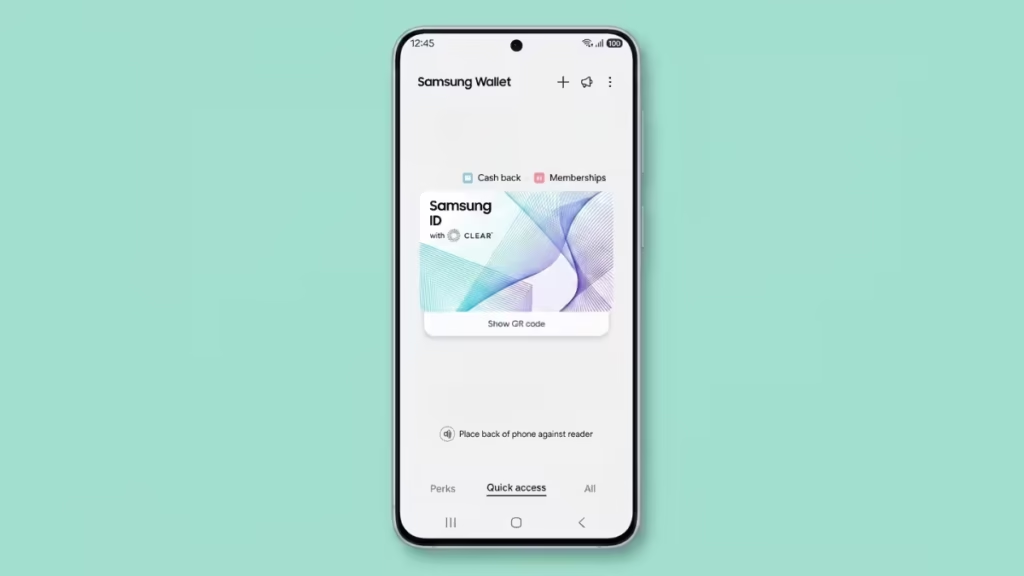
Here is everything you need to know about Samsung ID with CLEAR and how to set it up.
What Is Samsung ID with CLEAR?
Samsung ID with CLEAR is a free digital ID built into Samsung Wallet. It uses your US passport as the source document, which CLEAR verifies on the backend. Once approved, the digital ID lives securely on your Galaxy device and works at participating TSA checkpoints for domestic flights.
The ID also works at select sporting and entertainment venues, including BMO Stadium in Los Angeles, for age verification purposes such as purchasing alcohol or accessing age-restricted areas.
Samsung Knox handles the hardware and software security layer. Your passport data is encrypted directly on your device, and a fingerprint or PIN is required every time you access the ID.
Who Can Use Samsung ID with CLEAR?
You need all of the following:
- A valid US passport
- A Samsung Galaxy device running Android 9.0 (PLE) or higher
- A Samsung account
Samsung ID with CLEAR currently covers domestic flights only. It does not work for international travel.
How to Set Up Samsung ID with CLEAR
Setting up your digital ID takes only a few minutes. Follow these steps:
- Open Samsung Wallet on your Galaxy device
- Tap the Quick Access tab
- Tap the + button
- Select Digital IDs
- Choose Samsung ID with CLEAR
- Tap Get Card and follow the on-screen prompts
- Submit your US passport details when asked
- Wait for CLEAR to verify your information
Once CLEAR approves your passport, your Samsung ID with CLEAR becomes active. You can then present it at TSA checkpoints by tapping your phone on the reader or scanning the QR code.
How to Use Samsung ID with CLEAR at TSA Checkpoints
At a participating TSA checkpoint, unlock your Samsung Wallet using your fingerprint or PIN. Present the digital ID by tapping your phone on the compatible TSA reader or scanning the displayed QR code.
Note that not every TSA checkpoint uses a compatible reader. Availability depends on the specific airport and terminal. You can check the full list of participating airports at the TSA digital ID page. Samsung also recommends carrying your physical passport as a backup.
How Secure Is Samsung ID with CLEAR?
Security works on two levels:
- Device level: Samsung Knox encrypts your passport data directly on your Galaxy device. No passport information is stored in the cloud or accessible to third-party apps.
- Access level: Every time you open the digital ID, you must authenticate with a fingerprint or a secure PIN. No one else can open or use your ID on your device.
CLEAR also handles identity verification independently. The company runs your submitted passport data through its own verification platform before activating the digital ID.
Samsung ID with CLEAR vs Apple and Google Digital IDs
Apple launched its own digital ID feature in November 2025. Google also supports digital IDs through Google Wallet. Samsung ID with CLEAR now brings the same capability to Galaxy users, matching the feature set available to iPhone and Pixel owners.
All three platforms require a US passport, restrict use to domestic flights, and rely on TSA-compatible readers at participating airports. Samsung and Google both use third-party identity verification partners, while Apple handles verification through its own system.
Where Does Samsung ID with CLEAR Work?
Currently supported use cases include:
- TSA checkpoints at over 250 participating airports for domestic flights
- Age verification at select sporting arenas and entertainment venues, including BMO Stadium in Los Angeles
- General government-approved identity verification scenarios as the program expands

