Two incidents in the same week of October 2026 hit developers from opposite directions. A malicious LiteLLM 1.107.0 release shipped a credential stealer through PyPI and Docker, and a critical bug in Google's Brotli decoder (CVE-2026-111497, nicknamed HTTP2Shell) exposed Node.js, Python and Bun apps to memory corruption through ordinary compressed traffic. One attack abuses the packages you install. The other abuses data your code decompresses. Both land in the same place: your build and runtime environment, where API keys, cloud tokens and SSH keys live.
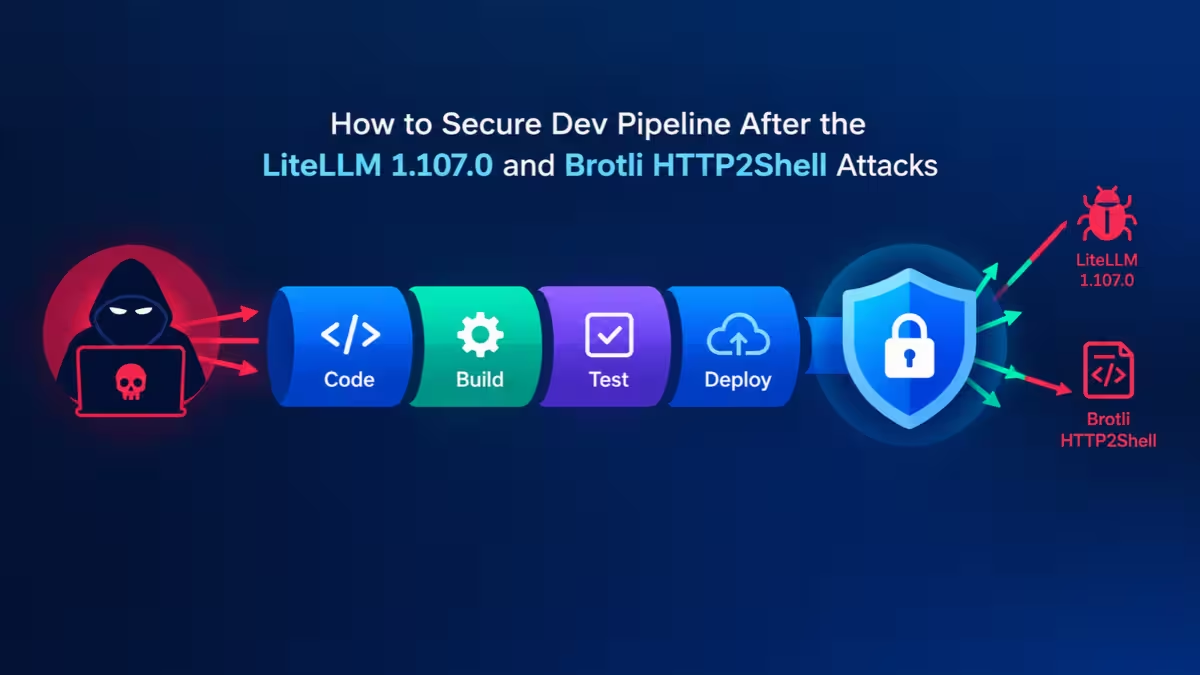
This guide walks through how to check your exposure, clean up, and harden your pipeline so the next incident costs you hours instead of days.
What Happened in the LiteLLM 1.107.0 and HTTP2Shell Brotli Attacks
Each incident targeted a different layer of the stack, so you need to understand both before you fix anything.
LiteLLM 1.107.0 (October 21, 2026): Attackers took GitHub CLI OAuth tokens from logs on an exposed internal LiteLLM deployment. With one token belonging to an organization owner, they disabled branch protection, force-pushed changes, and ran the release workflow against a lookalike repo named Berri-AI/litellm. The workflow then signed and published the poisoned build. The source code itself stayed clean. A single extra line in the Maturin build config dropped three files into site-packages: cook.pth, cook.py and sitecustomize.py. Python loads both .pth files and sitecustomize on every interpreter start, so the stealer ran whether or not your app imported LiteLLM. It sent secrets to litellm[.]dev/healthcheck and set up an hourly loader that pulls fresh code from a remote server.
Researchers saw attackers testing stolen AWS role credentials about 4.5 hours later, checking Bedrock model access in what looks like LLMjacking. This is LiteLLM's second compromise in 2026. The March attack (versions 1.82.7 and 1.82.8) started with a poisoned Trivy scanner leaking the project's PyPI publish token.
HTTP2Shell / CVE-2026-111497: Brotli versions 1.0.3 through 1.2.0 can write past an 8-byte internal buffer when a crafted stream forces an impossible block switch. It carries a 9.2 CVSS 4.0 score. Any process that decodes untrusted Brotli data can crash, leak memory, or in the worst case run attacker code. Researchers showed code execution on an official Node.js build in a lab, and public proof-of-concept code exists.
Which LiteLLM and Brotli Versions Are Affected
Match your stack against these builds and time windows before you run any checks.
LiteLLM:
- PyPI:
litellm==1.107.0, installed unpinned between 11:39 and 13:23 UTC on October 21 - Docker Hub and GHCR: tags
v1.107.0,latest,main-latestandmain-stable, pulled between 11:46 and 14:20 UTC on October 21
HTTP2Shell (CVE-2026-111497):
- Google Brotli C library 1.0.3 through 1.2.0
- Python
Brotliandbrotlicffipackages built on those library versions - Node.js and Bun builds that bundle a vulnerable decoder, including Node.js 20, 23 and 25, which receive no fix
Step 1: Check If LiteLLM 1.107.0 Infected Your Machines and CI Runners
Start here, because a confirmed hit changes everything that follows.
Run these checks on developer laptops, CI runners, container images and Kubernetes nodes:
# Installed version
pip show litellm | grep Version

# Malicious files dropped into site-packages
SITE=$(python3 -c "import site; print(site.getsitepackages()[0])")
ls -la "$SITE"/cook.pth "$SITE"/cook.py "$SITE"/sitecustomize.py 2>/dev/null

# Loader lock file
ls -la /tmp/remote_code_loader.lock 2>/dev/null

# Which images used the floating tags
docker images | grep -i litellm
Then search your egress, DNS and proxy logs for litellm.dev, raw.githubusercontent.com/letters9813 and any request path ending in /codepy. Also look for AWS CloudTrail calls to sts:GetCallerIdentity and bedrock:ListFoundationModels from the IPs 168.100.8.57 and 165.227.201.8.
If any check comes back positive, treat the host as compromised. Enterprise customers who pulled from LiteLLM's private registry were not affected.
Step 2: Remove the LiteLLM Malware and Rotate Leaked Keys
Removing the package does not undo the theft, so rotation matters more than cleanup.
- Isolate affected hosts from the network and stop LiteLLM containers.
- Block
litellm.devat your DNS resolver or egress firewall. - Uninstall LiteLLM, purge caches (
pip cache purge,rm -rf ~/.cache/uv) and delete the three dropped files. - Rotate secrets in order of damage potential: cloud credentials and instance roles first, then package registry tokens (PyPI, npm, Docker Hub), GitHub tokens, SSH keys, database passwords, and every LLM provider API key.
- Rebuild affected images from scratch with
--no-cacheinstead of patching them in place.
An hourly loader means the attacker could run anything on that host. Rebuilding from a known clean state is safer than trusting a cleaned machine.
Step 3: Patch CVE-2026-111497 in Node.js, Python and Bun
HTTP2Shell lives in a shared C library, so one patch per runtime is not enough.
Upgrade to these fixed releases:
| Component | Fixed version |
|---|---|
| Node.js 22 / 24 / 26 | 22.23.4 / 24.22.1 / 26.12.1 |
| Bun | 1.4.4 |
Python Brotli |
1.2.1 |
Python brotlicffi |
1.2.1.0 |
| Google Brotli C library | 1.0.10, 1.1.1 or 1.2.1 |
Node.js 20, 23 and 25 get no fix, so move those services to a supported line.
Check what each environment actually runs:
node --version
node -p "process.versions.brotli"
pip show Brotli brotlicffi
pipdeptree -r -p Brotli
dpkg -l | grep -i brotli        # Debian / Ubuntu
sudo grep -l brotlidec /proc/*/maps 2>/dev/null   # live processes
After you upgrade, restart every process. A running service keeps the old decoder in memory. Also bump base image pins like node:24.22.0 in your Dockerfiles, because rebuilding an old pin rebuilds the old bug. Python teams should verify by hand, since many scanners missed the PyPI packages when the CVE first went public.
Software that bundles its own Brotli copy, such as the .NET runtime, the PHP and Ruby Brotli extensions, DuckDB and ClickHouse, needs its own vendor update.
Step 4: Find Which Apps Decode Untrusted Brotli Data
A version match tells you what to patch, but reachability tells you what to patch first.
Rank services by how attacker-controlled Brotli data can reach them:
- Inbound request bodies: Express 5 with
express.json()decodes Brotli bodies by default through body-parser 2.x. That puts the decoder in front of anonymous traffic. - Outbound fetches: Node.js
fetch(), Pythonrequests,urllib3,aiohttpandhttpx[brotli]decode Brotli responses automatically when a Brotli package is installed. Webhooks, link previews, "import from URL" features, crawlers and AI agents that browse all fall here. No WAF sees this path. - Direct decoding: code that calls
brotliDecompress()on uploaded files, Parquet data, archives or queue messages.
Step 5: Block HTTP2Shell If You Cannot Patch Yet
These stopgaps cut off the attack paths from Step 4 until your upgrade ships.
Block Content-Encoding: br request bodies at your proxy, set express.json({ inflate: false }) (this also rejects gzip bodies, so test first), or uninstall Brotli and brotlicffi from Python environments that do not need them. Python HTTP clients fall back to gzip and deflate on their own. Stripping br from Accept-Encoding does not help, because a hostile server can send Brotli anyway.
Step 6: Pin Python Packages, Docker Images and GitHub Actions by Hash
Both LiteLLM attacks reached victims through floating versions and mutable tags.
Generate locked requirements with hashes and install against them:
pip-compile --generate-hashes requirements.in -o requirements.txt
pip install --require-hashes -r requirements.txt
uv lock and poetry.lock record hashes too. For containers, reference images by digest instead of tag:
FROM ghcr.io/berriai/litellm@sha256:<verified-digest>Tags like latest and main-stable carried the malicious LiteLLM image for hours. A digest cannot point to new content. Apply the same rule to GitHub Actions and pin each action to a full commit SHA instead of @v1 or @master.
Step 7: Secure GitHub Release Workflows Against Stolen Tokens
The October attack proved that signing alone does not stop a stolen owner token.
Harden the path from commit to published package:
- Publish with OIDC: Use PyPI Trusted Publishers so no long-lived upload token exists to steal.
- Scope secrets to one job: Give the publish token only to the release job, inside a protected environment that requires approval.
- Restrict workflow permissions: Set
permissions: contents: readat the top of every workflow and grantid-token: writeonly where publishing happens. - Protect branches from admins too: Enforce branch rules for organization owners so one stolen owner token cannot disable them.
- Pin the source repo in the workflow: Make the release job verify it builds from the exact expected repository, which blocks lookalike names like
Berri-AI. - Expire temporary access: LiteLLM widened release permissions for two engineers two days before the attack. Put an end date on every temporary grant.
Use short-lived GitHub CLI tokens on developer machines and revoke them when people change roles.
Step 8: Stop API Keys Leaking Into LLM Gateway Logs
LiteLLM's own investigation traced the stolen GitHub tokens to response bodies captured in gateway logs.
LiteLLM reported that Claude Code can, in specific cases, echo a user's GitHub CLI OAuth token into a response body, and any gateway that logs full responses then stores that token. Fix this at three points:
- Turn off full request and response body logging on LLM gateways, or run secret redaction on those logs before storage.
- Never expose an internal AI gateway, admin panel or log viewer to the public internet. Audit user accounts on those systems for names you do not recognize.
- Keep a secret scanner such as Gitleaks or TruffleHog running on log stores and CI artifacts, not only on source code.
Treat anything an AI coding tool prints as potentially sensitive, because it often runs with the same credentials you do.
Step 9: Limit What a Poisoned Package Can Steal in CI/CD
You cannot stop every upstream compromise, but you can limit what one bad package steals.
- Run CI jobs in ephemeral runners that hold only the secrets that job needs.
- Give services that fetch untrusted URLs an unprivileged user and no cloud credentials.
- Restrict egress from build runners to an allowlist of registries, so stealers cannot reach their exfiltration domains.
- Route installs through an internal package proxy that holds new releases for a short cooling period before teams can pull them.
- Add tools like Socket or pip-audit to CI to flag new install hooks,
.pthfiles or obfuscated code between versions.
A brand-new release that adds a .pth file or sitecustomize.py should fail your build until a human reviews it.
Frequently Asked Questions
Was I affected if I use LiteLLM but never upgraded to 1.107.0?
No, if you pinned an earlier clean version or pulled from LiteLLM's private enterprise registry. You were exposed if you installed LiteLLM unpinned on PyPI or pulled the latest, main-latest, main-stable or v1.107.0 Docker tags during the October 21 windows.
Is the October LiteLLM attack linked to the March TeamPCP attack?
Researchers have not confirmed a link. Both used a .pth file to launch the payload, but the encryption keys, exfiltration code and backdoor behavior differ between the two.
Does uninstalling LiteLLM 1.107.0 make my system safe?
No. The stealer had already sent your secrets out, and the hourly loader could have run extra code. Rotate every credential the host could reach and rebuild it from a clean image.
Is HTTP2Shell being exploited in the wild?
No attacks have been confirmed as of late October 2026, and the CVE is not on CISA's Known Exploited Vulnerabilities list. Public proof-of-concept code exists, so patch now rather than wait for that to change.
Do Apache and Nginx need the Brotli patch?
Default Apache and Nginx setups only compress responses and do not decode Brotli request bodies, so the bug does not reach them in that configuration. Update your system libbrotli anyway, since other software on the same host may link it.
Will a WAF protect me from HTTP2Shell?
Only for inbound request bodies. A WAF cannot inspect responses your own code fetches from other servers, so upgrading the runtime or library remains the only complete fix.