Upgrading from Windows 10 Pro to Windows 11 Pro should keep your license active. However, dual boot setups often confuse Windows activation. Are you suddenly seeing a message asking you to buy a new license from the Microsoft Store, even though you already own a valid Windows 10 Pro license?
Why Windows 11 Loses Activation in Dual Boot Systems
Dual boot installs create a separate Windows environment on the same hardware. Windows activation uses a hardware fingerprint to match your device with your digital license. When you install Windows 11 alongside Windows 10, the system sometimes treats it as a new device.
Common Causes of the Activation Problem:
- Installing Windows 11 on a new partition
- Changing boot configuration
- Using a local account instead of your Microsoft account
- License sync delay with Microsoft servers
Your license usually remains valid. Windows simply fails to attach it correctly.
Step 1 — Verify That Windows 11 Pro Is Installed
Activation fails immediately if Windows installs the wrong edition.
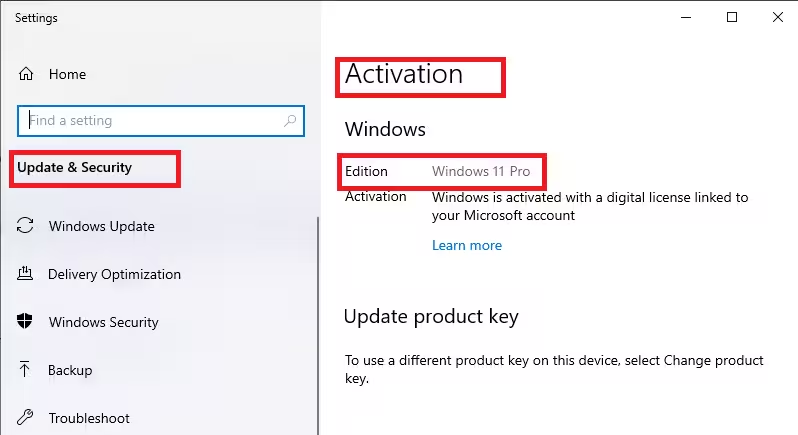
- Press Windows + I.
- Open System → About.
- Check Edition.
You must see: Windows 11 Pro
If you see Windows 11 Home or another edition, Windows cannot activate using a Pro license. You must upgrade the edition before continuing.
Step 2 — Sign In With the Same Microsoft Account
Windows links digital licenses to Microsoft accounts.
- Open Settings → Accounts.
- Confirm that you signed in using the same Microsoft account you used on Windows 10.
- Sign in if needed.
- Restart the computer.
After reboot, continue to the next step.
Step 3 — Run the Activation Troubleshooter
This tool reconnects your license automatically.
- Open Settings → System → Activation.
- Click Troubleshoot.
- Select I changed hardware on this device recently.
- Sign in with your Microsoft account.
- Select your device from the list.
- Click Activate.
Most systems activate immediately after this step.
Step 4 — Re-Enter Your Windows 10 Pro Product Key (If Available)
Retail licenses work across Windows versions.
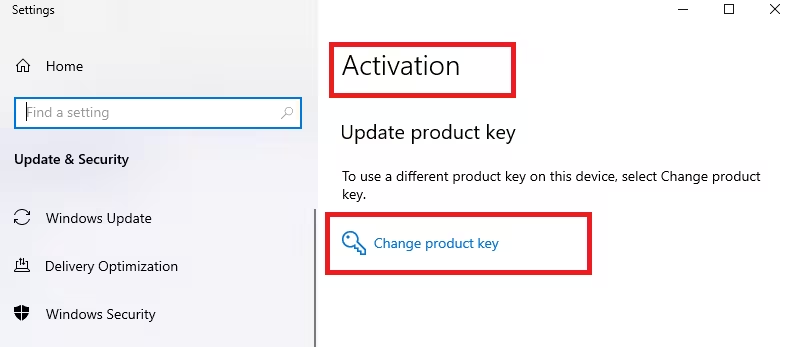
- Open Settings → System → Activation.
- Click Change product key.
- Enter your Windows 10 Pro key.
- Select Next and activate.
Skip this step if you do not have the product key.
Step 5 — Refresh the License Using Command Prompt
This step forces Windows to revalidate activation.
- Right-click Start → Terminal (Admin).
- Enter the following commands:
slmgr /ipk VK7JG-NPHTM-C97JM-9MPGT-3V66T
slmgr /ato- Restart the PC.
This generic key only triggers Microsoft activation servers. It does not bypass licensing.
Step 6 — Confirm Windows 10 Remains Activated
Dual boot systems share the same license entitlement.
- Boot into Windows 10 Pro.
- Open Settings → Update & Security → Activation.
- Confirm that Windows shows Activated.
If Windows 10 lost activation, activate it first. Then repeat activation steps on Windows 11.
Step 7 — Contact Microsoft Support for Manual Activation
If activation still fails and you own a retail license:
- Visit Microsoft Support.
- Choose Windows → Activation.
- Request manual activation or license reassignment.
Microsoft can rebind the license to your hardware.
When You Actually Need to Buy a New License
You may need a new license only if:
- Your original license came preinstalled (OEM).
- You replaced the motherboard.
- The license never linked to a Microsoft account.
- The license already transferred to another device.
If Windows 10 still activates on the same PC, you do not need to purchase another license.
FAQs
Why is Windows 11 Pro not activated after dual boot?
Windows fails to sync the existing digital license when dual boot changes the system configuration.
Do I need to buy a new license for dual boot Windows 11?
No. A valid Windows 10 Pro license usually activates Windows 11 on the same PC.
Can I use the same Windows 10 Pro key for Windows 11 Pro?
Yes. Retail and digital licenses transfer directly to Windows 11 Pro.
Does dual boot break Windows activation?
Dual boot can interrupt automatic license detection but does not invalidate the license.
How do I activate Windows 11 without buying a new key?
Run the activation troubleshooter or reapply your existing product key.
Why does Windows ask me to go to the Microsoft Store to activate?
Windows cannot detect your license and incorrectly prompts for purchase.
Will reinstalling Windows 11 fix the activation issue?
No. Activation usually resolves without reinstalling the operating system.
Is the generic Windows 11 Pro key safe to use?
Yes. It only refreshes license validation with Microsoft servers.

