Roblox Error Code 600 appears when you try to join a game and see the message:
“You were banned from this experience by the creator. Here’s a message from the creator.”
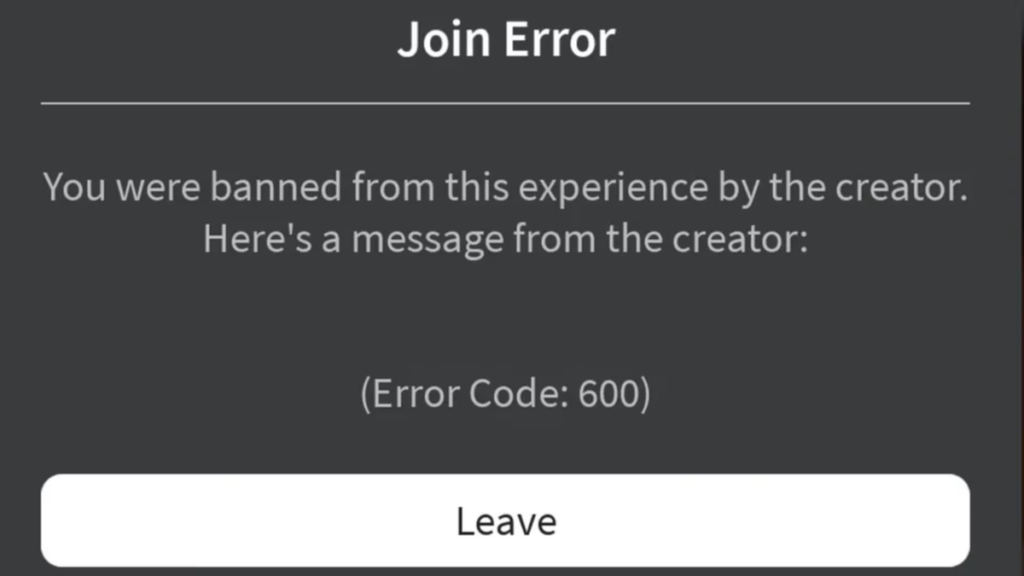
This is a game-level ban, not a platform ban. Your account still works across all other Roblox experiences. This guide explains every real cause of Error Code 600, what actually fixes it, and what to realistically expect from appeals.
What Is Roblox Error Code 600?
Error Code 600 means the experience creator has restricted your account from joining their game. It has nothing to do with Roblox Support or the main platform. Your account remains fully active elsewhere.
- The ban targets that one game, not your entire Roblox account
- Roblox Support cannot remove it
- Only the experience creator can lift the restriction
- The ban may affect multiple accounts on your network, not just yours
What Causes Roblox Error Code 600
Understanding the cause matters because it changes your fix options.
1. The Creator Banned Your Account Directly
The most straightforward cause. A moderator or automated rule inside the game flagged your account and issued a ban. This can happen for violating in-game rules, chat behavior, or exploiting mechanics.
2. Roblox Ban API Flagged You as an Alt Account
Since 2024, Roblox has provided developers a Ban API and alt-account detection tools. If a creator enables this, the system can ban all accounts that share the same network connection or device fingerprint. If someone else on your Wi-Fi received a ban, your account may have been flagged automatically, even if you never broke any rules.
3. False Positive from the Ban API
The alt-detection system produces false positives. Your account may have matched a banned account’s IP range or device profile without any actual rule violation. This is a known issue and a valid reason to appeal directly to the developer.
4. Buggy Developer Scripts or Plugins
Some games run custom scripts that trigger bans under specific conditions. A developer may have deployed a buggy plugin that banned players unintentionally. Checking the game’s community channels often reveals whether others experienced the same issue after an update.
5. Corrupt Local Cache Files
In some cases, corrupt Roblox cache files return an error that resembles a ban message. Clearing the cache removes this confusion entirely and is one of the few technical fixes that actually works for non-ban scenarios.
6. Network or Firewall Issues
A misconfigured firewall or DNS setting can occasionally block your connection to a specific experience’s servers and trigger an error that looks like a ban. Testing on a different network confirms or rules this out quickly.
How to Fix Roblox Error Code 600
Work through these fixes in order. Start with the ones that address your most likely cause.
Fix 1: Confirm the Ban Is Game-Specific
Before doing anything else, try joining a different Roblox experience. If other games load normally, your restriction is limited to one game. If you cannot join anything, you may be dealing with a different error like Roblox Error Code 403 (Authentication Failed) or a platform-wide outage.
Fix 2: Read the Ban Message for an Expiry Date
Some developers include an expiry date in the ban message. If it says “Expiry: Never”, the ban is permanent unless the developer manually removes it. If an expiry date exists, waiting is a valid option and no further action is required.
Fix 3: Clear Your Roblox Cache
Corrupt cache files can produce false ban errors. Clear the cache for your platform using the steps below.
Windows:
- Press Win + R to open the Run dialog
- Type
%Temp%\Robloxand press Enter - Select all files and folders inside that folder and delete them
Mac:
- Open Finder and click Go > Go to Folder
- Enter
~/Library/Cachesand press Return - Delete the
com.roblox.robloxfolder and any other Roblox folders
Android:
- Open Settings and tap Apps
- Tap Roblox, then tap Storage
- Tap Clear Cache and confirm
iPhone / iPad:
- Uninstall Roblox from your device
- Reinstall it from the App Store
Game Consoles:
- Uninstall Roblox
- Reinstall from your console’s store
After clearing cache, restart Roblox and try joining the experience again.
Fix 4: Restart Your Device and Router
If a network glitch or firewall issue caused the error, restarting your equipment clears it.
- Unplug your modem or router
- Wait 30 seconds, then plug it back in
- Wait about one minute for the connection to stabilize
- Restart your computer or device
- Launch Roblox and try again
This addresses the network-based trigger and is worth doing before testing other network options.
Fix 5: Log Out and Log Back Into Roblox
Several users report that a fresh login session resolved the error when the ban was not actually active.
- Open Roblox and click your profile icon
- Select Log Out
- Log back in with your credentials
- Try joining the experience
Fix 6: Try a Different Network Connection
If the Ban API flagged your IP address, switching networks removes that flag. Connect to a different Wi-Fi network or use your mobile data connection. You can also tether your computer to your phone’s hotspot.
If the game loads on mobile data but not on your home Wi-Fi, the restriction is network-based, not strictly account-based. This tells you the creator’s system is using IP-level controls.
A VPN fix approach like the one for Roblox Error Code 279 may help here, though results vary by game.
Fix 7: Appeal Directly to the Experience Creator
If none of the above fixes work, the ban is real and only the creator can remove it. Roblox Support cannot intervene on developer-issued bans, and they cannot contact the creator for you.
How to reach the creator:
- Open the experience’s Roblox page
- Look for a Discord server link, Roblox group, or social media profile in the description
- Send a polite message with your Roblox username and the ban message you received
- Ask whether the ban was issued in error or whether an appeal is possible
Keep your message brief and respectful. Developers reverse bans when the trigger was automated or a false positive. Avoid sending multiple messages or being aggressive, as that reduces your chances.
Fix 8: Try a Different Account on a Different Network
If you want to confirm the scope of the restriction without going through an appeal, test a separate Roblox account on a completely different network. Use mobile data and an account with no history in that game.
- If the new account loads the game normally, the ban targets your specific account
- If the new account gets blocked immediately, the creator uses network-level or device-level controls
This test gives you accurate information before you escalate an appeal. Note that Roblox’s alt-detection tools can flag new accounts if you are on the same network or device, so switching networks is essential for an accurate test.
What Does NOT Fix Error Code 600
Avoid wasting time on approaches that do not work for genuine bans:
- Contacting Roblox Support about the ban: they explicitly cannot remove developer-issued bans or contact creators on your behalf
- Reinstalling Roblox when the ban is real: the restriction lives on the server side, not on your device
- Waiting indefinitely: bans marked “Expiry: Never” do not expire on their own
How to Avoid Roblox Error Code 600 in the Future
- Follow the rules specific to each game, not just Roblox’s platform-wide rules
- Avoid exploiting glitches, using scripts, or running third-party tools like those that trigger issues in third-party software interfering with Roblox
- Avoid logging into multiple accounts within the same game on the same network
- If you share a Wi-Fi connection with others, be aware that their bans can affect your access through the Ban API
FAQs
Is Roblox Error Code 600 a permanent ban?
Not always. Some bans include an expiry date visible in the error message. If the message shows “Expiry: Never,” the ban is permanent unless the creator removes it manually.
Does Error Code 600 affect my entire Roblox account?
No. The restriction applies only to the specific experience where the creator issued it. You can still join other games and use all Roblox features.
Can Roblox Support remove Error Code 600?
No. Roblox Support explicitly states they cannot remove bans issued by experience creators or contact creators on your behalf.
Why do new accounts also get blocked?
Developers can use Roblox’s Ban API and alt-detection tools to flag accounts that share the same network, device, or IP range. A new account on the same network may trigger the same restriction automatically.
Does clearing the cache actually fix Error Code 600?
Only if the error is not a real ban. Corrupt cache files occasionally produce false ban-style errors. If a real ban exists on the server side, clearing cache has no effect.

