Microsoft released Windows 11 Insider Preview Quality Update build 26220.8575 for version 25H2 through the Beta channel on June 8, 2026. This flight delivers one notable feature change and four targeted fixes that address audio failures, Settings crashes, and system freezes.
What Is Windows 11 Build 26220.8575?
Build 26220.8575 is a Beta channel update for Windows 11 version 25H2. Microsoft distributes it through the Windows Insider Program and targets users who want early access to quality improvements before they reach the general public.
This build does not introduce a redesigned interface or a major new feature set. Instead, it focuses on one Windows Update behavior change and a set of reliability fixes that affect everyday use.
Unlimited Update Pauses in Windows 11 Build 26220.8575
The most significant change in this build lets you pause Windows updates as many times as you want. Previously, Windows 11 capped how often you could delay updates before forcing you to install them.
With build 26220.8575, you can go to Settings > Windows Update and extend the pause repeatedly with no hard limit. Microsoft has not confirmed whether this behavior will ship to all Windows 11 users in a future stable release, but the feature is now active for Beta channel Insiders on version 25H2.
Fixes Included in Build 26220.8575
Audio Not Working After Previous Flights
Some Insiders lost audio entirely after installing earlier Beta builds. Build 26220.8575 resolves this issue. If your sound stopped working after a recent Insider update, installing this build should restore it.
Installed Apps Page Crashes in Settings
Navigating to Settings > Apps > Installed Apps caused reliability failures in the previous flight. Microsoft fixed the underlying issue in this build, so the page now loads and functions correctly.
System Freezes with Search, Notepad, and Other Apps
Users on the previous Beta build reported system freezes when using Windows Search, Notepad, and certain other applications. This build resolves those freezes. If your PC locked up during normal use in the last flight, this update addresses that behavior directly.
Windows 11 26H1 Gets a New Build Train
Alongside the 25H2 Beta update, Microsoft introduced a new build series for Windows 11 version 26H1.
Insiders in the Beta (26H1) channel now receive builds from the 28000 series, starting with build 28020.2236. Insiders in the Experimental (26H1) channel receive builds from the 28100 series, starting with build 28120.2242. Both updates carry general improvements without new features.
Microsoft notes that Windows 11 26H1 targets specific hardware, including Qualcomm Snapdragon X2 Series devices. Most Insiders should leave the default Windows core version selected in Advanced options rather than manually selecting 26H1.
You can switch between the Beta and Experimental 26H1 channels from Settings > Windows Update > Windows Insider Program without a clean reinstall. Windows applies the change through an in-place upgrade.
Administrator Protection Now Available in Settings
The Experimental (26H1) build 28120.2242 adds a user-facing toggle for Administrator Protection. You can enable it from Settings > Privacy and Security > Windows Security > Account protection. A restart is required after you turn it on.
Microsoft had previously rolled out Administrator Protection as an IT admin-managed policy. This update brings the toggle directly to end users.
Microsoft did not release a new build for the standard Experimental channel (25H2 or Future Platforms) in this flight. The company advised Insiders in those channels to watch for future updates.
How to Download Windows 11 Build 26220.8575
To get this build, your device must be enrolled in the Windows Insider Program on the Beta channel.
- Open Settings and go to Windows Update.
- Select Windows Insider Program and confirm your device is on the Beta channel.
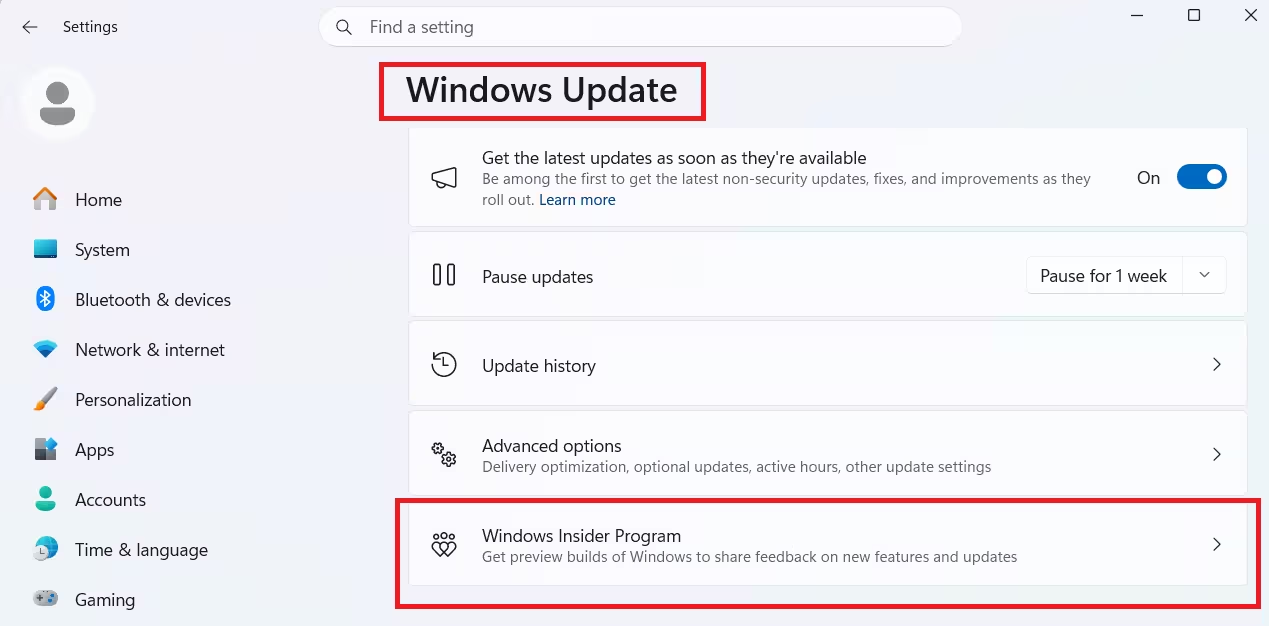
- Turn on Get the latest updates as soon as they are available.
- Click Check for updates and install build 26220.8575.
If you prefer a clean installation, Microsoft makes ISO files available through the Windows Insider Preview Downloads page. Specific preview ISOs are only available for a limited time.

