Cloudflare Tunnel Error 1033 shows up when Cloudflare cannot find a healthy cloudflared connector for a tunnel-backed hostname. It usually means the tunnel itself is offline, not that your application has crashed. This article walks through how to diagnose the exact cause and fix it based on your tunnel’s status.
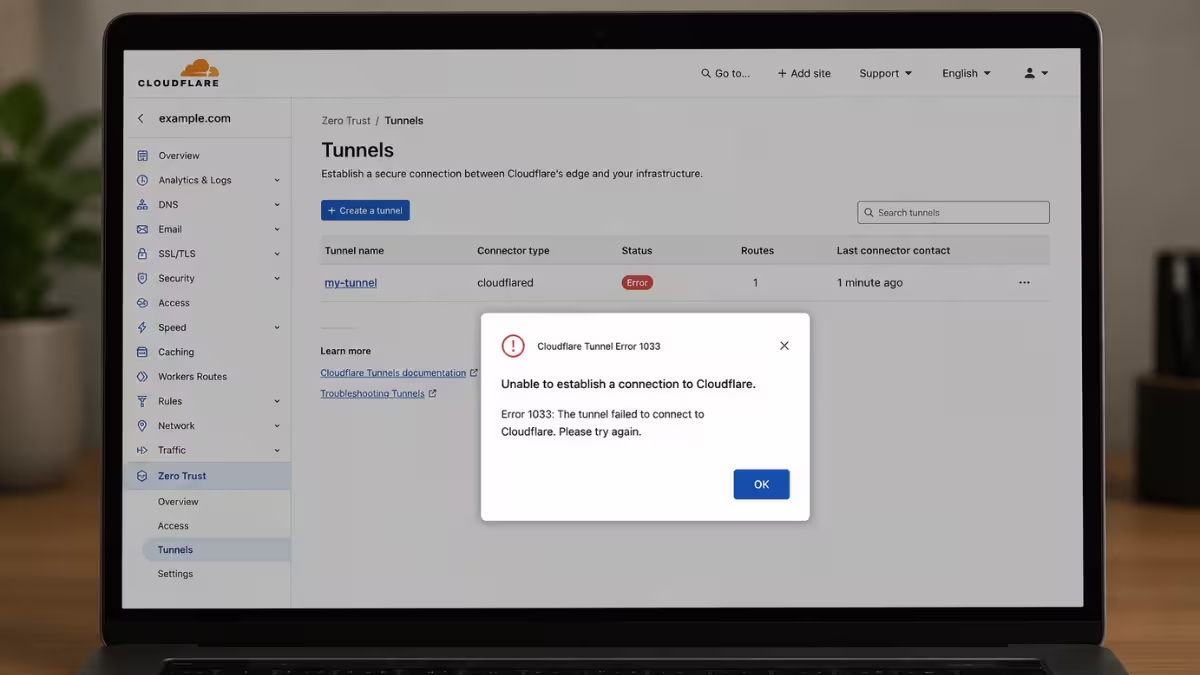
What Causes Cloudflare Tunnel Error 1033
The error points to a broken connection between Cloudflare’s network and your cloudflared daemon.
- The
cloudflaredprocess stopped, crashed, or was never started after the tunnel was created. - The host machine lost power, rebooted, or lost internet access.
- A local firewall or router rule blocks outbound traffic to Cloudflare’s tunnel ports.
- The tunnel config points to the wrong local IP, port, or protocol.
- Docker containers running
cloudflaredand the app cannot reach each other over the network.
Fix 1: Restart the cloudflared Service
Check this first since a stopped service is the most common cause of Error 1033.
Confirm your tunnel’s status before restarting anything. Log into the Cloudflare dashboard and go to Networking > Tunnels, or run cloudflared tunnel list from your terminal. If the status reads Down, the connector has stopped responding.
On Linux and macOS:
- Run
sudo systemctl restart cloudflaredto restart the service. - Confirm it’s active with
sudo systemctl status cloudflared. - Check recent activity with
journalctl -u cloudflared -f.
On Windows:
- Open the Services app.
- Locate Cloudflared in the list.
- Right-click it and select Restart.
If the host machine itself lost power or dropped off the network, fix that connectivity issue first. Restarting the service won’t help if the server can’t reach the internet.
Fix 2: Reconnect an Inactive Tunnel
If your tunnel shows Inactive, it was created but never had a connector run on your server.
- Open the Cloudflare dashboard and go to Networking > Tunnels.
- Select your tunnel and open the Overview tab.
- Select Add a replica.
- Choose your operating system and copy the installation command shown.
- Run that command on your origin server to complete the initial connection.
This step establishes the first handshake between your server and Cloudflare’s network. Once it completes, the tunnel status should switch to Healthy within a minute or two.
Fix 3: Fix Routing and Docker Networking Issues
If the tunnel shows Healthy but the error still appears, the connector cannot reach your local application even though it’s connected to Cloudflare.
- Open your
config.ymlfile and confirm the local IP and port match your running app exactly, for examplehttp://192.168.1.50:8080. - Check that the protocol in your routing rule matches what your app expects. Routing HTTP traffic to an app that requires HTTPS breaks the connection.
- If both
cloudflaredand your app run in Docker containers, they can’t communicate overlocalhostor127.0.0.1. Put both containers on the same custom Docker network and reference the app by its container name, for examplehttp://my-web-app:80.
If the tunnel shows Degraded, one or more of the four required connections has failed even though the tunnel is still serving some traffic.
- Review your
cloudflaredlogs withjournalctl -u cloudflared -ffor connection failures. - Check local firewalls like Windows Defender or UFW, and network-wide filters like pfSense, Unifi, or Pi-hole, for rules blocking outbound traffic on TCP/UDP port 7844. Cloudflare’s firewall configuration docs list every required port and IP range.
Prevent Error 1033 From Happening Again
A tunnel that isn’t running as a managed service will go down the moment its terminal window closes or the host reboots.
- Run
cloudflared service installto set it up as a system service that starts automatically on boot. - If you’re using Docker, add
restart: unless-stoppedunder thecloudflaredservice in yourdocker-compose.ymlfile. - Monitor connector health and set up an alert for when the process stops.
- Recheck your public hostname routes after any config change or deploy.
Frequently Asked Questions
What does Cloudflare Error 1033 mean?
It means a Cloudflare Tunnel-backed hostname can’t be resolved to a healthy cloudflared connector. Cloudflare’s edge network has nowhere to send the request.
Is Error 1033 the same as the Argo Tunnel error?
Yes. Cloudflare Tunnel was previously called Argo Tunnel, so older guides and forum posts often use that name for the same error.
Can a visitor fix Error 1033?
Not directly. A refresh after a short wait sometimes works if the tunnel was briefly restarting, but the actual fix depends on the site owner restoring the connector.
Does Error 1033 mean the origin server is down?
Not necessarily. The local app behind the tunnel can be running fine while Cloudflare still can’t reach it through a broken tunnel connection.
Should I check DNS settings first?
Check the tunnel status before DNS. Error 1033 is almost always a missing or unhealthy connector rather than a DNS misconfiguration.

