You picked a strong password. You turned on two-factor authentication. Then an attacker took over your account anyway, and your login screen never saw them.
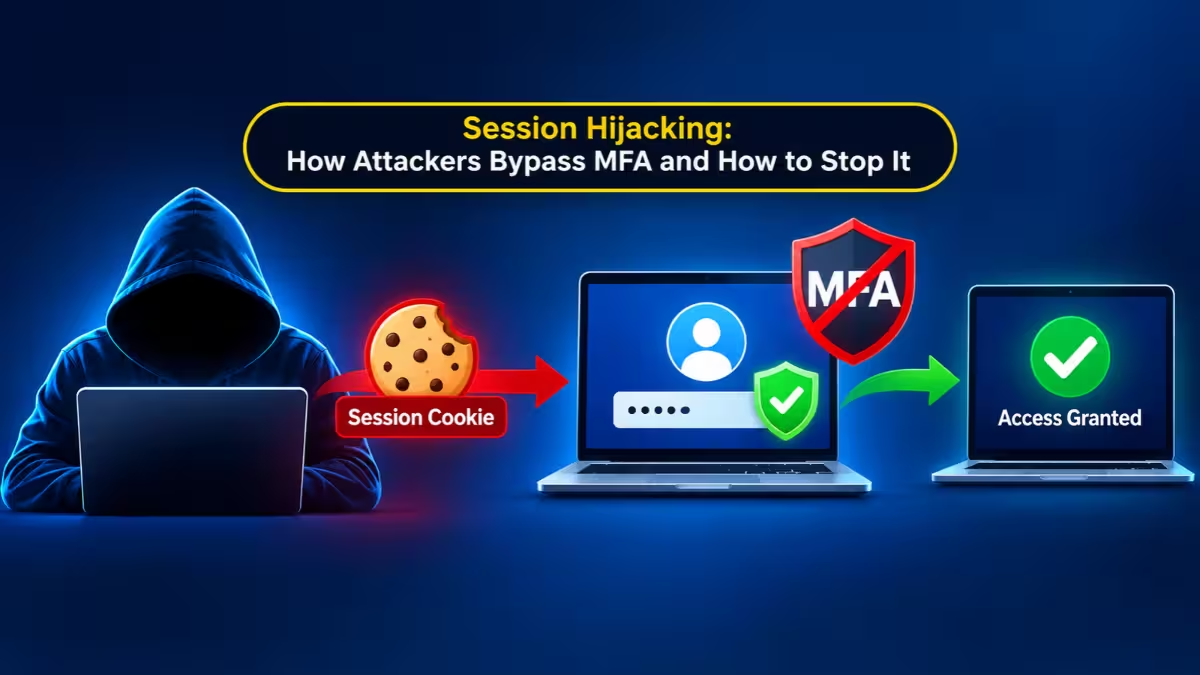
That is session hijacking. The attacker does not break your login. They steal the proof that you already logged in, and they use it from their own machine. This guide explains how the theft works, how to notice it, and what you can do today to shrink the risk, whether you are a regular user or someone who runs a website.
What Is Session Hijacking?
Session hijacking is an attack where a criminal steals the session token a website gives your browser after you log in, then uses that token to act as you. The attacker never needs your password or your MFA code. The website sees a valid token and lets them in.
How Session Hijacking Bypasses MFA and Passkeys
When you sign in to a website, the server checks your password and your second factor once. After that, it hands your browser a small token, usually stored as a cookie. Your browser sends that token with every request, and the server uses it to remember you.
Think of it like a wristband at a festival. The guard checks your ticket once at the gate. After that, anyone wearing the wristband walks in freely. Nobody asks the wearer to prove who they are again.
Security people call this a bearer token. Whoever presents it gets the access. The server does not check whether the browser, the device, or the person changed. If an attacker copies your token into their browser, the site treats them as you.
This is why MFA and passkeys do not solve the problem on their own. They protect the moment of login. The token is created after that moment, and it carries all the trust. Attackers noticed, and they now run token replay attacks instead of cracking passwords.
The scale shows how much attackers like this route. Security researchers report that a single infostealer infection grabs around 44 passwords on average but more than 1,800 cookies. Cookies are simply the richer prize.
How Attackers Steal Session Tokens (6 Common Methods)
Attackers use several routes. Some target your device, some target the network, and some target the website itself.
Infostealer malware
This is the most common route today. Infostealers are small programs that hide inside cracked software, fake installers, and fake "fix this error" pages, a trick known as ClickFix. Once one runs, it reads your browser's cookie store, copies saved logins, and uploads everything to the attacker within seconds. Families such as Lumma, RedLine, and Vidar sell as a service, so even low skilled criminals can run campaigns. Authorities have taken down thousands of their domains, yet the operators rebuild quickly.
Adversary-in-the-middle phishing
In this attack, a fake login page acts as a relay between you and the real site. You type your password and approve your MFA prompt on what feels like a normal login. The relay passes everything to the real site, then keeps the session cookie the real site sends back. You get logged in, and so does the attacker.
OAuth device code phishing
Here the attacker starts a legitimate device login flow and tricks you into entering the code on the real Microsoft or Google page. You complete a real login, even with a passkey, and the tokens go to the attacker's script instead of your device.
Malicious browser extensions
An extension with broad permissions can read cookies for the sites you visit and send them out quietly. A coupon tool or a file converter can turn into a cookie thief after an update.
Cross-site scripting
If a website fails to clean user input, an attacker can plant JavaScript on a page. When you load it, the script reads your cookie and ships it off. This one depends on a flaw in the website, not on anything you did.
Network sniffing and session fixation
On an unencrypted connection, such as an old HTTP page on public Wi-Fi, anyone on the network can capture the cookie in plain text. With session fixation, the attacker sets a known session ID before you log in. If the site keeps that ID after your login, the attacker already holds a working key.
What Attackers Do With a Hijacked Session
The damage depends on what the account can reach. A hijacked email session lets the attacker read messages, set up forwarding rules, and reset other accounts. A hijacked cloud or SaaS session can expose customer data and files. In business settings, one session often connects to other apps through OAuth, so the attacker moves from one tool into many.
Attackers also dig in. They add a new device, change recovery settings, or approve a malicious app. Those changes keep working after the original session ends.
One detail trips up many people: refresh tokens. A refresh token can mint new access tokens on its own, and it can survive a password reset. If you only change your password after an incident, an attacker with a refresh token can keep going.
How to Detect Session Hijacking
A hijack leaves few obvious traces because no failed login ever appears. Watch for these clues instead:
- A "new sign-in" alert or device notification you did not trigger
- Account activity from a country or network you have never used
- Mail forwarding rules, new connected apps, or recovery emails you did not add
- Sent messages you did not write
- A service that logs you out unexpectedly, then shows odd activity afterward
For teams, the useful signals look like this: one session appearing from two networks at the same time, a browser that changes from Chrome on Windows to a command line client mid-session, impossible travel between two locations, and sudden bulk downloads from an account that normally reads a few files a day.
How to Prevent Session Hijacking as a User
You cannot control how every website handles sessions, but you can reduce what a thief can grab and how long it stays useful.
- Block the malware route first. Download software only from official sites. Avoid cracked apps. Never paste commands from a web page into a terminal or the Run box because a page told you to fix something.
- Keep browsers and extensions lean. Remove extensions you do not use, and review the permissions of the rest. Update your browser often.
- Sign out of sensitive accounts. Closing a tab does not end a session. Clicking "Sign out" tells the server to cancel it, which makes a stolen copy useless.
- Clear cookies on exit for high-value sites. An empty cookie store gives an infostealer less to take. Chrome, Firefox, and Edge all offer a setting for this.
- Separate your browsing. Use one browser profile for banking and work with no extensions, and another for everything else.
- Stay on HTTPS. Turn on the "Always use secure connections" option in your browser, and use a VPN on public Wi-Fi.
- Use a dedicated password manager. Browser-saved passwords sit in the same place infostealers raid first.
- Be careful with login prompts. If a login appears right after you clicked a link, close it and go to the site directly. Never enter a device code that someone sent you.
How to Prevent Session Hijacking on Your Website
If you build or manage a website or a company tenant, you have much stronger tools. Start with the basics, then move to the advanced controls.
Harden the cookie
Set three flags on every session cookie. Secure keeps it off plain HTTP. HttpOnly blocks JavaScript from reading it. SameSite limits cross-site sending.
Set-Cookie: session_id=abc123; HttpOnly; Secure; SameSite=Strict; Path=/Check the OWASP Session Management Cheat Sheet for the full list of recommended practices.
Rotate and shorten
Issue a fresh session ID right after login to stop fixation. Keep lifetimes short for admin accounts, and expire idle sessions. Always invalidate the session on the server at logout, because deleting the cookie in the browser does not cancel a stolen copy.
Bind sessions to a device
Device Bound Session Credentials tie a session to a key stored in the device's secure hardware, so a cookie copied to another machine fails. Chrome is rolling this out, and you can enforce it on managed fleets through enterprise policy. In Microsoft Entra ID, turn on Continuous Access Evaluation so the service can cut off a token within minutes when risk signals appear.
Compare the context
Store basic details such as the browser family and network range when the session starts. If both change at once, force a fresh login. Compare ranges, not exact IP addresses, so mobile users and VPN users do not get locked out all day.
Watch for abuse after login
Alert on impossible travel, simultaneous use from two places, new OAuth app approvals, and sudden data exports. Require a fresh authentication for sensitive actions such as changing recovery settings or adding an administrator.
Treat refresh tokens as first-class targets
Rotate them, limit their scope, and review third-party app grants regularly. Forgotten integrations with broad access work like a permanent stolen session.
What to Do If Your Session Gets Hijacked
Speed matters, and the order matters too.
- Use the "sign out of all devices" option on the affected service.
- Revoke connected apps and app passwords, and remove unknown devices.
- Change the password from a clean device, since the old one may carry an infostealer.
- Check mail forwarding rules, recovery email, and phone number for changes you did not make.
- Scan the original device with a trusted security tool, and remove the malware before you log in again.
- Admins should revoke refresh tokens as well as sessions. In Microsoft Entra ID, the Graph
revokeSignInSessionsaction handles this. - Review the account's activity logs to see what the attacker opened or changed.
Frequently Asked Questions
Can session hijacking happen if I use MFA or passkeys?
Yes. MFA and passkeys protect the login step. A session token created after that step can still be stolen by malware or a phishing relay and used elsewhere.
Does logging out really help?
Yes, when the site cancels the session on its server. A properly logged-out token stops working, even if an attacker copied it earlier.
Does changing my password stop an attacker who has my cookie?
Not always. Some services keep existing sessions and refresh tokens alive after a password change. Sign out of all devices and revoke app access as well.
Do HttpOnly cookies make theft impossible?
No. HttpOnly blocks script-based theft, such as cross-site scripting. Malware that reads your browser files from disk can still take the cookie.
Is public Wi-Fi still dangerous?
It carries less risk than before because most sites use HTTPS. Misconfigured sites and rogue hotspots still create openings, so a VPN and HTTPS-only mode remain smart habits.
What is the single best habit to start with?
Avoid the malware route. Install software only from official sources, skip cracked apps, and never run commands a web page tells you to run. Infostealers cause most token theft today.
Related Guides
- Token Replay Attack Explained: How Stolen Microsoft 365 and GitHub Tokens Bypass MFA
- How to Spot AI-Generated Fake Login Pages Before You Sign In (Checks, MFA Risks and Fixes)
- ShinyHunters SSO Data Theft Attacks Use Voice Phishing to Breach Okta, Microsoft, and Google Accounts
- How to Protect Your Business Accounts from Password Spraying Attacks
- 5 Best Password Managers You Can Trust With Every Login