A sudden spike in website traffic from China, Singapore, or both can be confusing — especially when your site does not target users in those regions. Many website owners see this in Google Analytics or Cloudflare: thousands of visits from locations like Lanzhou (China) or Singapore, almost always with 0-second session duration and 100% bounce rates.

Unusual Traffic From China and Singapore: What’s Really Happening?
In most cases, this surge is not real users browsing your website. Instead, the traffic comes from automated systems designed to scan, scrape, or test websites across the internet.
Here are the most common reasons:
1. Bot Traffic and Automated Scanners
China and Singapore are two of the biggest data-center hubs in Asia. A lot of automated traffic originates from these regions, including:
- Scraping bots copying website content
- SEO bots checking backlinks and keywords
- Security scanners looking for vulnerabilities
- AI crawlers indexing the open web
- Spam tools sending fake referral traffic
These bots don’t interact with your website, so they generate “empty” sessions with:
- No engagement
- Only 1 pageview
- 0–1 second duration
This matches the exact behavior many site owners report today.
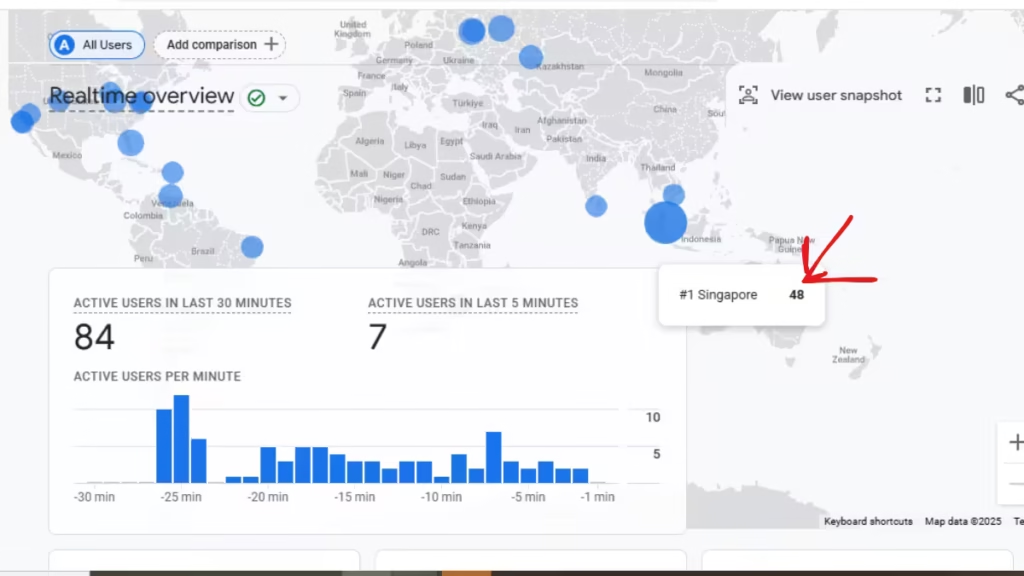
2. Singapore Is a Global VPN & Proxy Exit Point
Even if the actual user is in the US, India, or Europe, their VPN may route through Singapore.
Why Singapore?
- Extremely fast internet backbone
- Many VPN providers host their servers there
- Strong infrastructure and data privacy policies
This means legitimate users may appear as Singapore traffic — mixed in with bots from the same region.
3. Chinese Scraping and Aggregator Bots
Many Chinese websites run automated systems that copy global site content. If your site publishes:
- Gaming guides
- Tech tutorials
- News
- Trending topics
…it becomes an easy target. These bots behave like users but do not load scripts correctly, so analytics marks them as “direct traffic” with no engagement.
4. Referrer Spam and Fake Sessions
Some spam tools deliberately inject fake sessions into Google Analytics for:
- promoting malicious sites
- SEO manipulation
- hacking or reconnaissance
- inflating competitor traffic
These sessions almost always originate from data-center IP ranges.
5. Google Analytics Misclassification
GA4 is still imperfect when dealing with bot filtering.
It often mislabels:
- bot pings as “real sessions”
- server requests as pageviews
- proxy hits as direct traffic
- old browser agents as human visitors
This creates misleading spikes — especially from regions with heavy automated infrastructure.
How to Confirm Whether the Traffic Is Fake
You can identify bot activity by checking these signals:
1. 0-second session duration
Bots do not load JavaScript fully, causing Analytics to trigger only the first event.
2. 1 page per session
They almost always hit only the homepage or a random landing page.
3. Unusual device/browser patterns
Old browsers like Chrome 41, Android 4, or blank user agents are classic bot signatures.
4. Traffic hitting at odd hours
Large waves of traffic at 2AM–6AM (your local time) usually means automated scanning.
5. Huge jumps with no matching server load
Analytics may show 5,000 new visits — but your hosting CPU remains stable. This is a sign that the “visits” aren’t real hits to your server.
Does This Hurt Your SEO?
Not directly — Google ignores bot traffic for ranking. But it can still cause problems:
- Analytics becomes unreliable
- Conversion tracking gets distorted
- Engagement reports become unusable
- Data models (GA4 insights, audience segments) get polluted
So while Google won’t penalize you, your internal reporting and strategy may suffer.
How to Fix the Issue (Without Breaking Your Website)
Here’s how to immediately reduce bad traffic from China and Singapore.
1. Use Cloudflare’s Managed Challenge (Recommended)
This is the safest option. It filters bots without blocking legitimate users.
Create this Firewall Rule:
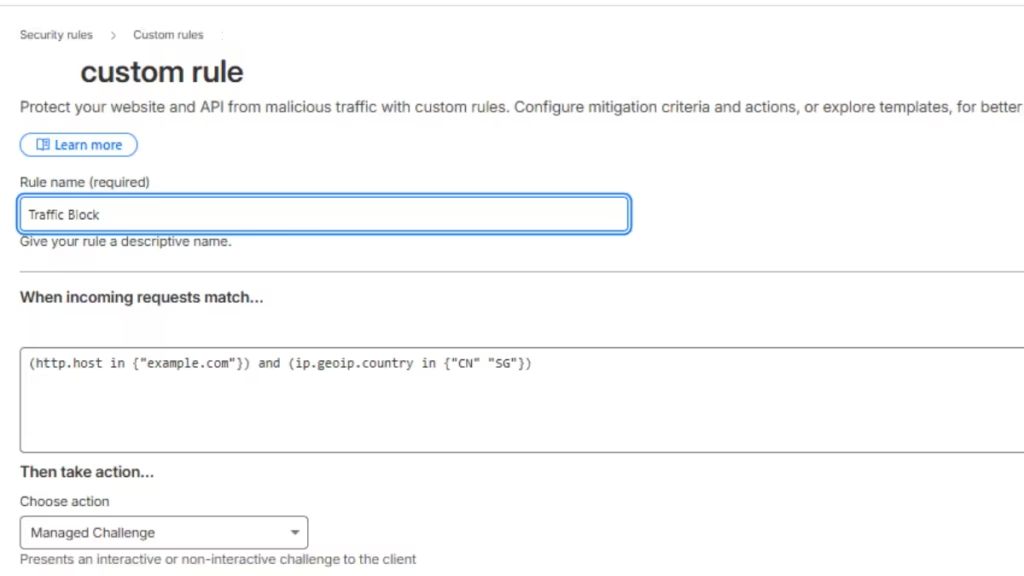
Cloudflare → Security → WAF → Firewall Rules → Create Rule → Expression Editor
Paste this:
(http.host in {"example.com"}) and (ip.geoip.country in {"CN" "SG"})Action: Managed Challenge
This alone stops most unwanted traffic.
2. Block Empty User Agents
Bots often send no browser signature.
Create another rule:
http.user_agent eq ""Action: Block
This is safe because real browsers ALWAYS provide a user agent.
3. Monitor Firewall Events
Cloudflare will start labeling traffic as:
- JS Challenge
- Managed Challenge
- Bot Fight Mode (blocked)
You’ll quickly see which countries produce the most suspicious requests.
4. Turn On Bot Fight Mode
Go to:
Security → Bots → Bot Fight Mode → ON
This automatically blocks thousands of known scrapers.
5. Add a Web Application Firewall Plugin (for WordPress)
Good options:
- Wordfence
- Sucuri
- iThemes Security
These stop login-page attacks and vulnerability scans often coming from China-based IPs.
Should You Block These Countries Completely?
Yes — only if you do not serve any users from these regions.
If your site is international or bilingual, use Managed Challenge instead of a full block.
Blocking China and Singapore entirely may help if:
- your server is under load
- the traffic is targeting wp-admin
- scrapers hit your site daily
But if your audience is global, a challenge is safer.
Read More:
- Cloudflare Bot Fight Mode: Whitelist Good Bots and Block Bad Bots
- How to Stop, Detect, and Prevent DDoS Attack with Cloudflare
- How to Block AI Crawlers and Protect Your Website
A sudden surge in traffic from China and Singapore is almost always caused by bots, scanners, or proxy-based traffic, not real users. While the spike may look alarming, it doesn’t mean your site is under attack — it simply means automated systems have discovered your domain.
By applying a few Cloudflare rules and monitoring your analytics, you can clean up your traffic and keep your data reliable without harming legitimate visitors.

