A threat actor tracked as Storm-2949 is actively targeting Microsoft Azure and Microsoft 365 environments using a technique that abuses a built-in Microsoft feature: the Self-Service Password Reset (SSPR) flow. Microsoft’s Defender Security Research Team published a detailed breakdown, describing it as “methodical, sophisticated, and multi-layered.”
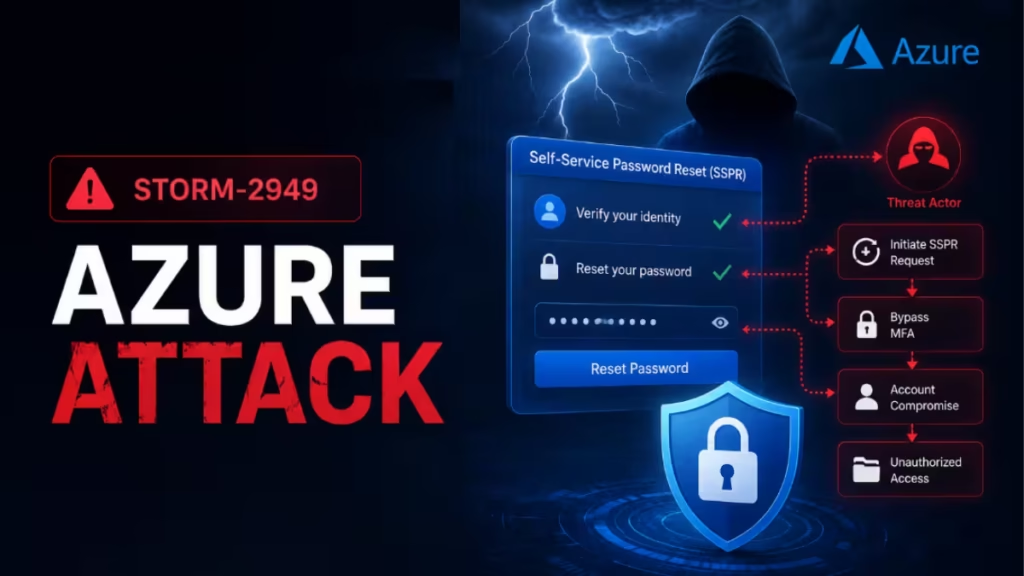
The attack does not rely on traditional malware. Instead, Storm-2949 hijacks legitimate cloud administration features including SSPR, Azure RBAC permissions, Azure Key Vault access, VM extensions, and OneDrive bulk downloads to achieve full-spectrum control over an organization’s cloud environment. This guide explains how the attack works and what steps you need to take to harden your Azure environment against it.
What Is Azure SSPR Abuse?
Self-Service Password Reset (SSPR) is a legitimate Microsoft feature that lets employees reset their own passwords without contacting IT. When a user clicks “Forgot my password,” Microsoft sends an MFA prompt to their registered secondary device. The user approves it and sets a new password.
Storm-2949 abuses this flow by initiating the SSPR process on behalf of a targeted user and then calling the user on the phone while the MFA prompt is active. The caller poses as an internal IT support representative and instructs the user to approve the MFA prompt as part of a routine security check.
Once the user approves, the attacker resets the password, removes the user’s existing MFA methods (phone numbers, email addresses, and Microsoft Authenticator registrations), and enrolls Microsoft Authenticator on their own device. The legitimate user loses access immediately. The attacker gains persistent, MFA-protected control of the account.
How Storm-2949 Executes the Azure SSPR Abuse Attack
Microsoft describes the campaign in two distinct phases: identity compromise and full Azure infrastructure takeover.
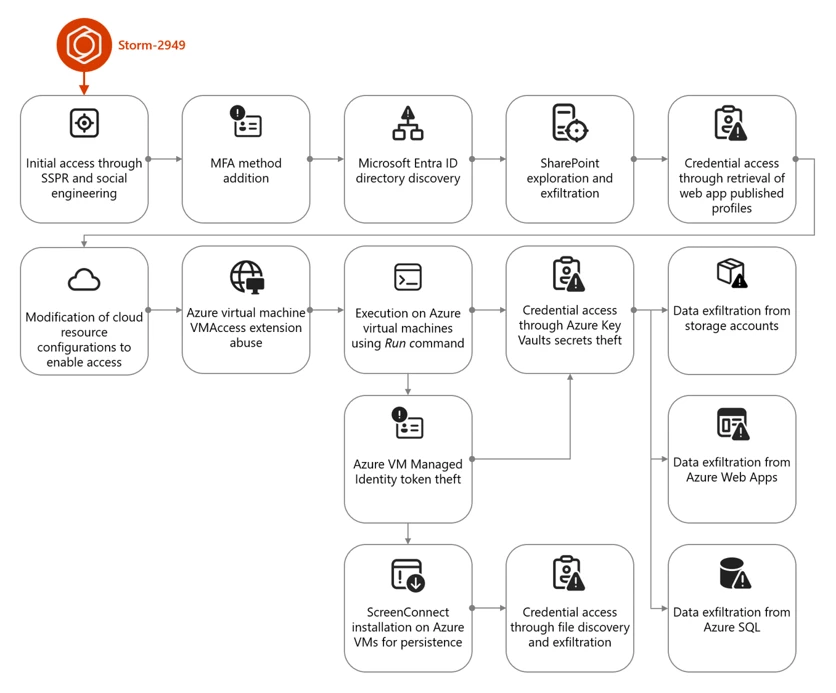
Phase 1: Social Engineering and Microsoft 365 Exfiltration
Storm-2949 begins by identifying specific users inside the target organization, focusing on IT personnel and senior leadership. They obtain the target’s phone number and Microsoft 365 email address, then initiate the SSPR flow and call the victim simultaneously.
This social engineering technique mirrors the method used in tech support scam calls, where attackers impersonate trusted figures to pressure victims into taking dangerous actions. After hijacking the first account, Storm-2949 runs a custom Python script through the Microsoft Graph API to enumerate users, roles, applications, and service principals across the tenant. They also attempt to add credentials to compromised service principals to establish persistence independent of the hijacked user accounts.
The threat actor then uses the same SSPR technique to compromise additional accounts inside the organization, repeating the process across multiple users within the same tenant.
With access to these accounts, Storm-2949 targets OneDrive and SharePoint in Microsoft 365. They search for VPN configuration files and IT operational documents to identify paths into the endpoint network. In one documented instance, Storm-2949 used the OneDrive web interface to download thousands of files in a single action. This pattern repeated across every compromised account because different identities had access to different folders and shared directories.
Phase 2: Full Azure Infrastructure Takeover
Once Storm-2949 holds multiple compromised identities with privileged Azure RBAC roles, they pivot to the victim’s Azure environment.
Azure App Services: Storm-2949 invokes the microsoft.Web/sites/publishxml/action management operation, which retrieves a web app’s publishing profile. This profile contains authentication credentials for FTP, Web Deploy, and the Kudu management console. Through Kudu, the attacker browses the file system, inspects environment variables, and executes remote commands inside the app’s context.
Azure Key Vault: The attacker pivots to Key Vaults using the compromised user’s Owner role. Over four minutes, Storm-2949 manipulates access configurations and extracts dozens of secrets including database connection strings and identity credentials. These secrets then provide access to the primary production web application.
Azure Storage and SQL: Storm-2949 uses the microsoft.sql/servers/firewallrules/write operation to open SQL server firewall access, connects using credentials stolen from Key Vault, exfiltrates data, and then deletes the modified firewall rules to cover their tracks.
For Azure Storage accounts, they invoke microsoft.Storage/storageAccounts/listkeys/action to retrieve storage keys and SAS tokens, then use a custom Python script leveraging the Azure SDK to download large volumes of blob data over multiple days.
Azure Virtual Machines: Storm-2949 deploys the VMAccess extension to create rogue local administrator accounts on targeted VMs. The same technique administrators use to reset root passwords on Linux VMs becomes a backdoor in the attacker’s hands. Through the Run Command feature, they execute PowerShell scripts that disable Microsoft Defender real-time protection and behavior monitoring, then install ScreenConnect, a remote monitoring tool used as a persistent backdoor. After completing each action, the scripts clear Windows event logs, remove execution artifacts, and delete command history to complicate forensic investigation.
How to Protect Your Azure Environment from SSPR Abuse
Apply these controls in order of priority. The identity layer is the highest-value hardening target because it is the entry point for the entire attack chain.
Harden MFA and SSPR Configuration
Standard authenticator app prompts are vulnerable to the social engineering technique Storm-2949 uses because the attacker calls the victim at the exact moment the prompt appears. Phishing-resistant authentication methods break this technique entirely.
- Require phishing-resistant MFA strength for all administrator and privileged user accounts. FIDO2 security keys and passkeys cannot be approved through a phone call.
- Set up a passkey for your Microsoft account and remove SMS-based authentication. Microsoft confirmed SMS verification is now a leading source of account fraud.
- Ensure every privileged user already has a registered MFA method before an attack occurs. Accounts with no registered method create an opening for attackers to enroll their own device during an SSPR event.
- Enable Conditional Access policies that require device compliance or trusted IP verification for every sign-in attempt. This blocks stolen credentials from working on attacker-controlled infrastructure.
- Turn on Microsoft Entra ID Protection to monitor identity-based risks and automatically remediate risky sign-ins with Conditional Access policies.
Apply the Principle of Least Privilege with Azure RBAC
Storm-2949’s ability to compromise Key Vaults, storage accounts, and SQL servers depended entirely on compromised identities holding overly permissive Azure RBAC roles.
- Audit all Azure RBAC role assignments across every subscription. Remove or scope down any identity with more access than their role requires.
- Avoid assigning the Owner role to user accounts on Key Vaults or production Azure subscriptions. Use granular custom roles with minimum required permissions.
- Restrict the
microsoft.Web/sites/publishxml/actionpermission. Limit who can retrieve publishing profiles for Azure App Services. - Audit and restrict the use of VMAccess and Run Command. Both features should require tight RBAC scoping and generate monitoring alerts when invoked.
- Use Azure Policy to continuously enforce hardened RBAC configurations across your subscriptions.
Secure Azure Key Vault
Storm-2949 extracted dozens of secrets from a single Key Vault in under four minutes. These controls reduce exposure and improve detection speed.
- Enable diagnostic logs in Azure Key Vault and retain them for up to a year. This allows you to reconstruct full activity trails when a security incident occurs.
- Restrict public network access to Key Vault. Enable private endpoints and disable public access to reduce the attack surface.
- Enable purge protection to prevent immediate, irreversible deletion of vaults and secrets. Use the default 90-day retention interval.
- Regularly audit Key Vault RBAC role assignments and access policies. Microsoft recommends using Azure RBAC over Key Vault access policies for all permission management.
- Enable Defender for Key Vault to automatically detect suspicious policy changes, unusual access patterns, and high-volume secret queries.
Protect Azure Storage Accounts
Storm-2949 exfiltrated data from Azure Storage over multiple days by manipulating network access rules and obtaining storage keys directly through the management plane.
- Disable public network access to all storage accounts. Use private endpoints for Azure Storage account access.
- Avoid anonymous read access for blob data entirely. Every access should require authentication.
- Enable immutable storage for Azure Blob Storage to protect against accidental or malicious deletion of blobs or storage accounts.
- Enable Azure blob backup to protect from malicious deletions.
- Apply fine-grained access control using Azure attribute-based access control (ABAC) for sensitive blob data rather than broad RBAC assignments.
- Enable Azure Monitor for Azure Blob Storage to log all access events and detect mass download activity early.
Lock Down Azure App Services and Virtual Machines
- Disable legacy authentication methods for Azure App Services. Enforce managed identity usage to eliminate credential theft through publishing profiles.
- Enable diagnostic logging in App Service to capture suspicious deployment or configuration changes.
- Configure SQL server firewall rules to allow access only from known, trusted IP addresses. Monitor for unauthorized changes to those rules.
- Use Azure Policy to restrict or audit the deployment of VM extensions such as VMAccess and Run Command across all subscriptions.
- Enable Microsoft Defender Tamper Protection on all endpoints to prevent attackers from disabling security services on compromised VMs.
- Enable Microsoft Azure Backup for virtual machines to maintain recovery options in case of compromise.
Enable Detection and Monitoring
Storm-2949’s attack blends into expected administrative behavior because they use legitimate Azure management features. Detection requires correlated signals across identity, cloud, and endpoints.
- Use the Azure Monitor activity log to track all Azure management events in real time. Review the changes to legacy agent data uploads in Azure Monitor to ensure your monitoring stack is fully current.
- Enable Defender for Storage to catch unusual data extraction volumes, unauthorized public access changes, and suspicious blob access from unusual IP addresses.
- Enable Microsoft Defender for Cloud across all workloads: Defender for Resource Manager, Defender for Servers, Defender for Key Vault, Defender for Databases, and Defender for Storage.
- Use Microsoft Defender XDR advanced hunting to query the
CloudAuditEventsandCloudStorageAggregatedEventstables and proactively hunt for lateral movement patterns across Azure resources. - Enable Defender for Cloud Apps connectors to monitor SaaS activity including OneDrive and SharePoint for mass download events.
- Turn on Endpoint Detection and Response (EDR) in block mode in Microsoft Defender for Endpoint so it can block malicious artifacts even when running alongside another antivirus solution.
What to Do If Your Account Is Already Compromised
If Storm-2949 or a similar attacker has already accessed your Microsoft 365 or Azure environment, take these steps immediately:
- Revoke all active sessions for compromised accounts using the Microsoft Entra admin center.
- Rotate all secrets in every Azure Key Vault the attacker may have accessed.
- Regenerate storage account keys and invalidate any SAS tokens that the attacker could have retrieved.
- Review and restore SQL server firewall rules to your trusted IP list.
- Audit all Azure RBAC role assignments and remove any accounts or service principals the attacker added.
- Search all Azure VMs for ScreenConnect or other remote access tools and remove them immediately. Run a full Microsoft Defender virus scan on every affected endpoint.
- If you encounter Azure sign-in failures after remediation, check for MFA method conflicts from the attacker’s registered Authenticator device and remove it through the Entra admin center.
- If your Microsoft account itself was hacked and authentication methods were removed, follow Microsoft’s account recovery process before attempting any other remediation step.
Block the following known Storm-2949 indicators of compromise at your network perimeter: 176.123.4[.]44, 91.208.197[.]87, and 185.241.208[.]243 (the ScreenConnect C2 instance used by the attacker).
Related Tech Guides
- How to Set Up a Passkey for Your Microsoft Account and Remove SMS Authentication
- How to Upgrade to TLS 1.2 Cipher Suite for Azure Storage (Compatibility and Enforcement Guide)
- Microsoft Halts Legacy Agent Data Uploads Ahead of March 2026 Shutdown in Azure Monitor
Errors and Fixes

