Your AI agent does not crash. That is the problem.
Traditional software fails loudly. It throws a stack trace, exits with a code, and tells you which line broke. An AI agent fails quietly. It keeps running, keeps calling tools, keeps burning tokens, and produces something that looks like work but is not. By the time you notice, the credits are gone.
Research on production agent trajectories has mapped these failures into a consistent taxonomy, and the same handful of patterns show up again and again. This guide covers the seven you will actually hit, what causes each, and the fix.
Failure 1: Step Repetition (The Infinite Loop)
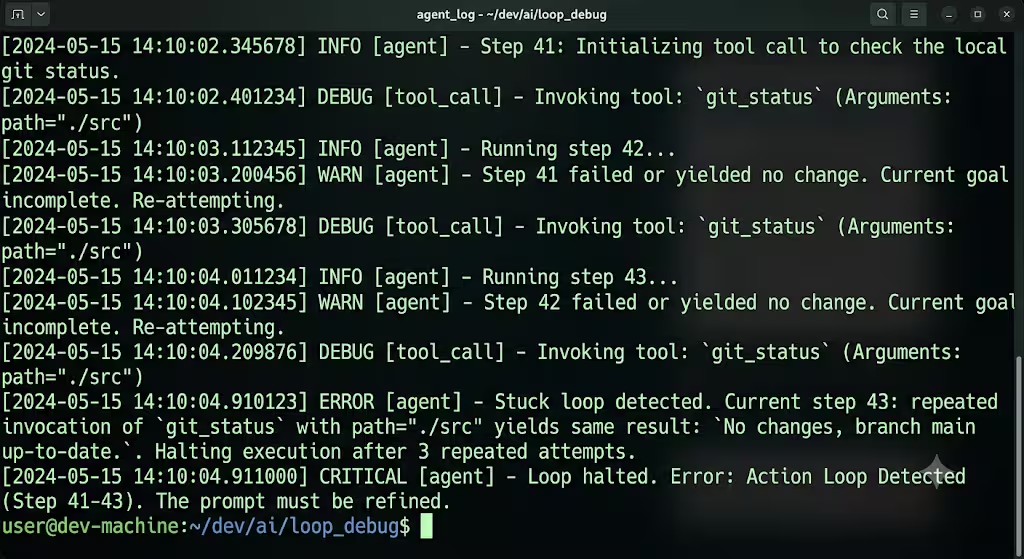
What it looks like: The agent calls the same tool, with the same arguments, over and over. Sometimes with tiny parameter variations that look like progress but are not.
This is the single most common agent failure in production. Analysis of agent trajectories found step repetition accounts for roughly 15.7 percent of all failures, making it the top failure mode across every model tested. In some weaker models, action looping was observed in over 80 percent of traces.
Why it happens: Ambiguous tool feedback. When a tool returns something like “more results may be available,” the agent believes another call will make progress. It will not. The agent thinks the same thought, so it takes the same action.
There is a nastier variant: tools returning well-formed JSON with zero useful data. The response is technically valid, so the agent thinks it is progressing.
The fix: Add cycle detection and a hard step ceiling.
MAX_STEPS = 50
recent_actions = []

def check_loop(tool_name, args):
    signature = f"{tool_name}:{hash(str(args))}"
    if recent_actions.count(signature) >= 3:
        raise RuntimeError("Loop detected. Same call 3x.")
    recent_actions.append(signature)
    if len(recent_actions) > MAX_STEPS:
        raise RuntimeError("Step budget exhausted.")
Deduplicate against the last five actions. Three identical calls in a row is a loop, not persistence.
Failure 2: Unaware of Termination Conditions
What it looks like: The agent finishes the job but does not know it is done. It keeps going, “improving” things that need no improvement, or re-searching for information it already has.
This accounts for around 12.4 percent of agent failures. In document-processing agents it shows up as infinite refinement loops that consume compute for hours.
Why it happens: No explicit completion criteria. The agent has no definition of “done,” so it never reaches it.
The fix: Return explicit terminal states from every tool. Not prose, states.
return {"status": "SUCCESS", "data": result}
# or
return {"status": "FAILED", "reason": "not_found"}
Clear SUCCESS and FAILED states stop the agent from retrying completed operations. In documented cases this dropped tool calls from fourteen down to two. Also define completion criteria up front: “must return JSON with fields X, Y, Z.” Then a missing field is an alarm, not a cloud bill.
Failure 3: Reasoning-Action Mismatch
What it looks like: The agent’s stated reasoning says one thing and its actual tool call does another. The chain-of-thought reads “I should query the users table,” and then the call hits the orders table.
This is roughly 13.2 percent of failures, and it is the hardest one to catch because the reasoning looks correct in your logs.
Why it happens: The model generates plausible reasoning text separately from the structured tool call. They can diverge. Worse, models sometimes rationalize an incorrect action after the fact rather than acknowledging a backtrack.
The fix: Log the full chain, not just the output. Every tool call, every tool response, every reasoning step. Then assert on the gap:
Compare the stated intent against the executed call. If reasoning mentions a target the tool call does not touch, flag the trajectory for review. Yes, the traces get huge. You need them at 3 a.m. when something breaks.
Failure 4: Context Window Overflow
What it looks like: The agent works fine for ten steps, then starts forgetting earlier instructions, dropping constraints, or producing degraded output.
Why it happens: Every tool response gets appended to the context. A tool that returns an 80KB payload eats your window in a single call. Loss of conversation history shows up in the taxonomy as its own distinct failure mode.
The fix: Use the memory pointer pattern. Store large tool outputs in external state and pass a short reference into the LLM context instead of the full blob.
# Instead of returning 200KB of JSON:
store["result_a1b2"] = big_payload
return {"ref": "result_a1b2", "summary": "412 rows, 3 columns"}
Documented implementations reduced per-call context usage from 200KB+ down to under 100 bytes. The agent fetches the full payload only when it actually needs it.
Failure 5: Response Truncation (finish_reason=’length’)
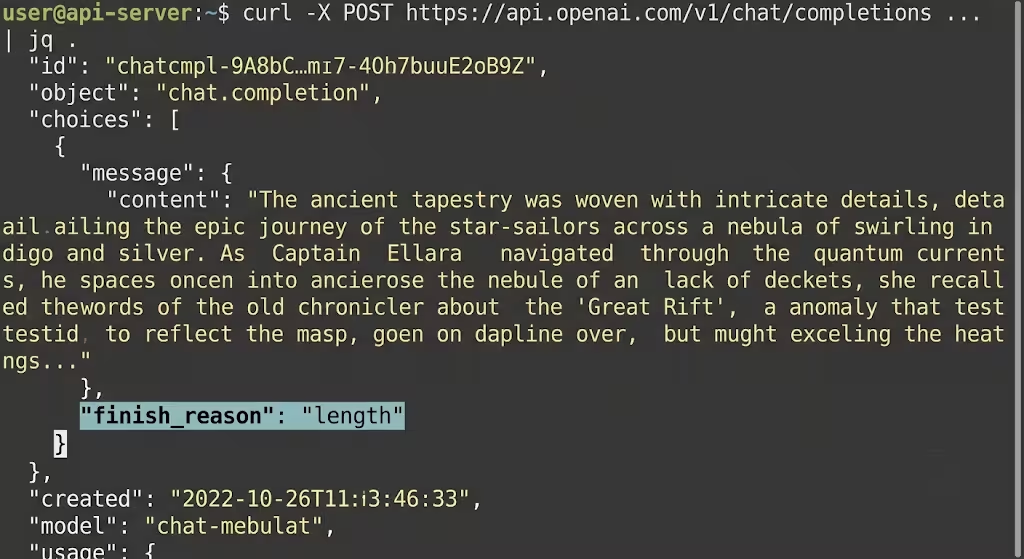
What it looks like: The agent starts generating a good response, then stops mid-sentence. No error. No crash. The finish_reason field quietly reads “length”.
Why it happens: The model hit its output token ceiling. But “hit the ceiling” has several distinct causes that all produce the identical message:
- max_tokens is too low. The obvious one. Raise it 25 to 50 percent and retest.
- max_tokens was never sent. Some frameworks read the value from your config, then silently fail to pass it to the API. It looks correct. It never arrives.
- Ollama defaults. Ollama’s default context window is 2,048 tokens, not 8,192. Fix it in a Modelfile:
FROM llama3:8b
PARAMETER num_ctx 8192
PARAMETER num_predict 1024- The context window is full. Input and output share one budget. If your prompt and history consume 60K of a 64K window, only 4K remain for output. Raising max_tokens changes nothing.
The fix, always: check the stop reason before you use the output.
if response.choices[0].finish_reason == "length":
    # Retry with higher limit or request continuation
Agent frameworks add their own truncation bugs on top of this, config values dropped before reaching the API, hardcoded output caps you cannot override, auto-compression that never triggers due to threshold math. If you are running Hermes specifically, this breakdown of the five Hermes truncation causes and their fixes maps each error string to the exact config bug behind it.
Failure 6: Tool Timeouts and Hangs
What it looks like: The agent stops. Nothing happens. No error, no progress, just a process sitting there while an external API never responds.
Why it happens: No timeout on the tool call. The agent blocks indefinitely waiting for a response that is never coming.
The fix: Timeout every external call, and design long-running tools as async with a handle.
response = requests.get(url, timeout=30)For genuinely slow operations, return a job handle immediately and let the agent poll, rather than blocking the whole loop.
Failure 7: No Verification (Or Incorrect Verification)
What it looks like: The agent declares success. The output is wrong. Nobody checked.
The taxonomy splits this in two: no or incomplete verification (8.2 percent) and incorrect verification (9.1 percent), where the agent actively validates erroneous output as correct. Together they account for nearly a fifth of all failures.
Why it happens: The agent is both the worker and the judge. It has every incentive to declare victory.
The fix: Never let the agent grade its own homework. Gate each phase with an external check, static rules first, then an LLM judge, then a human for anything critical. Test with adversarial tool responses: feed it malformed JSON, an empty response, a 50,000-token document when it expected 200 words.
The Pre-Deployment Checklist
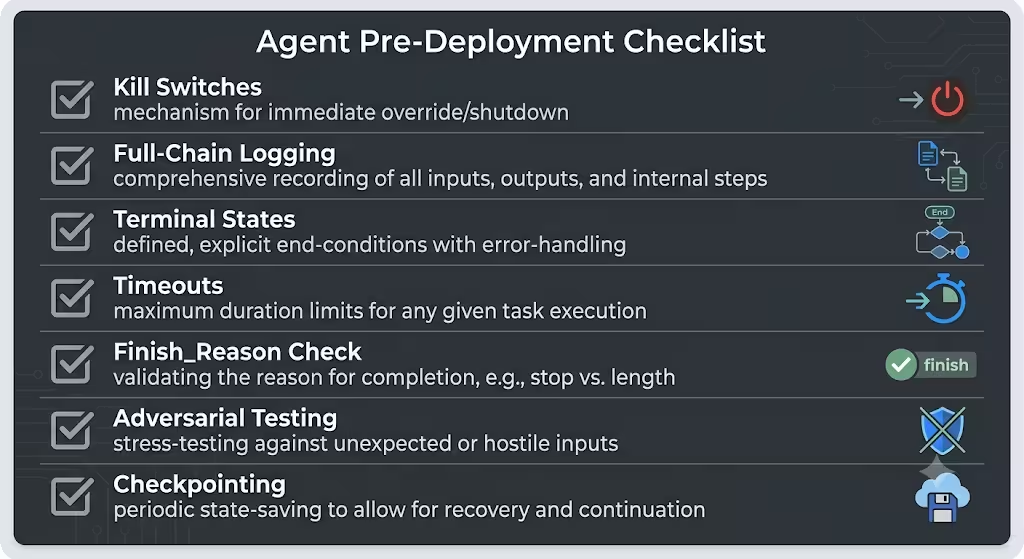
Before any agent touches production, verify each of these:
1. Kill switches. A hard step counter (max 50 iterations), a token budget ceiling per session, and action deduplication against the last five calls. These three checks prevent the large majority of runaway scenarios.
2. Full-chain logging. Every tool call, every response, every reasoning step, with a trace ID. Not just the final output.
3. Explicit terminal states. Every tool returns SUCCESS or FAILED, never ambiguous prose.
4. Timeouts on every external call. No unbounded waits.
5. A finish_reason check on every model response before the output is used downstream.
6. Adversarial testing. Malformed JSON, empty responses, oversized payloads.
7. Checkpointing. Save progress so a crash at step 20 does not restart from step 1.
import json
from pathlib import Path

def save_checkpoint(step, state, learnings):
    Path("progress.json").write_text(
        json.dumps({"step": step, "state": state, "learnings": learnings})
    )
Save your learnings, not just your state.
Frequently Asked Questions
Why does my AI agent repeat the same action?
Ambiguous tool feedback. Responses like “more results may be available” make the agent believe another identical call will make progress. Return explicit SUCCESS or FAILED states and add deduplication against recent actions.
Why does my agent keep running after finishing the task?
It has no definition of “done.” This is the “unaware of termination conditions” failure, roughly 12.4 percent of all agent failures. Define explicit completion criteria and enforce a max-step budget.
Why does my agent’s response cut off mid-sentence?
It hit the output token limit. Check finish_reason (or done_reason in Ollama). If it equals length, either your max_tokens is too low, was never sent, or your context window is already full.
Why is Ollama truncating more than my cloud provider?
Ollama defaults to a 2,048-token context window. Set num_ctx and num_predict explicitly in a Modelfile.
How do I stop an agent from burning API credits?
Three lines of defense: a hard step counter, a per-session token budget ceiling, and deduplication against the last five actions. An agent stuck in a loop can burn through significant credits running the same query with slightly different phrasing.
The Bottom Line
Agents do not fail like software. They fail like a distracted intern with your credit card.
Every failure above has the same root cause: nobody told the agent when to stop. No step ceiling, no completion criteria, no verification gate, no timeout, no truncation check.
Add the kill switches first. Log the full chain. Verify externally. Then let it run.
Read More:

