Google Search is showing a 500 Internal Server Error for thousands of users across India, the United States, and other countries. If you searched something on Google and saw the message “We’re sorry but it appears that there has been an internal server error while processing your request. Our engineers have been notified and are working to resolve the issue. Please try again later,” your device and internet connection are not the problem. Google’s servers are.
This guide explains what the 500 Internal Server Error means, why Google Search is down, and what you can do right now while Google fixes it.
What Is the Google Search 500 Internal Server Error?
A 500 Internal Server Error is a server-side HTTP status code. It means the server received your request but could not complete it because something went wrong on its end.
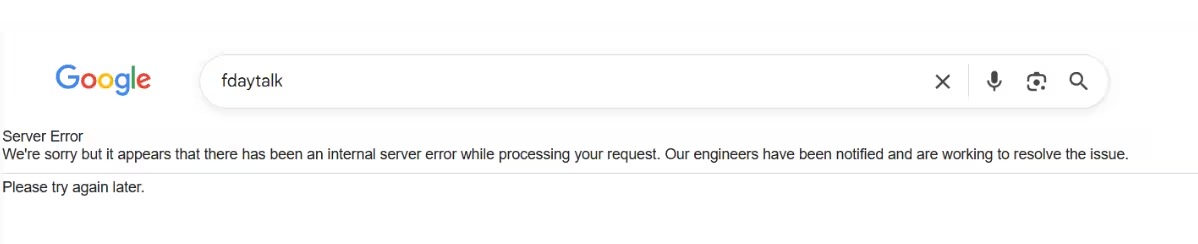
When Google Search throws this error, the full message reads:
Server Error We’re sorry but it appears that there has been an internal server error while processing your request. Our engineers have been notified and are working to resolve the issue. Please try again later.
Your browser, device, and internet connection are working fine. The fault sits entirely with Google’s backend infrastructure. This is the same class of error you might see on other services when their servers fail, similar to Discord Error 3002 or Outlook error 550 5.7.520, where the service itself fails to process the request rather than anything going wrong on your end.
Is Google Search Down Right Now?
Yes. As of May 12, 2026, Google Search is down for a large number of users. Hundreds of users in India reported the outage in under 30 minutes, and reports also came in from the United States and other regions.
Downdetector confirmed a significant spike in issue reports. Interestingly, the official Google Search Status page shows “No incidents,” which means Google has not yet updated its public status dashboard.
Users across X (formerly Twitter) started posting screenshots of the error page as the outage spread, confirming this is not isolated to one region or device type.
Why Is Google Search Showing a Server Error?
Google has not released an official statement yet. A 500 error at this scale points to a backend infrastructure failure. Possible causes include:
- A failed software deployment or update pushed to production
- Overloaded or crashed servers handling search queries
- A database or indexing system failure
- A network issue inside Google’s data center infrastructure
Google engineers have been notified automatically through their monitoring systems and are actively working on a fix. You cannot resolve this from your side.
What to Do When Google Search Shows a 500 Error
Since this is a server-side outage, your options are limited. Here is what you can do right now.
1. Wait and Try Again
The simplest and most effective step is to wait a few minutes and refresh the page. Large-scale Google outages usually resolve within minutes to a couple of hours. Press F5 or tap the refresh button and try your search again.
2. Check Google’s Status Page
Visit Google Workspace Status to see whether Google has acknowledged the outage officially. If the page still shows no incidents, the outage is real but Google has not updated the dashboard yet.
3. Use a Different Search Engine Temporarily
While Google is down, switch to an alternative search engine:
- Bing at bing.com
- DuckDuckGo at duckduckgo.com
- Yahoo Search at search.yahoo.com
Bing in particular covers a strong range of results and works as a reliable temporary replacement.
4. Clear Your Browser Cache
In rare cases, a cached error page can keep showing the error even after Google restores service. Clear your browser cache:
- Chrome: Press Ctrl + Shift + Delete, select Cached images and files, and click Clear data.
- Edge: Press Ctrl + Shift + Delete, check Cached images and files, and click Clear now.
- Firefox: Press Ctrl + Shift + Delete, check Cache, and click Clear Now.
On mobile, go to your browser app settings, find Storage or Site Data, and clear the cache.
5. Try an Incognito or Private Window
Open an incognito window in Chrome (Ctrl + Shift + N) or a private window in Firefox or Edge (Ctrl + Shift + P) and try the search again. This bypasses stored cookies and cached data.
6. Try a Different Browser or Device
If you only tested one browser, open a different browser and try Google Search again. You can also try the Google app on your phone or switch from desktop to mobile, or vice versa.
7. Check Downdetector for Live Updates
Go to Downdetector to see live user reports. The spike in reports will confirm whether the outage is still ongoing or whether Google has resolved it.
Is This a Problem With Your Internet?
No. A 500 Internal Server Error is not a connectivity issue. If other websites load normally and you can browse the internet without problems, your connection is fine. The error originates entirely from Google’s servers.
If you are also experiencing general internet problems alongside the Google outage, that is a separate issue. Check your router and modem, or contact your internet service provider.
When Will Google Search Come Back Up?
Update (May 12, 2026): Google Search is back up and working normally. Google engineers resolved the outage, and users across India, the US, and other affected regions can now search without hitting the 500 error.
If Google Search still shows the error on your device after the outage has ended, clear your browser cache (steps above) and try again. A cached error page can persist even after the service recovers.
Related App and Streaming Error Fixes
- How to Fix Discord Error 3002
- How to Fix Outlook Error 550 5.7.520
- How to Fix Outlook Not Receiving Emails on Laptop and Phone
The Google Search 500 Internal Server Error is a server-side outage outside your control. Use an alternative search engine while Google resolves the issue, and try Google Search again after a short wait.

