WhatsApp now lets you write a message today and send it later. You no longer need to stay up until midnight for a birthday wish, and you no longer need to wait for the right hour in another time zone. You type the message, pick a delivery time, and WhatsApp handles the rest.
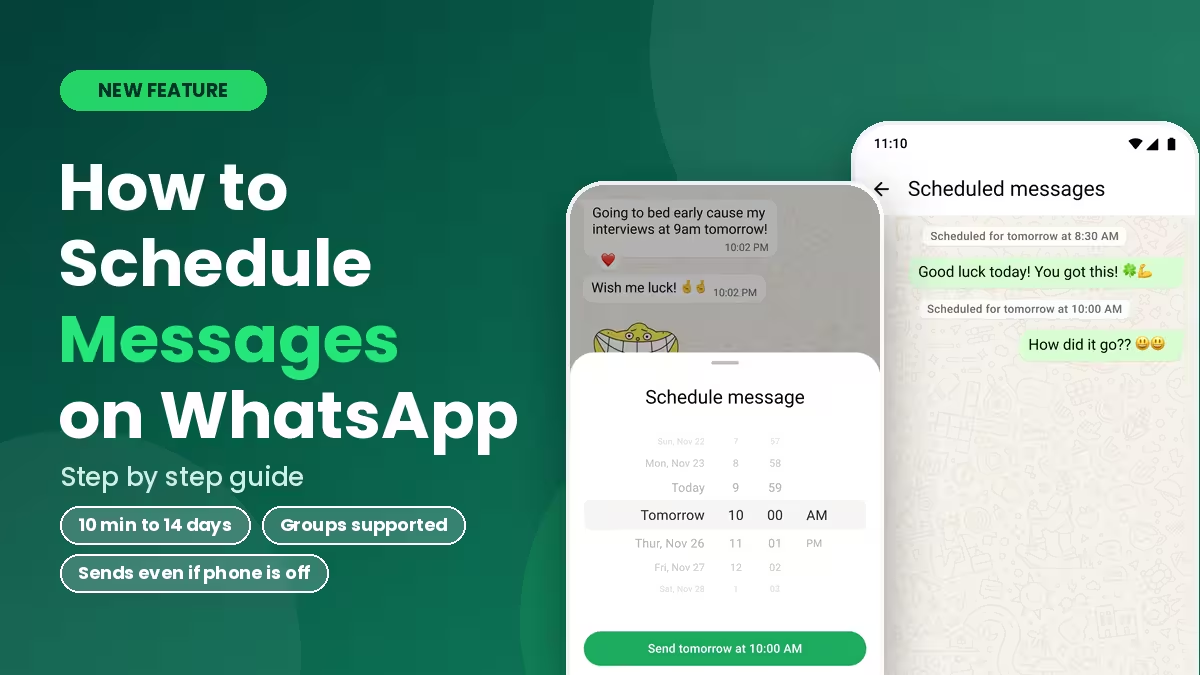
This guide shows you how to schedule a message, what you can schedule, and how to manage your queue once you set it up.
Can You Schedule Messages in WhatsApp Now?
Yes. You can now schedule messages on WhatsApp with a built-in scheduler, so you can queue a message for a future time instead of sending it right away. The recipient sees a normal message, with no label or hint that you planned it ahead. The scheduler works in personal chats and in group chats.
WhatsApp is rolling the feature out to users worldwide in stages, so your account may get it a few days or weeks after someone else's.
How to Schedule a WhatsApp Message (Step by Step)
Follow these steps on your phone:
- Open the individual chat or group chat where you want to send the message.
- Type your message in the text box. If you plan to send a photo or video, attach it and add a caption if you want one.
- Wait for the send button to appear. WhatsApp shows the microphone icon until you add content, so the scheduling option only works once the send arrow shows up.
- Press and hold the send button. A scheduling menu opens.
- Pick the date and the exact time you want the message to arrive.
- Confirm your choice. WhatsApp saves the message and holds it until the delivery time.
Keep the 10-minute minimum in mind. If you choose a time closer than that, WhatsApp will not accept it, so pick a slot at least ten minutes ahead.
WhatsApp Message Scheduling Limits (Time, Chats, and Media)
| Detail | What WhatsApp allows |
|---|---|
| Earliest delivery | 10 minutes from now |
| Latest delivery | 14 days from now |
| Chat types | One-on-one and group chats |
| Content types | Text, photos, and videos |
| Phone needs to stay on? | No |
| Encryption | End-to-end encrypted |
Can You Schedule Photos, Videos, and Documents on WhatsApp?
You can schedule these content types:
- Text messages
- Photos
- Videos
WhatsApp does not list documents or contact cards as supported. If you need to send a file at a set time, send it manually when the moment arrives.
Do Scheduled WhatsApp Messages Send When Your Phone Is Off?
Yes. WhatsApp stores your scheduled message on its side, so it still reaches the recipient if your phone is switched off or the battery dies. This makes the feature useful when you travel, work long shifts, or expect to lose signal.
Are Scheduled WhatsApp Messages End-to-End Encrypted?
Yes. Scheduled messages keep the same end-to-end encryption that protects your regular personal chats. Only you and the person or group you message can read the content. WhatsApp cannot read it either. You can add more protection with Chat Lock for private chats, View Once for voice messages, and passkeys for your account.
How to View, Edit, or Delete a Scheduled WhatsApp Message
You can review everything you have lined up, and you can remove a message before it sends if you change your mind. Open the queue of future messages from your account and delete any message you no longer want to deliver. Once the delivery time passes, the message goes out and you cannot pull it back through the scheduler.
WhatsApp has not confirmed that you can edit a scheduled message. If you need to change the wording, delete the message and schedule a new one with the correct text.
Best Ways to Use Scheduled Messages on WhatsApp
- Birthdays and anniversaries: Write the greeting early and set it for 12:00 AM.
- Time zone gaps: Deliver a message during your contact's morning instead of waking them at night.
- Work reminders: Send a reminder to a colleague or team group at the start of their day.
- Festival and holiday wishes: Queue greetings for several chats in advance so you do not miss anyone during a busy week.
- Travel days: Schedule updates for family while you sit on a flight with no network.
Why Is the Schedule Option Missing on My WhatsApp?
If a long press on the send button shows nothing new, your account has not received the feature. Try these fixes:
- Update WhatsApp from the Google Play Store or the App Store.
- Close the app fully and reopen it.
- Check again in a few days, since the rollout reaches users in waves.
Updating the app does not guarantee instant access. WhatsApp switches the feature on server side for each account, so some people see it a little later even on the latest version.
Do You Still Need Third-Party Apps to Schedule WhatsApp Messages?
Not once the built-in scheduler reaches your account. Older workarounds relied on outside tools that often needed extra permissions or a phone that stayed active at send time. The native option removes both problems, because WhatsApp itself holds and delivers the message. Use the steps above and skip the extra apps.
Frequently Asked Questions
How far ahead can I schedule a WhatsApp message?
You can schedule a message anywhere from 10 minutes to 14 days ahead.
Can I schedule messages in WhatsApp group chats?
Yes. The scheduler works in both one-on-one chats and group chats.
Will the receiver know I scheduled the message?
No. The message looks like any other message when it arrives.
Will my scheduled message send if my phone is off?
Yes. WhatsApp delivers it at the chosen time even if your phone is off or out of battery.
Can I schedule photos and videos?
Yes. Text, photos, and videos all work with the scheduler.
Can I schedule documents or contacts?
WhatsApp does not list them as supported, so plan to send those manually.
Can I cancel a scheduled message?
Yes. Delete it from your scheduled list before the delivery time arrives.
Are scheduled messages end-to-end encrypted?
Yes. They carry the same end-to-end encryption as your regular personal chats.
Why do I not see the schedule option on my phone?
WhatsApp is releasing the feature in phases. Update the app and check again after a few days.