You changed a firewall rule, restarted the service, and your app still cannot reach the server. One short command tells you whether the port answers: telnet host port. Windows 11 hides the Telnet Client by default, so you need to switch it on first. This guide walks you through the setup, the commands, and the safer tools you can use when Telnet is not an option.
What Telnet Does and Why Windows 11 Disables It
Telnet opens a raw TCP connection to any host and port, then relays your keystrokes to the other side. It dates back to the early days of networking and became a standard (RFC 854) in 1983. It sends every character, including usernames and passwords, as plain text. That design makes it unsafe for remote logins, so Microsoft ships the client disabled.
Admins still keep it around for a simple reason. Telnet shows you in seconds whether a service listens on a port, and it lets you type text-based protocols such as HTTP and SMTP by hand.
Common jobs for Telnet today:
- Confirm a port passes through a firewall or security group
- Debug email delivery by typing SMTP commands yourself
- Send a hand-built HTTP request and read the raw reply
- Read the greeting banner of a service during an authorized security check
- Manage older switches, routers, and embedded gear that only accept Telnet
How to Enable Telnet in Windows 11 (3 Methods)
Until you enable the feature, Command Prompt answers telnet with "'telnet' is not recognized as an internal or external command." You need administrator rights for every method below.
Method 1: DISM in Command Prompt
Right-click Command Prompt or Windows Terminal, pick Run as administrator, and enter:
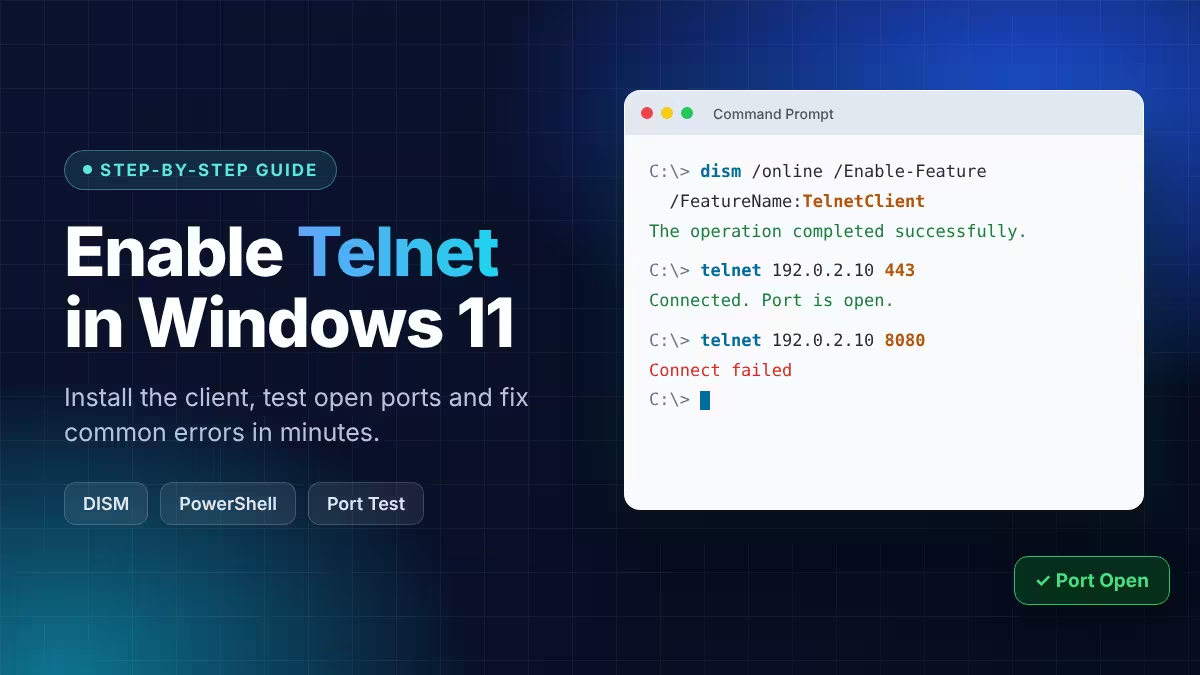
dism /online /Enable-Feature /FeatureName:TelnetClientWindows finishes in a few seconds and prints a success message. You do not need to restart.
Method 2: PowerShell
Open PowerShell as administrator and run:
Enable-WindowsOptionalFeature -Online -FeatureName TelnetClientOn Windows Server, use Install-WindowsFeature Telnet-Client instead.
Method 3: Windows Features window
- Press Win + R, type
optionalfeatures, and press Enter. - Scroll down and tick Telnet Client.
- Click OK and wait for Windows to confirm the change.
You can also reach this window through Settings. Go to System, then Optional features, then More Windows features. Telnet Client does not appear in the "View features" search list, which confuses many people.
Confirm the install
Close every open terminal and start a fresh Command Prompt. Terminal windows that were open before the install cannot see the new command. Type telnet and press Enter. This banner means everything works:
Welcome to Microsoft Telnet Client
Escape Character is 'CTRL+]'
Microsoft Telnet>
Type quit to leave.
How to Use the Telnet Command to Check if a Port Is Open
The syntax is telnet host port. Put a space between the host and the port. A colon does not work, because Telnet reads it as part of the host name. If you skip the port, Telnet uses 23.
telnet example.com 80The host can be a domain name or an IP address.
How to Read Telnet Results: Connected, Refused or Timed Out
What a successful connection looks like
On Windows, the screen goes blank and the title bar changes to "Telnet" plus the host. Windows prints no "Connected" message, so many people think the command froze. The blank screen means the port accepted your connection.
On Linux and macOS, you see "Trying", then "Connected to", then the escape character hint.
What a failure looks like
Windows prints this when the port refuses you:
Connecting To 192.0.2.10...Could not open connection to the host, on port 80: Connect failedLinux and macOS print "Connection refused" instead.
Quick reference
| What you see | What it tells you |
|---|---|
| Blank screen or "Connected" | A service listens and your traffic reaches it |
| Instant "Connect failed" or "refused" | The host replied, but nothing listens on that port, or a firewall rejects you |
| Long wait, then timeout | A firewall or security group drops your packets, or the host is down |
| "Unknown host" | DNS cannot resolve the name, so try the IP address |
Apps and games hit the same results. A Minecraft getsockopt error usually means a refused or timed-out connection, and Zoom error 5003 often points to a firewall block. Battlefield 6 connection errors follow the same pattern, so a quick Telnet test to the server port tells you which side fails.
How to Exit Telnet Correctly
Press Ctrl + ] to reach the Telnet prompt, type quit, and press Enter. Ctrl + C does not close the session, and this trips up almost every new user. If the remote service has its own exit command, such as QUIT for SMTP, that works too.
Fix "Telnet Is Not Recognized as an Internal or External Command"
This error means Windows cannot find the Telnet program. Two causes account for nearly every case.
- The client is still disabled. Run the DISM or PowerShell command from the enable section as administrator, then try again.
- Your terminal opened before the install. Close it and start a new Command Prompt or PowerShell window.
If the error survives both fixes, check that you ran the enable command in an elevated window. Without admin rights, Windows refuses the change and the command stays missing. Open the Windows Features window and confirm the Telnet Client box shows a tick.
Telnet Commands You Can Use Inside a Session
After you press Ctrl + ], or after you run telnet with no arguments, you land at the Telnet prompt. These commands work in the Windows client and in the Linux and macOS clients:
| Command | Action |
|---|---|
open host port |
Start a new connection |
close |
End the current connection and stay in Telnet |
status |
Show your connection state |
display |
List the current settings |
set and unset |
Change options, such as set localecho on Windows |
quit |
Exit Telnet |
? |
List every command the client supports |
Windows also lets you log a whole session to a text file:
telnet /f session.txt mail.example.com 25Telnet Port Test Commands for SSH, SMTP, RDP, MySQL and Redis
Swap in the port that matches the service you want to check:
| Command | Service |
|---|---|
telnet host 22 |
SSH |
telnet host 25 or 587 |
Email (SMTP) |
telnet host 80 or 443 |
Web (HTTP and HTTPS) |
telnet host 3389 |
Remote Desktop |
telnet host 3306 or 5432 |
MySQL or PostgreSQL |
telnet host 6379 |
Redis |
How to Send an HTTP Request With Telnet
Connect to port 80, type the request below, and press Enter twice to finish it:
telnet example.com 80
GET / HTTP/1.1
Host: example.com
Connection: close
The server replies with a status line like HTTP/1.1 200 OK, then the headers, then the page content.
On Windows, turn on local echo before you start, or you will type blind. Press Ctrl + ], enter set localecho, and press Enter twice. Do not use Backspace. Telnet sends it to the server as a character and does not delete anything.
This trick fails on port 443. HTTPS begins with a TLS handshake, and Telnet cannot perform one. Telnet only proves the port is open. For a real encrypted conversation, run openssl s_client -connect example.com:443.
How to Test an SMTP Mail Server With Telnet
SMTP is a text protocol, so Telnet handles it well. A typical session looks like this:
telnet mail.example.com 25
220 mail.example.com ESMTP Postfix
EHLO client.example.com
250-mail.example.com
250-STARTTLS
250 8BITMIME
MAIL FROM:<sender@example.com>
250 2.1.0 Ok
RCPT TO:<receiver@example.com>
250 2.1.5 Ok
DATA
354 End data with <CR><LF>.<CR><LF>
Subject: telnet test
Hello from telnet.
.
250 2.0.0 Ok: queued
QUIT
221 2.0.0 Bye
The numeric codes show you where delivery breaks:
- 220 means the server is ready
- 250 means the server accepted your command
- 354 means you can send the message body, ending with a line that holds only a dot
- 530 means the server wants authentication first
- 550 or 554 means the server rejected you because of an unknown mailbox, a relay block, or a blocklisted IP
Two warnings apply here. Many home internet providers and cloud hosts block outbound port 25, so a timeout may point to your own network. Port 587 also needs STARTTLS before login, which Telnet cannot do. Use openssl s_client -starttls smtp -connect mail.example.com:587 for that step.
How to Read Service Banners With Telnet
- Redis (6379): Type
PING. A healthy server answers+PONG. If a password protects it, you get aNOAUTHmessage. - SSH (22): The server announces its version right away, for example
SSH-2.0-OpenSSH_9.6. - MySQL (3306): You see a burst of unreadable characters with a version string inside. That is the handshake, and it proves the port works.
Security testers use these banners because a version string often points to known vulnerabilities. Run such checks only on systems you own or have written permission to test.
How to Install Telnet on Linux and Mac
Most Linux distributions and every recent Mac ship without a Telnet client.
| System | Command |
|---|---|
| Debian, Ubuntu, Kali | sudo apt install telnet |
| Fedora, RHEL, Rocky, AlmaLinux | sudo dnf install telnet |
| Arch Linux | sudo pacman -S inetutils |
| Alpine | apk add inetutils-telnet |
| macOS | brew install telnet (requires Homebrew) |
Apple removed Telnet in macOS High Sierra, so "command not found" on a Mac is normal. Run which telnet after the install to confirm the path.
Telnet Alternatives: Test-NetConnection, Netcat and curl
Locked-down work laptops and minimal containers often block the install. These built-in tools answer the same "is the port open" question.
Windows PowerShell includes Test-NetConnection, which needs no admin rights:
Test-NetConnection example.com -Port 443Check the output line TcpTestSucceeded. A value of True means the port is open. You can shorten the command to tnc.
macOS and Linux include Netcat:
nc -vz example.com 443The -z flag checks the port and exits. Drop it for an interactive session.
curl also speaks the Telnet protocol, and Windows 10 and 11 include curl.exe:
curl -v telnet://192.0.2.10:3306A "Connected to" line means success. All of these tools test one port at a time. To scan many ports, use a dedicated scanner such as Nmap.
Telnet vs SSH: Why You Should Never Log In Over Telnet
Telnet has no encryption, no server verification, and no integrity checks. Anyone who captures traffic on the path can read your whole session, password included. A compromised router, a shared Wi-Fi network, or a mirrored switch port all give an attacker that view.
SSH solves each of those problems and adds key-based logins. Use SSH for every remote login.
Attackers still exploit Telnet today. The Mirai botnet in 2016 infected hundreds of thousands of cameras and routers by logging in over Telnet with factory passwords. If you find port 23 open on a device in your own network, disable Telnet on it or isolate the device.
Treat Telnet as a testing tool. Never type credentials you care about into it. Turn the Windows feature off again when you finish your checks, especially on shared or exposed machines.
Is It Legal to Use Telnet? Rules for Safe Testing
Connect only to systems you own or have written permission to test. Even a plain port check can trigger intrusion detection and break a provider's acceptable use policy. Never try default passwords on devices you do not control.
Frequently Asked Questions
How do I enable Telnet on Windows 11?
Open Command Prompt as administrator and run dism /online /Enable-Feature /FeatureName:TelnetClient. You can also tick Telnet Client in the Windows Features window, which you open with optionalfeatures. Then start a new Command Prompt window.
Why does Windows say Telnet is not recognized?
The client is still disabled, or you opened the terminal before the install finished. Enable the feature and open a fresh window.
How do I Telnet to a specific port?
Type the host, a space, then the port, such as telnet 192.0.2.10 8080. Do not use a colon.
How can I tell if a port is open?
Run telnet host port. A blank screen on Windows, or "Connected to" on Linux and macOS, means the port is open. An instant failure means nothing listens there. A long wait followed by a timeout means a firewall drops the traffic.
How do I exit Telnet?
Press Ctrl + ], type quit, and press Enter. Ctrl + C does not work.
What is the default Telnet port?
Port 23. Telnet connects there when you leave out the port number.
Can Telnet test HTTPS?
Only partly. It confirms that port 443 accepts connections, but it cannot complete the TLS handshake. Use openssl s_client -connect host:443 or curl -v https://host for a full test.
How do I install Telnet on a Mac?
Install Homebrew, then run brew install telnet. For a quick port check without any install, use nc -vz host port.
Is Telnet still worth using?
Yes, for diagnostics. It remains handy for port checks, text protocol debugging, and legacy network gear. Use SSH for any real login.