If you open Claude AI and see the message “Taking longer than usual. Trying again shortly (attempt)” the chatbot is struggling to generate a response within its normal timeframe. The interface retries automatically, but when you see attempt 3, attempt 5, or even attempt 7 without a response appearing, something is blocking the request from completing.

This error shows up for several different reasons. The fix that works depends entirely on which cause applies to your situation.
Check Anthropic Server Status First
Before changing anything on your end, verify whether Anthropic’s servers are the problem.
Go to status.anthropic.com and look at the current status for Claude.ai, the API, and Claude Code. If any service shows a partial outage, degraded performance, or an active incident, the retry loop is caused by a server-side issue and no client-side fix will resolve it.
During outages, Anthropic engineers work on the fix from their side. The only action available to you is to wait and retry after 30 to 60 minutes.
If the status page shows all systems operational, the issue is on your end and the fixes below apply.
Fix 1: Start a Fresh Chat Session
Long conversations carry a large context window. Every message, uploaded file, and prior response adds to the total token count Claude has to process. When that count gets high enough, response times increase significantly and the retry loop can trigger repeatedly.
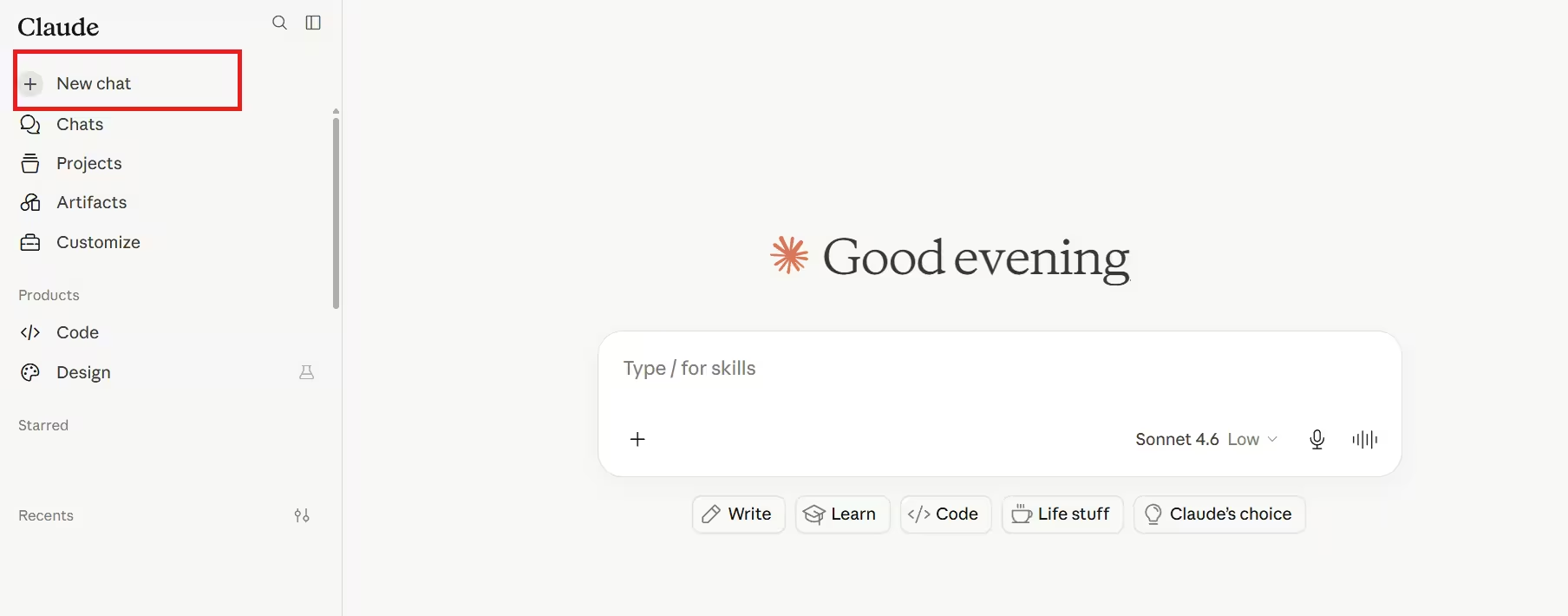
- Open the Claude.ai sidebar
- Click New Chat
- Paste only the content relevant to your current request
- Send the message without any prior conversation overhead
This single step resolves the retry loop for most users who have been working inside the same chat for an extended period.
Fix 2: Shorten or Simplify Your Prompt
Very long prompts with large pasted documents, extensive instructions, or multiple uploaded files push processing time beyond the response threshold. Claude has to read and process everything in your message before generating a reply.
To reduce prompt length:
- Remove any background context that is not directly needed for the specific request
- Split a large task into smaller individual requests instead of asking for everything at once
- If you have uploaded a large file, reference only the specific section you need rather than asking Claude to process the entire document
A focused 200-word prompt will generate a response faster than a 2,000-word prompt asking for the same output.
Fix 3: Clear Your Browser Cache
A corrupted or outdated cache can interrupt the connection between your browser and Claude’s servers, causing requests to stall mid-process.
Chrome:
- Press Ctrl + Shift + Delete (Windows) or Cmd + Shift + Delete (Mac)
- Set the time range to Last 7 days
- Check Cached images and files and Cookies and other site data
- Click Clear data
- Reload claude.ai and retry
Firefox:
- Press Ctrl + Shift + Delete
- Select Cache and Cookies
- Click Clear Now
- Reload and retry
Edge:
- Press Ctrl + Shift + Delete
- Check Cached images and files
- Click Clear now
- Reload claude.ai
Fix 4: Disable Browser Extensions
Ad blockers, privacy extensions, and script blockers can interfere with the WebSocket connection Claude uses to stream responses. Even extensions unrelated to security can cause conflicts.
- Open your browser’s extensions page
- Chrome:
chrome://extensions - Edge:
edge://extensions - Firefox:
about:addons
- Chrome:
- Toggle every extension off
- Reload claude.ai
- Send a test message
If the response comes through normally, re-enable extensions one at a time to identify which one is causing the conflict. Once identified, add claude.ai to that extension’s allowlist or exception list.
Fix 5: Switch to a Different Browser
If the issue persists after clearing cache and disabling extensions, the browser itself may have a deeper compatibility issue with Claude’s interface.
Try opening claude.ai in a different browser entirely. Chrome, Edge, Firefox, and Safari all handle WebSocket connections slightly differently. A browser that works on Claude’s end may complete the request that your primary browser cannot.
If Claude responds normally in the alternate browser, the problem is isolated to your main browser’s configuration.
Fix 6: Check Your Internet Connection
A slow or unstable connection drops the streaming response before it completes. Claude begins generating a reply server-side, but if the data cannot reach your browser fast enough, the interface registers a timeout and retries.
Run a speed test at fast.com or speedtest.net. If your connection is below 5 Mbps or showing high latency, switch to a more stable network.
If you are on Wi-Fi, move closer to your router or switch to a wired connection. If you are using a VPN, disconnect it and retry. VPN routing can add latency that causes Claude responses to time out before they arrive.
Fix 7: Use Claude on a Different Device
If all the above steps fail on your primary device, open claude.ai on a phone, tablet, or a different computer. This rules out device-specific issues such as low RAM causing the browser to drop the connection, or aggressive power management settings interrupting network activity on a laptop.
Sign in to your Claude account on the alternate device and send the same request. If it works, the problem is specific to your original device’s configuration.
Why Claude Shows Multiple Retry Attempts
The Claude.ai interface retries automatically when a response takes longer than expected. Attempt 3 is a warning. Attempts 5, 6, and 7 mean each successive retry is also failing, which points to either a server-side outage or a persistent connection problem on your end.
Retrying inside the same stalled chat rarely helps. A new session or a different browser breaks the retry loop more reliably than waiting for the automatic retries to succeed.
Frequently Asked Questions
Why does Claude say “taking longer than usual” on every message?
This happens most often during an active Anthropic server incident or when your chat session has accumulated a very long context. Start a new chat and check status.anthropic.com to rule out a server issue.
Does the retry loop mean my message was sent multiple times?
No. The interface retries the same request. Your message is not duplicated on Claude’s end.
Will Claude eventually respond if I wait long enough?
During a server outage, waiting is the only option. In a normal session, if the response has not arrived by attempt 4 or 5, start a new chat with a shorter prompt rather than continuing to wait.
Does using Claude on mobile fix the issue?
Sometimes. The mobile app and mobile browser use different connection handling than the desktop browser. If the desktop version is stuck, the mobile version may complete the request successfully.
How do I know if Anthropic is having an outage?
Go to status.anthropic.com. Active incidents appear at the top of the page with live updates from Anthropic engineers.

