Microsoft has pushed two fresh Windows 11 version 26H1 preview builds to Insiders. Build 28020.3382 lands in the Beta channel, and build 28120.3393 goes to the Experimental channel. Search gets the biggest upgrade this time, but Cloud rebuild, AutoPlay, XBOX mode and File Explorer also pick up meaningful changes.
Here is a quick breakdown of everything these builds bring and what it means for your PC.
Windows 11 26H1 Builds 28020.3382 and 28120.3393: Key New Features
- Windows Search now handles volume, brightness and cursor size through inline sliders.
- Phone Link integration lets you call or text straight from Search.
- Cloud rebuild can now securely wipe your drive before you hand the PC to someone else.
- AutoPlay gets a modern Windows 11 look with dark mode support.
- XBOX mode receives a redesigned Gaming Task View.
- File Explorer shows file sizes in proper units and opens folders in new tabs with a middle click.
- Windows now warns you that prompt-based DPAPI operations end in April 2027.
Beta vs Experimental: Feature Comparison by Build
| Feature | Build 28020.3382 (Beta) | Build 28120.3393 (Experimental) |
|---|---|---|
| Simplified Search home | Yes | No |
| Inline Search actions and phone controls | No | Yes |
| Secure drive sanitization in Cloud rebuild | Yes | No |
| Modern AutoPlay with dark mode | Yes | Yes |
| New Gaming Task View in XBOX mode | No | Yes |
| File Explorer improvements | No | Yes |
| DPAPI retirement warning | No | Yes |
| Loading animation rollback | Yes | Yes |
New Windows 11 Search: Inline Sliders, Phone Link Calls and Filters
Microsoft keeps building on the new Search experience it started rolling out earlier in the month, and build 28120.3393 turns Search into a small control center.
Quick Controls Right Inside Search
You can now change your volume, screen brightness and cursor size using sliders that appear directly in the results. Microsoft also labels actions more clearly and surfaces suggested actions, so you discover extra controls without digging through Settings.
Call and Text From Your PC
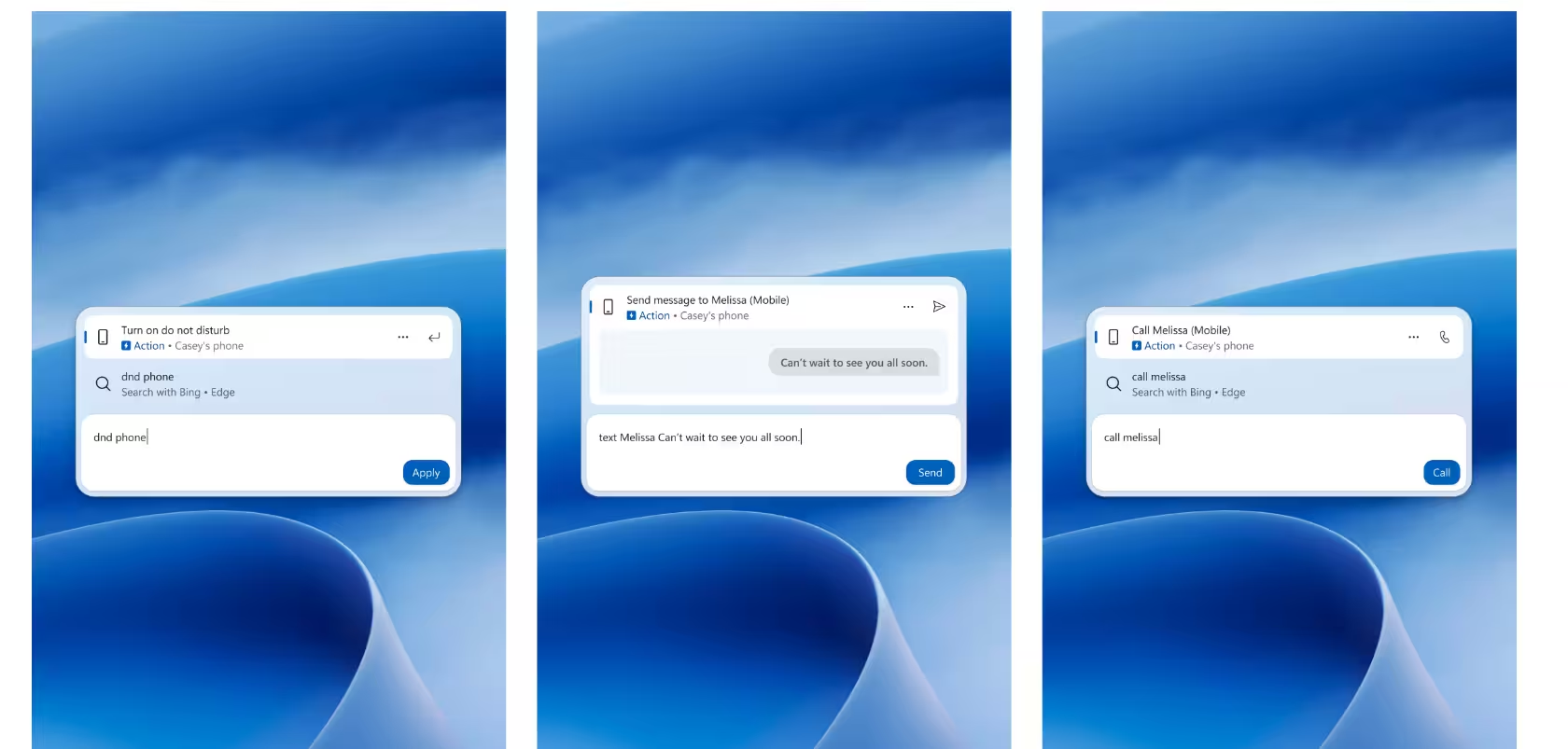
If you connect your phone through Phone Link, Search lets you place calls, send texts and toggle phone features like Do Not Disturb. Android phones work right away. iPhone owners need to wait until early next year.
Richer Results and Filters
Search results now carry far more context:
- File previews with the last modified date, location and author
- Web answers for weather, stocks and quick facts
- Microsoft Store suggestions for apps and games
- Filters for Files & Folders, Settings, Actions and more as you scroll
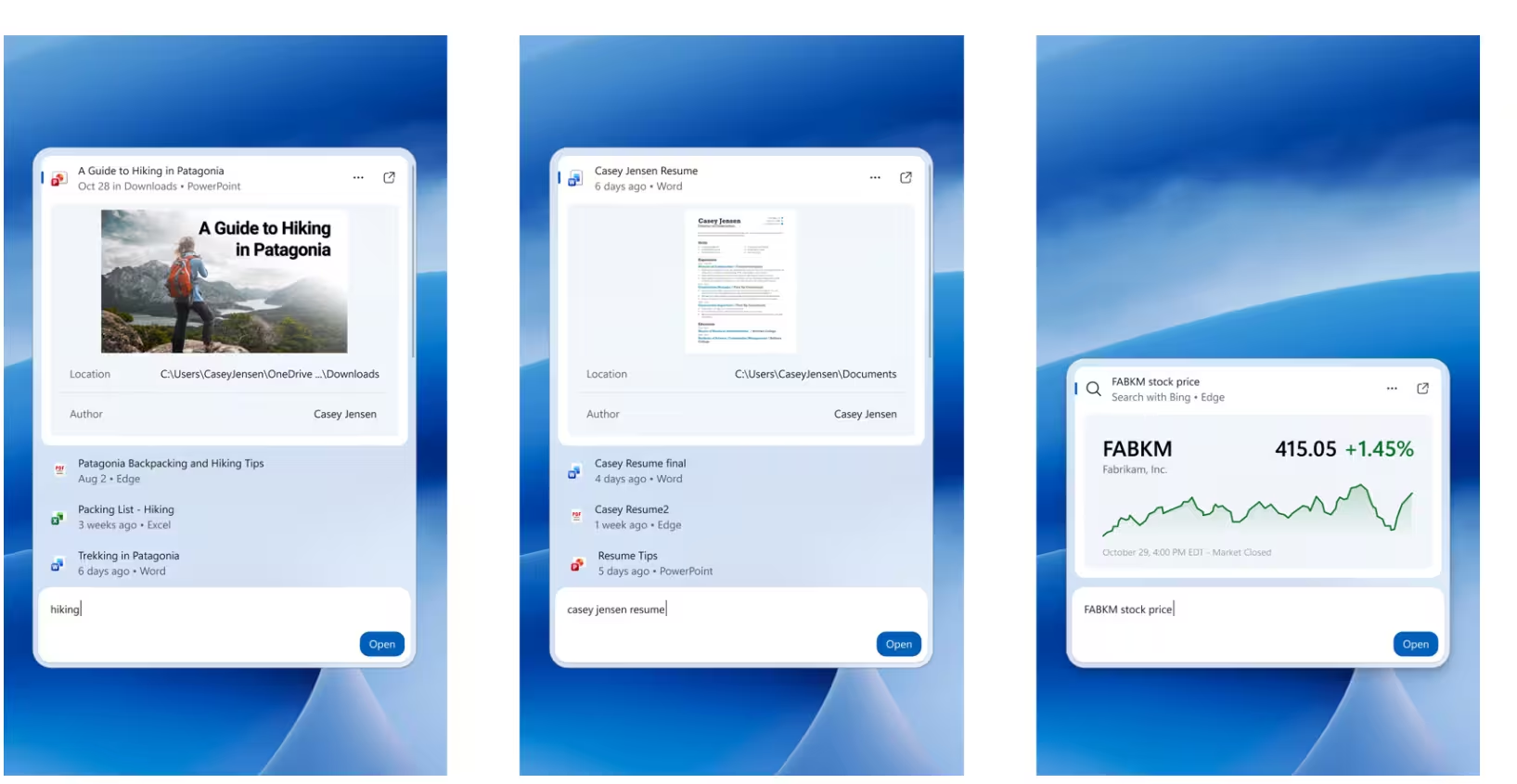
You can also right-click any result and give it a thumbs up or thumbs down. Before you type anything, you can clear out items you don't want in the recent list.
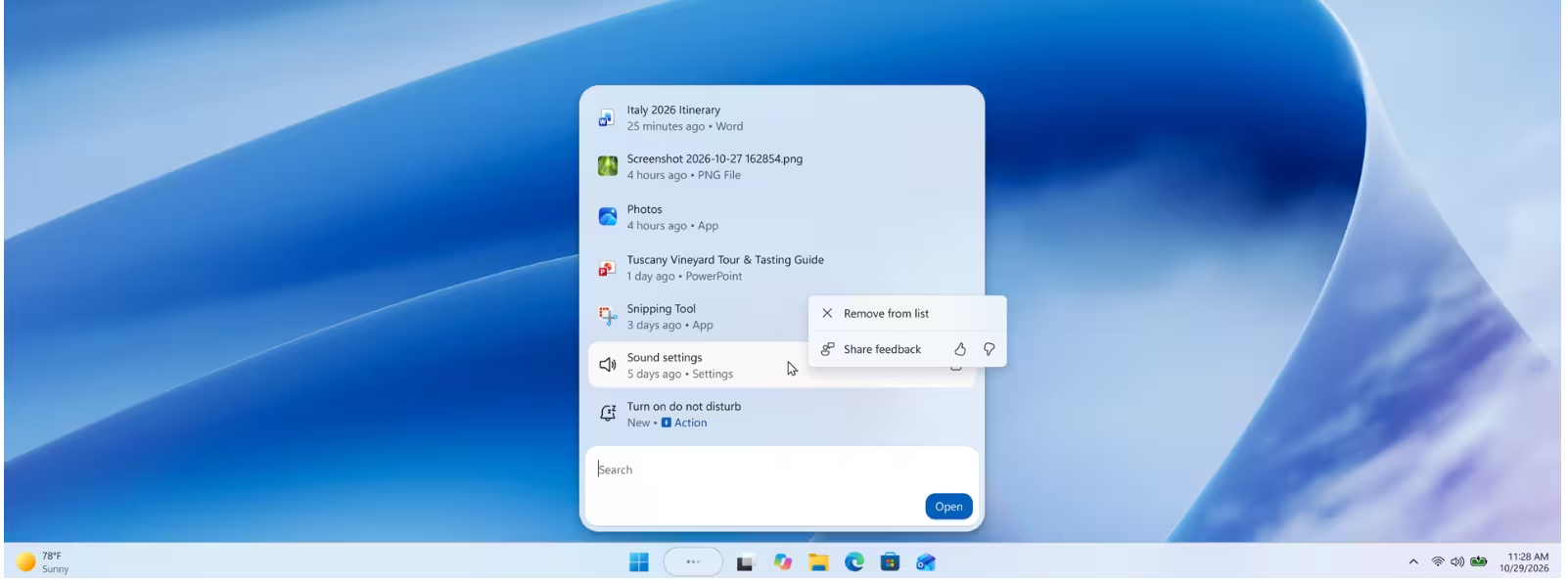
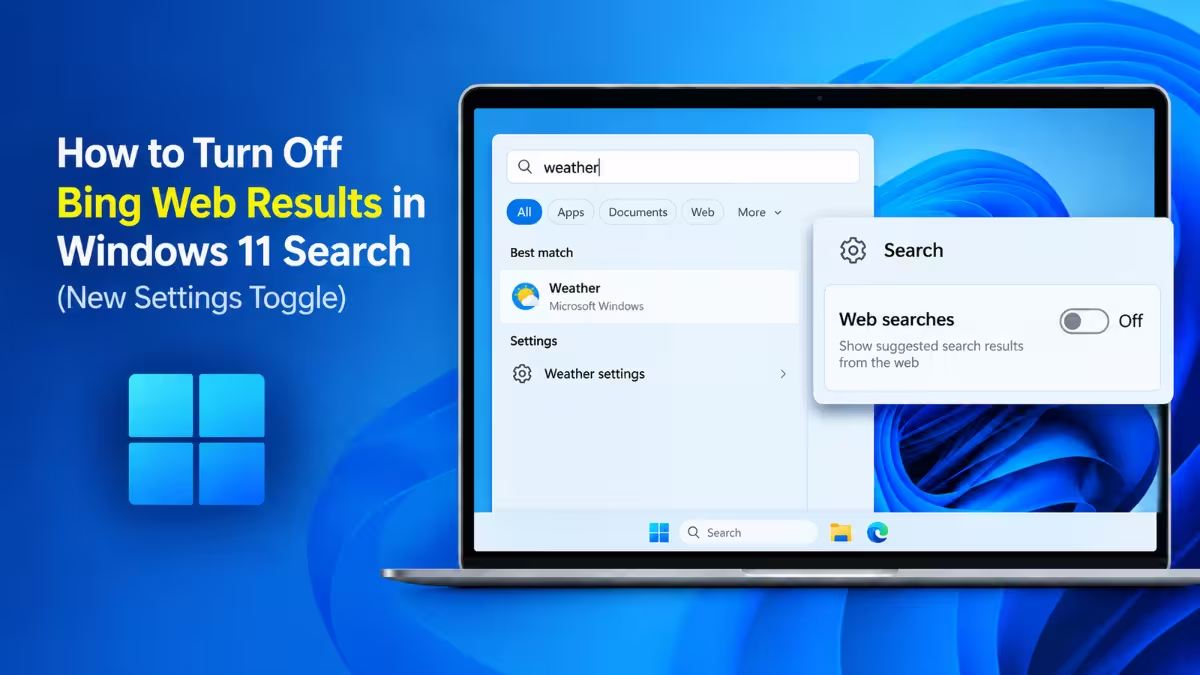
If you prefer local results only, head to Settings > Privacy & security > Search and switch off web and Microsoft Store suggestions.
Cleaner Search Home on Beta
Build 28020.3382 trims the clutter on the Search home screen and puts your recent searches front and center. Each result now carries a clear label telling you whether it comes from an app, a setting, a file, the web or the Store.
One limitation remains. The new Search panel always opens at the bottom center of the screen. Microsoft is working on support for other taskbar positions and for searches you launch from the Start menu.
Secure Drive Wipe Option Added to Windows 11 Cloud Rebuild
Selling, returning or passing on a laptop? Build 28020.3382 makes that safer. When you launch Cloud rebuild from the Windows Recovery Environment (WinRE), Windows now offers two paths:
- Remove files if you plan to keep using the PC yourself.
- Remove & sanitize files if the PC is leaving your hands.
The sanitize option taps into your storage drive's built-in hardware erase feature to destroy the data before Windows reinstalls. That goes well beyond a normal reset, which can leave recoverable traces behind.
IT admins also benefit. They can now set up and trigger Cloud rebuild remotely through the Recovery CSP, either on the currently installed build or on a specific target build.
Redesigned AutoPlay Dialog with Dark Mode Support
Both builds replace the dated AutoPlay dialog that pops up when you plug in a phone, camera or USB drive. The new version follows the Windows 11 design language, supports dark mode and scales properly with your text size and display settings. You still get the same options for deciding what happens when a device connects.
AutoPlay notifications now stay in the Notification Center too, so you can come back to them later instead of losing them.
Gaming Task View Redesign for Controller Users in XBOX Mode
Build 28120.3393 refreshes the Gaming Task View in XBOX mode. A new navigation bar gives you one-tap access to Exit to Desktop and Power Options, which makes life much easier when you only have a controller in your hand.
File Explorer Updates: Middle-Click Tabs, Better File Size Units
Build 28120.3393 also polishes File Explorer in several small but welcome ways:
- The Home page opens faster and feels more responsive.
- You can scroll the Recommended carousel with touch.
- The Details view shows sizes in KB, MB or GB instead of forcing everything into KB.
- A middle click on a folder in the Address Bar or Home page opens it in a new tab.
- Cloud files show better thumbnails in the Details pane.
- File properties follow a cleaner layout.
Microsoft also fixed a bug that wiped the Address Bar text when you clicked near its right edge to edit it.
DPAPI Prompt Retirement Warning for Developers
Developers should pay attention to this one. Build 28120.3393 now shows a warning whenever an app runs a prompt-based protect or unprotect operation through the Data Protection API (DPAPI). Microsoft plans to retire this prompt-based experience in April 2027.
Microsoft recommends three steps:
- Stop creating new prompt-protected data.
- Move to supported non-interactive protection methods.
- Decrypt or migrate any existing prompt-protected data before the deadline.
Regular DPAPI operations that don't rely on prompts keep working as before.
Other Fixes: Security Key PIN Screen and Paused Loading Animations
- Security key PIN screen: The Experimental build drops the "Other user" icon, which makes the PIN entry screen simpler and easier to read.
- Loading animations paused: Both builds pull back the new solid donut-style spinners on Boot, Logon, Restart, Shutdown and Update screens. Microsoft found a bug and plans to bring them back soon.
New Intune Policy for Private Feedback Hub Submissions
Alongside these builds, Microsoft added a new Intune policy for commercial customers. Once an admin enables it, employees' Feedback Hub submissions stay private. Only Microsoft and people within the same organization can see them, and nobody can post them to the public community.
How to Download Windows 11 Builds 28020.3382 and 28120.3393
- Open Settings and go to Windows Update.
- Select Windows Insider Program and join the Beta or Experimental channel.
- Turn on Get the latest updates as soon as they're available.
- Click Check for updates and let Windows download the build.
Keep in mind that Insider builds can contain bugs, so avoid installing them on a PC you rely on for daily work.
Is This Update Worth Installing?
These two builds show Microsoft pushing Windows Search toward a true command bar where you change settings, control your phone and preview files without leaving one panel. The secure sanitize option in Cloud rebuild stands out as the most practical addition for anyone who resells or recycles hardware, while the AutoPlay redesign finally removes one more piece of old Windows design.
Frequently Asked Questions
What are Windows 11 builds 28020.3382 and 28120.3393?
They are Windows 11 version 26H1 Insider Preview builds. Build 28020.3382 belongs to the Beta channel, and build 28120.3393 belongs to the Experimental channel.
Can I call someone from Windows Search?
Yes. Build 28120.3393 lets you call or text through Search when you connect a phone with Phone Link. Android works now, and iPhone support arrives early next year.
What does "Remove & sanitize files" do in Cloud rebuild?
It uses your drive's hardware erase capability to securely destroy your data before Windows reinstalls. Use it before you sell, return or reassign a PC.
Can I turn off web results in the new Windows Search?
Yes. Go to Settings > Privacy & security > Search and turn off web and Microsoft Store suggestions.
When will Microsoft retire prompt-based DPAPI?
Microsoft plans to retire the prompt-based DPAPI experience in April 2027. Other DPAPI operations stay unaffected.
Why did the new loading spinners disappear?
Microsoft temporarily rolled them back to fix a bug and expects to restore them soon.
Related Guides
- Windows 11 Build 29695.1001 Adds a New Magnifier Contrast Theme and Fixes Several Issues (Future Platforms)
- Windows 11 Is Testing a Hidden Unified Memory Setting for AI PCs
- Windows 11 KB5129195: What the Emergency Update Fixes and Doesn't Fix
- Windows 11 26H2 Not Showing Up? How to Get the Update Manually