A text lands from a number you don't know. It says your parcel is stuck, a refund is waiting, or you won a prize. The last line reads "Reply STOP to unsubscribe." Most people type those four letters without a second thought.
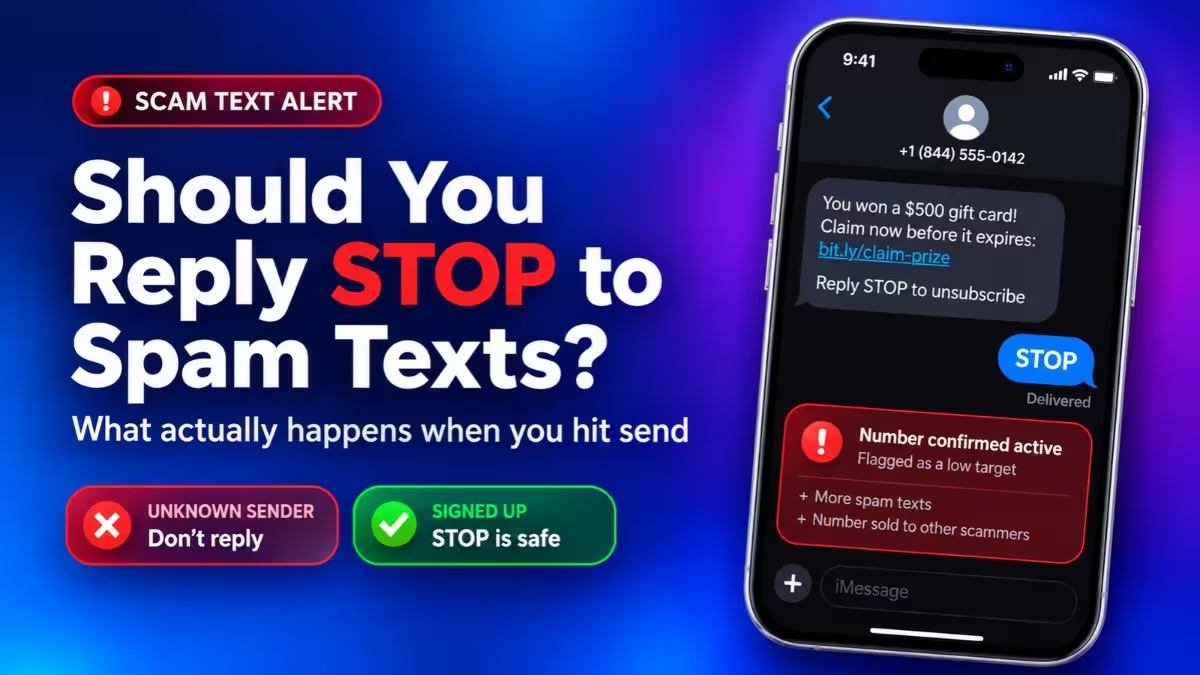
That habit makes sense. Real companies use STOP all the time, and it works with them. Scammers know this too, and they copy the line on purpose. When the sender is a fraudster, your STOP reply doesn't remove you from anything. It tells them a real person owns the number.
This guide explains what really happens after you reply, when STOP is safe, and what you should do with junk texts instead.
Quick Answer: Should You Reply STOP to Spam Texts?
Reply STOP only to businesses you knowingly signed up with, such as your bank, pharmacy, airline, or a store loyalty program. For any unexpected or suspicious text, don't reply at all. Block the sender, report the message by forwarding it to 7726, and delete it.
Why Scammers Add "Reply STOP" to Their Texts
Scammers send messages to huge lists of numbers. Many of those numbers are dead, switched off, or recycled. The sender has no idea which ones reach an actual person.
The STOP line solves that problem for them. It does two jobs:
- It makes the text look legitimate: Your brain links "Reply STOP" with real brands that follow the rules, so you relax.
- It invites a reply: Any response, even a single word, proves the number is active.
Security researchers who tracked smishing campaigns carrying this opt-out line found most of them aimed at English-speaking countries, with the United States taking the largest share. People in these markets get genuine alerts from banks, clinics, and couriers every day, so a fake one blends right in.
What Happens If You Reply STOP to a Spam Text?
Your reply hands the sender several useful facts at once:
Your number works: The scammer moves you from a raw list to a verified one.
A human reads the messages: Auto-replies and dead lines don't type STOP. You do.
You respond to strangers: In the sender's eyes, someone who answers one unknown text will likely answer the next.
From there, a few things tend to follow:
- More spam arrives: Some people notice new junk within hours or days.
- Your number gets sold: Fraud groups and shady data brokers trade verified numbers, and active ones fetch a higher price.
- The scams get sharper: Follow-up texts may use your name, mimic your bank, or push urgent account warnings.
- Calls start: Many operations shift from text to voice once they know a number is live, so expect more spam calls, often from fake support agents or bank impersonators.
To a scammer, "STOP" and "tell me more" carry the same value. Both confirm a live target.
Can Replying STOP Hack Your Phone or Steal Your Data?
No. Typing STOP does not install malware, unlock your accounts, or give anyone access to your device. The real danger sits in the next steps of the chain:
- Tapping a link that opens a fake login or payment page
- Downloading a file or app the message pushes, since fake apps often carry Android malware
- Calling a number listed in the text
- Sharing a one-time code, your address, birth date, or account details
Think of the reply as the door you open. It doesn't rob you on its own, but it invites the person standing outside to keep knocking.
When Is It Safe to Reply STOP?
STOP is a legal opt-out tool for real businesses. In the US, the Telephone Consumer Protection Act requires companies that send marketing texts to give you a way out and honor it.
Replying STOP is fine when all of these apply:
- You recognize the sender and remember signing up
- The message comes from a known short code or saved number
- The text looks like the brand's normal alerts, with no odd links or pressure
Typical safe examples include appointment reminders from your doctor, transaction alerts from your bank, school notices, and promo texts from a store you joined.
If any part of the message feels off, skip the reply. You can still unsubscribe through the company's official app or website, or by changing notification settings in your account. That route keeps you away from the text completely.
How to Tell a Real Opt-Out From a Scam Text
A real opt-out line comes from a business you know, about something you chose. A scam text borrows the same line but gives itself away. Treat a message as suspicious if it shows any of these signs:
- It comes from a number you never saved and didn't expect
- It claims you won something you never entered
- It mentions a refund, unpaid toll, or delivery problem out of nowhere
- It uses a specific dollar amount to make the story feel real
- It pushes urgency, like "act now" or "access expires today"
- It opens casually as if you already know the sender ("Where have you been?!")
- It asks you to join a WhatsApp or Telegram group, often about investing or crypto
- It has broken grammar, strange spacing, or a shortened link
When a text claims to come from your bank, a courier, or a government office, don't use the number or link inside it. Open the organization's official website or app, or call the number printed on your card or statement.
Does Replying STOP Ever Fail With Real Companies?
Sometimes, yes. A legitimate sender usually stops after you reply, but the law gives them a short window to process the request. Under the TCPA, a business has up to 10 business days to stop texting your number. A message or two can still slip through during that time, and that doesn't mean the company ignored you.
Two other cases cause trouble:
- You can't tell the sender is fake: Scammers pose as banks, carriers, couriers, and government agencies. If you assume the text is real and reply STOP, you confirm your number to a fraudster.
- The business keeps texting after the window: A company that ignores a valid opt-out breaks the rules. Report it to the FTC at ReportFraud.ftc.gov.
The simple test still holds: if you didn't sign up for it, don't reply to it.
What to Do Instead of Replying STOP
Step 1: Leave it alone
Don't reply, don't tap links, and don't call any number in the message.
Step 2: Block the sender
Report the message first (see the reporting section below), because your carrier may ask for the sender's number. Then block it.
On iPhone:
- Open the conversation and tap the sender's number at the top.
- Tap Info.
- Tap Block this Caller, then confirm with Block Contact.
On Android (Google Messages):
- Long-press the conversation in your inbox.
- Tap Block.
- Tick Report spam and confirm.
You can also open the chat, tap the three-dot menu, and pick Details > Block & report spam.
Step 3: Delete it
Once you report and block the number, remove the message. Take a screenshot first if you might need it later.
Blocking won't stop everything. Scammers rotate and spoof numbers constantly. Still, it shuts down repeat texts from that specific source.
How to Report Spam Texts (7726, FTC, Carrier)
Reports help carriers and regulators shut down scam senders, so they take a few seconds and pay off for everyone.
- Forward to 7726: Long-press the message, choose Forward, and send it to 7726 (the keypad spells SPAM). AT&T, Verizon, T-Mobile, and most other US carriers use these reports to block spam across their networks. Your carrier may text back asking for the sender's number.
- Use the built-in report button: iPhone may show Report Junk or Report Spam under texts from unknown senders. Tap it to send the details to Apple and your carrier. Google Messages offers Report spam when you block a number.
- File an FTC complaint: Go to ReportFraud.ftc.gov, which feeds the agency's enforcement database. More reports on one scam pattern raise the odds of an investigation.
How to Filter Spam Texts on iPhone and Android
Reacting to each junk text gets tiring. Filters handle most of it in the background.
iPhone: Open Settings > Apps > Messages. Turn on Filter Spam and Screen Unknown Senders. Texts from numbers outside your contacts move into a separate folder, so they don't trigger alerts.
Android: In Google Messages, tap your profile picture, open Messages settings, then go to Protection & Safety (or Spam protection on some versions) and switch it on. Review caught messages under Spam & blocked. If spam alerts keep popping up on your screen, learn how to fix spam notifications.
Carrier tools: T-Mobile Scam Shield, AT&T ActiveArmor, and Verizon Call Filter all offer free spam blocking. The basic tiers do the job for most people.
Third-party apps: Apps such as Truecaller, Hiya, RoboKiller, and keyword filters like SpamHound add extra screening. Some need access to your data, so weigh that before you install one, and learn how to spot fake apps first. Some tools now also offer scam detection inside AI chats, like Malwarebytes in ChatGPT.
I Already Replied STOP: What Should I Do Now?
Don't panic. A single reply doesn't compromise your phone. Take these steps to limit fallout:
- Stop the conversation: Send nothing else, even if they answer back.
- Leave links alone: Don't tap anything in that thread.
- Block and report the number as described above.
- Turn on spam filtering if you haven't already.
- Expect follow-ups: Stay extra wary of texts and calls that mention your bank, a package, or your name for the next few weeks.
- Secure your accounts if you shared anything: If you tapped a link or gave out personal details, change your passwords, turn on two-factor authentication, and watch your bank statements. Run a Microsoft Defender scan or remove malware from your PC if you downloaded anything. If the text pushed a crypto investment group, review your crypto wallet security too. In the US, IdentityTheft.gov builds a recovery plan for you.
How Did Scammers Get My Number?
Several common routes put your number on spam lists:
- Data breaches at companies that hold your details
- Data broker sites that collect and sell contact info
- Public social media profiles and old forum accounts
- Contest, coupon, and free-trial forms
- Random number generators that simply guess
You can shrink your exposure. Keep your number off public profiles, skip it on giveaway forms, and send removal requests to people-search sites. Use an authenticator app for two-factor codes when a service allows it, so fewer sites need your phone number at all.
Frequently Asked Questions
Does replying STOP to a spam text make it worse?
Usually, yes. A reply confirms the number is active and that a person reads the messages. That often leads to more spam texts, scam calls, and your number landing on lists that other fraud groups buy.
Is it safe to reply STOP to a legitimate company?
Yes. If you signed up for texts from a real business, replying STOP removes you from their list. US law requires them to honor the request.
Can a scammer hack my phone if I reply STOP?
No. A text reply alone can't hack your phone. The risk comes from tapping links, downloading files, calling numbers in the message, or sharing personal information.
What does forwarding a text to 7726 do?
It sends the message to your mobile carrier as a spam report. The carrier uses those reports to spot and block scam senders across its network. It costs nothing.
I replied STOP by accident. What should I do now?
Stop responding, block the number, report it to 7726, and switch on spam filtering. If you didn't share any details or tap a link, your risk stays low. Just watch for follow-up scam texts and calls.
Will blocking a number stop all spam texts?
No. Scammers switch and spoof numbers often, so new texts can still arrive. Pair blocking with your phone's spam filters and your carrier's free protection for better results.
Why do I keep getting spam texts even though I never reply?
Your number probably sits on lists from data breaches, broker sites, or random guessing. Turn on spam filters, report every junk message, and request removal from people-search sites to cut the volume.