Microsoft has added two more items to its list of deprecated Windows features: MTP over Bluetooth and the Family Safety app for Windows. Both still work today, but Microsoft says it will retire them in a future Windows release. Most people will never notice the change, yet a few workflows need a new home. Here is what each deprecation means and what to do about it.
Which Windows 11 Features Microsoft Just Deprecated
Microsoft updated its deprecated features page for Windows in November with two new entries:
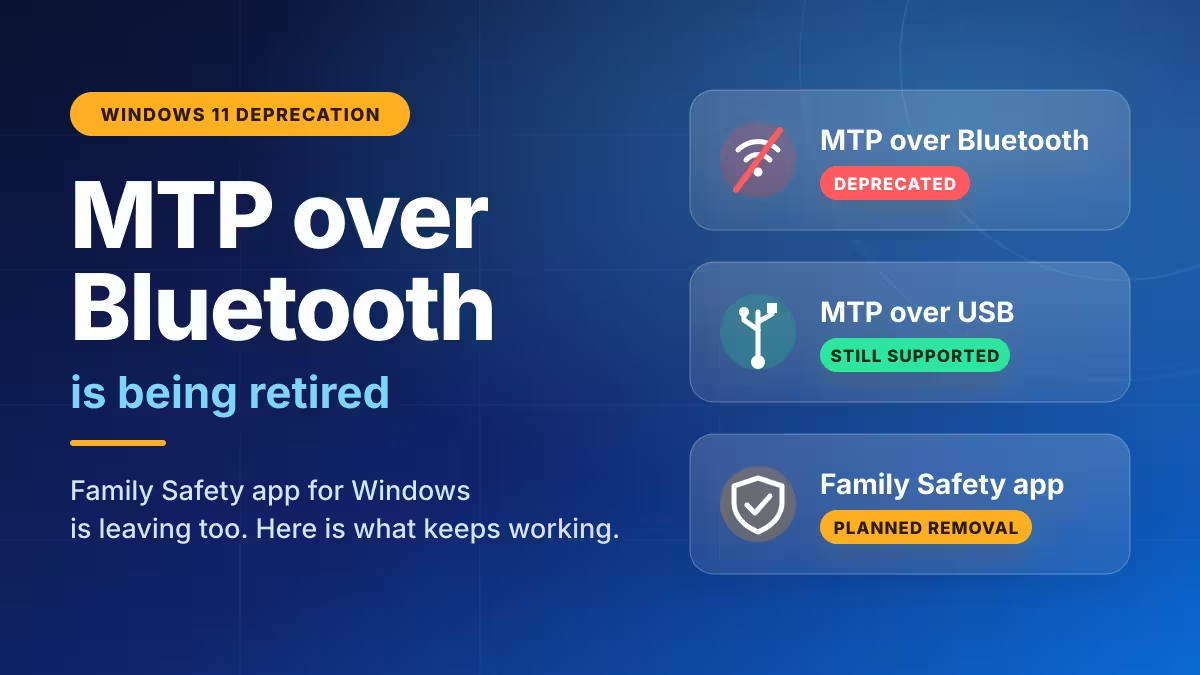
- MTP over Bluetooth: Microsoft says this feature might be removed in a future Windows release.
- Family Safety app for Windows: Microsoft plans to remove the app in a future OS release.
Microsoft has not named the Windows version that will drop MTP over Bluetooth, and it has not explained why it is retiring the feature.
What MTP Over Bluetooth Does on Windows 11
Media Transfer Protocol (MTP) lets Windows browse and copy files on a phone, camera, or media player. When you plug an Android phone into your PC and tap "File transfer," File Explorer uses MTP to show your photos and videos.
Most people run MTP over a USB cable. Windows can also run the same protocol over a wireless Bluetooth link, and that wireless option is the part going away. USB-based MTP stays fully supported, and Microsoft points users there as the replacement.
Is Windows 11 Removing All Bluetooth File Transfer?
Some early headlines made this sound like Windows 11 is dropping Bluetooth file sharing altogether. The deprecation page does not say that. The entry covers only MTP over Bluetooth. Your Bluetooth headphones, mouse, keyboard, and speakers keep working, and pairing is not affected. If a device does stop connecting, reinstalling the Bluetooth driver is a good first step.
Microsoft is also still improving Bluetooth elsewhere in Windows 11, and recent cumulative updates include Bluetooth fixes. A recent update lets Bluetooth LE Audio devices hold 48kHz stereo sound while the microphone is active.
How to Transfer Files From Your Phone Without MTP Over Bluetooth
If you move files from a phone or camera over Bluetooth, you have three easy options:
- Use a USB cable: It transfers files much faster than Bluetooth and keeps working with MTP.
- Use Phone Link: Windows can pair with your phone and move photos and files over your network.
- Use a cloud service: Upload from your phone and download on your PC.
Bluetooth has always trailed wired connections on speed, so you will likely save time by switching now instead of waiting for Microsoft to cut the feature.
Windows 11 Family Safety App Removal: What Changes for Parents
The second deprecation hits the Family Safety app that ships with Windows 11. Parents use it to manage screen time, app and game limits, and web filtering for their children.
Microsoft is not shutting down Family Safety itself. You keep every feature through two other routes:
- The Microsoft Family Safety mobile app
- The Family Safety web portal
Only the dedicated Windows app disappears. Microsoft's support page currently points to late 2027 as the removal target. After that point, new Windows installations will not include the app, and Microsoft will stop offering it in the Microsoft Store.
The timing surprises some people because Microsoft has also said it wants to expand family features on Windows 11. The app also works largely as a front end for the same web service, so the web portal gives you the same controls without a separate install.
Will These Features Stop Working Right Away?
Microsoft uses "deprecated" to mean it no longer actively develops a feature and may remove it later. Your PC does not lose anything the day a notice appears. The gap between notice and removal varies a lot:
- 3D Viewer went from deprecated to gone from the Microsoft Store within months.
- WMIC lingered far longer before Microsoft stopped offering it as a Feature on Demand on newer Windows 11 versions.
MTP over Bluetooth has no removal date yet, so it could vanish soon or stay for years. The Family Safety app has the clearer schedule.
Do You Need to Act Now?
For most users, no. Few people send files over Bluetooth MTP today, and few parents rely on the Windows app instead of their phone. If you do use either one, take these steps:
- Try a USB cable the next time you copy files from your phone.
- Install the Family Safety mobile app and bookmark the web portal.
- Check the deprecated features page once in a while for removal dates.
You do not need to pause Windows updates or change your family accounts over this.
Frequently Asked Questions
Is Microsoft removing Bluetooth from Windows 11?
No. Microsoft deprecated only MTP over Bluetooth, which is a file transfer method. Bluetooth audio, pairing, and accessories keep working.
Can I still transfer files from my phone to a Windows 11 PC?
Yes. MTP over USB remains supported, and Phone Link and cloud services also work.
When will Microsoft remove MTP over Bluetooth?
Microsoft has not announced a date. The feature keeps working on current installations until a future release removes it.
Is Microsoft shutting down Family Safety?
No. Microsoft is retiring only the Windows app. You can manage the same settings through the mobile app and the web portal.
When will the Family Safety app leave Windows?
Microsoft's support page currently lists late 2027. Microsoft has not confirmed it as a firm date, so plans could shift.
Does deprecated mean the feature stops working now?
No. A deprecated feature keeps working until Microsoft removes it. Deprecation means the company has stopped developing it and may remove it later.
Do I need to change anything today?
Only if you depend on one of these two features. Start using USB for phone transfers and set up the Family Safety mobile app or web portal, and you will have nothing to fix later.
Related Guides
- How to Fix Bluetooth Error Code 43 in Windows 11 and 10 (7 Working Fixes)
- How to Download and Install Intel Wireless Bluetooth Drivers on Windows 11
- How to Fix AirPods Not Connecting to Windows 11 (Working Solutions)
- PowerShell 7 Default in Windows: What Changes for Users, Scripts and PowerShell 5.1
- Windows 11 Apps to Remove or Disable: What to Uninstall, What to Keep and Free Alternatives