Google Drive and Dropbox make file syncing effortless, but they share one weakness that most users never think about: the company keeps the key to your files. Both services encrypt data on their servers, yet they can still decrypt it whenever their systems, their staff, or a court order requires it.
If you store tax papers, client contracts, ID scans, or private photos, that design deserves a second look. A group of encrypted cloud storage services now lets you lock files on your own device before they upload, so the provider only ever holds scrambled data. This guide covers the five best options, how the encryption works, and where each one falls short.
Can Google Drive and Dropbox Read Your Files?
Every major cloud service advertises "encryption," so the word alone tells you very little. What you really need to know is where the encryption happens and who controls the key.
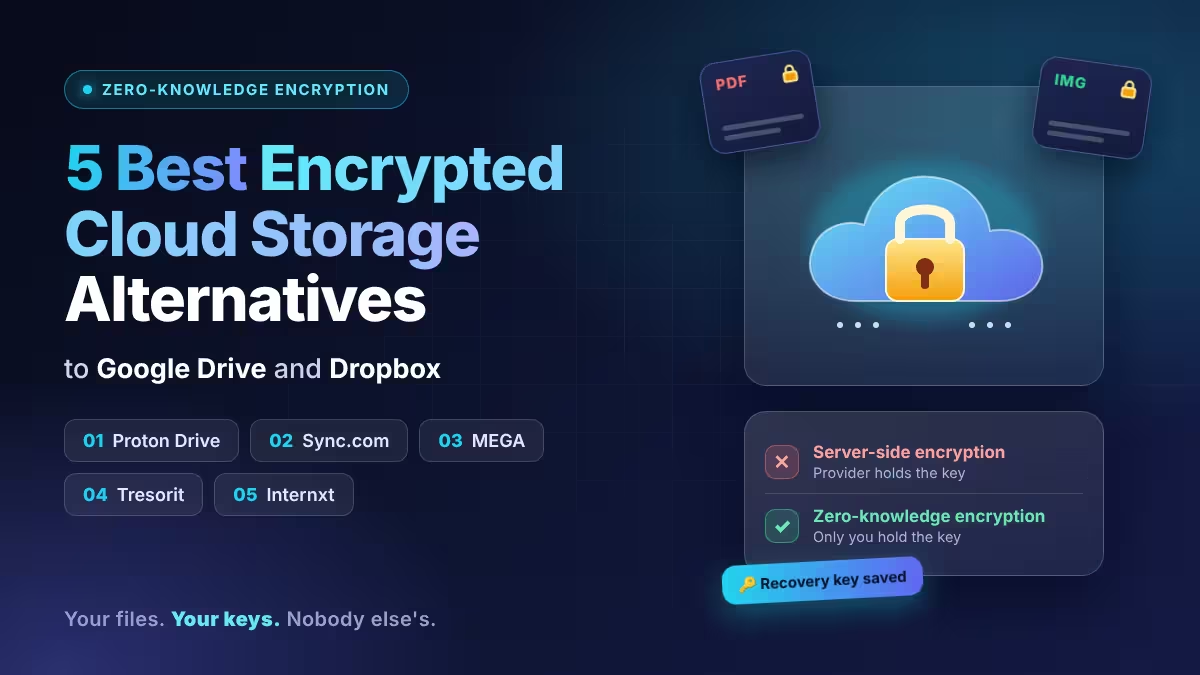
Server-side encryption (Google Drive, Dropbox, OneDrive, Box): Your file travels to the provider over an encrypted connection, and the provider encrypts it again on its disks. This blocks outside attackers who steal hard drives or sniff network traffic. However, the provider manages the key, so it can open your files to generate previews, run AI search, scan content, or answer a legal request.
The short answer is yes, technically they can. Zero-knowledge storage removes that access, and the next section explains how.
What Is Zero-Knowledge Encryption in Cloud Storage?
Zero-knowledge encryption (also called client-side or end-to-end encryption) works differently. Your device encrypts each file with a key derived from your password before anything leaves your computer or phone. The provider receives only ciphertext and never sees the key. A hacker who breaches its servers, a rogue employee, or a subpoena all hit the same wall: unreadable data.
The price of that protection is responsibility. Because the provider cannot see your key, it also cannot reset your password the usual way. Every zero-knowledge service gives you a recovery key or phrase. Store it in a password manager or print it and keep it somewhere safe, because losing both your password and recovery key means losing your files.
Encrypted Cloud Storage Compared: Free Space, Price and Privacy
| Service | Free Plan | Zero-Knowledge by Default | Based In | Best For |
|---|---|---|---|---|
| Proton Drive | 5 GB | Yes, all plans | Switzerland | Full privacy ecosystem |
| Sync.com | 5 GB | Yes, all plans | Canada | Secure sharing and backup |
| MEGA | 20 GB | Yes, all plans | New Zealand | Largest free tier |
| Tresorit | ~3 GB | Yes | Switzerland | Regulated businesses |
| Internxt | 1 GB | Yes, all plans | Spain | Open source, post-quantum crypto |
| Google Drive | 15 GB (shared with Gmail and Photos) | No | USA | Real-time collaboration |
| Dropbox | 2 GB | No | USA | Integrations and team workflows |
Pricing changes often, so check each provider's pricing page before you subscribe.
1. Proton Drive: Best for a Full Google Replacement
Proton Drive comes from the Swiss team behind Proton Mail, and it treats privacy as the whole product rather than a feature. It encrypts your files, file names, and folder structure on your device on every plan, including the free one. Proton also publishes its app source code, so independent researchers can check the encryption for themselves.
Recent updates have closed much of the usability gap with Google. Proton Docs and Proton Sheets now let you edit documents and spreadsheets together inside an encrypted workspace. The mobile apps scan documents, back up photos automatically, and organize media well. Linux users currently get a command-line client while a full desktop app is in progress.
Pros:
- End-to-end encryption on every plan, including metadata
- Open-source apps and Swiss jurisdiction
- Paid plans bundle Proton Mail, VPN, Pass, and Calendar
Cons:
- The free plan starts small and grows to 5 GB after setup tasks
- No full graphical Linux client yet
Pricing: Paid storage starts at roughly $4 per month for 200 GB, and the Unlimited bundle adds 500 GB plus the full Proton suite.
Choose it if: You want to replace Gmail, Drive, and Google Docs with one private ecosystem.
2. Sync.com: Best for Secure File Sharing
Sync.com, a Canadian company, has offered zero-knowledge storage since 2011 and applies it to everything you upload without asking for an extra fee. It focuses on sharing that stays secure: you can add passwords, expiry dates, and download limits to any link, and you can request files from people outside the service.
Sync also keeps deleted files and old versions for a long window on paid plans, which helps you recover from accidental deletions or ransomware. Business teams like its admin console and its compliance with HIPAA, GDPR, and Canada's PIPEDA.
Pros:
- Zero-knowledge encryption across the entire account
- Strong sharing controls and long version history
- Good value on the 2 TB tier
Cons:
- No Linux desktop app
- The desktop client syncs a single folder, and uploads run slower than mainstream rivals
- No lifetime plan
Pricing: 5 GB free, with the 2 TB personal plan costing around $8 per month on annual billing (discounts often bring it lower).
Choose it if: You share sensitive files with clients and want encryption that works without any setup.
3. MEGA: Best for Free Storage
MEGA gives away 20 GB with no credit card, which beats every other well-known provider. It encrypts files end to end on all plans and runs apps for Windows, macOS, Linux, Android, and iOS. You also get encrypted chat and video calls, file versioning, and a Rewind feature that rolls a synced folder back to an earlier state.
Keep two caveats in mind. First, free accounts face a transfer quota that can pause big downloads until it resets. Second, academic researchers disclosed serious cryptographic flaws in MEGA in 2022, including attacks that could expose user keys. MEGA released patches, but privacy purists still weigh that history, especially since MEGA uses AES-128 while most rivals use AES-256.
Pros:
- 20 GB free storage
- End-to-end encryption on every plan
- Apps on every major platform, including Linux
Cons:
- Transfer limits on the free plan
- Past security research findings dent its reputation
Pricing: The entry Essential plan costs about €3.33 per month (billed yearly) for 200 GB with a VPN and password manager included, and the 2 TB tier starts near €9.99 per month.
Choose it if: You want the most free encrypted space possible for personal files.
4. Tresorit: Best for Business and Compliance
Tresorit targets law firms, healthcare providers, and finance teams that must prove their data is safe, not just claim it. Swiss Post owns the company, and it holds ISO 27001 certification, supports HIPAA with a signed agreement, and stores data in EU data centers.
Beyond storage, Tresorit adds encrypted data rooms, Outlook integration for encrypted email attachments, eIDAS-compliant e-signatures, remote device wipe, and detailed audit logs. Its client code is closed source, but multiple independent audits back its security claims.
Pros:
- Formal compliance certifications and audit trails
- Business tools such as data rooms and e-signatures
- Apps for every major platform
Cons:
- Tiny free plan
- Expensive compared with consumer services
- Built for secure sharing rather than live document editing
Pricing: Personal plans start near $5 per month for a small allowance, while business plans begin around $19 per user per month. A 14-day trial lets you test paid features.
Choose it if: Your work falls under regulations and you need paperwork that shows auditors you protected client data.
5. Internxt: Best for Open-Source Privacy
Internxt, from Valencia in Spain, encrypts files on your device on every plan and publishes all its code on GitHub. It also adds post-quantum encryption (Kyber-512) on top of AES-256, which aims to protect today's uploads against future quantum computers. Securitum, an independent firm, has audited the service.
Paid plans bundle extras like a VPN, antivirus, and PC cleaner, and power users get WebDAV, Rclone, and NAS support. The apps stay simple, though, and the mobile apps have historically lacked strong automatic photo backup.
Pros:
- Open-source code and independent audits
- Post-quantum encryption by default
- Low-cost large plans and lifetime deals
Cons:
- Only 1 GB free
- Fewer sync options than mature rivals
Pricing: Large annual plans are very cheap during frequent promotions, and lifetime plans start in the few-hundred-euro range for multiple terabytes.
Choose it if: You want open-source, audited, future-proof encryption and plan to pay for storage.
Can You Keep Google Drive and Still Encrypt Your Files?
You do not have to abandon your current account to gain privacy. Free tools like Cryptomator create an encrypted vault inside your Google Drive, Dropbox, or OneDrive folder. Your device encrypts each file before the sync client uploads it, so Google or Dropbox only stores ciphertext.
This approach suits people who rely on Google Workspace for work but want a locked area for personal documents. Remember that files inside the vault lose web previews and in-browser search, since the provider can no longer read them. If you would rather run your own server than trust any provider, these self-hosted apps can replace paid subscriptions.
How to Choose the Best Encrypted Cloud Storage
Start with your main reason for leaving:
- Maximum privacy with daily usability: Proton Drive or Sync.com
- Most free space: MEGA
- Compliance and client audits: Tresorit or Sync.com business plans
- Open source and future-proof crypto: Internxt or Proton Drive
- Linux desktop users: MEGA or Internxt
Next, check the features you use every day. If you edit documents with coworkers in real time, Proton Drive comes closest to Google Docs. If you mostly back up photos, confirm that the mobile app supports automatic uploads, and look at these Google Photos alternatives for photo-focused options. If you share large files with clients, compare link controls and bandwidth limits. If you only need basic backup and sync without encryption, compare the best cloud storage services first.
How to Switch from Google Drive or Dropbox Without Losing Files
- Sign up and save your recovery key before you upload anything.
- Export your data from Google Drive using Google Takeout, or download folders directly from Dropbox's desktop app.
- Test a small folder first. Upload it, open a few files on your phone and computer, and try a share link.
- Move the rest in batches so you can spot failed uploads. Expect the first big upload to take longer, since your device encrypts each file locally.
- Switch your phone's photo backup to the new app and turn it off in the old one.
- Delete the old copies only after you confirm everything arrived intact.
Moving to Proton Drive? Follow this guide to move files from Google Drive to Proton Drive.
Frequently Asked Questions
What is the most secure alternative to Google Drive?
Proton Drive and Sync.com rank as the most secure everyday choices because they encrypt every file on your device, on every plan, without extra fees. Tresorit adds formal certifications for businesses, while Internxt adds open-source code and post-quantum encryption.
Does Dropbox or Google Drive use end-to-end encryption?
No. Both encrypt files on their servers and in transit, but they keep the keys, so they can technically access your content. Dropbox offers stronger key controls only on certain advanced business plans.
Which encrypted cloud storage gives the most free space?
MEGA leads with 20 GB of free zero-knowledge storage. Proton Drive and Sync.com follow with 5 GB each, while Tresorit and Internxt offer smaller free plans.
Can I recover my files if I forget my password?
Only if you saved the recovery key or phrase the service gave you at signup. Zero-knowledge providers never see your key, so they cannot reset your password the traditional way.
Is zero-knowledge storage slower than Google Drive?
Your first large upload can take a little longer because your device encrypts files before sending them. After that initial sync, daily use feels about the same as any mainstream service.
Can I keep using Google Drive but still encrypt my files?
Yes. Install Cryptomator, create a vault inside your Google Drive folder, and drop sensitive files into it. Google stores only the encrypted versions.
Are encrypted cloud services safe from hackers?
The encryption itself is extremely hard to break, so a server breach only leaks unreadable data. Your account can still fall to weak passwords, phishing, or malware on your device, so turn on two-factor authentication and keep your devices updated.
Related Guides
- How to Replace Cloud Subscriptions With a Home Server and Tailscale
- Leaving Microsoft 365 Family? Best Alternatives for Office Apps, Notes and Family Cloud Storage
- Google AI Mode Gets Drive, Wallet and Gemini Integration: What Changes for You
- 4 Best Raspberry Pi Projects to Replace Paid Subscriptions
- iCloud+ Pricing 2026: Are You Overpaying for Storage?